Lesson 63 of 63
Journey F, recap: What just happened, and where to find it again
What you will be able to do
The last recap, and the end of the course. The administrator walks back through what running the group left behind: the structure, the people and their roles, the rules, the review. It ends with the one screen that ties all six journeys together.
Before you start
- Parts 1 to 7 of Journey F are done.
- You are signed in as an organisation administrator.
Steps
- 1
Organisation structure: the region
Start in Access control, on Organisation structure. UAE Online sits under Head office with one company in it and the role grants made on it. This is the shape that scoped roles follow.
- 2
People and assignments: the regional manager
Select People and assignments and find Hana Qasim. She holds Compliance officer and Org unit administrator on UAE Online, each with the reason it was given. The second was granted by the other administrator's approval.
- Select People & assignments
- Type Search people…:
Hana
- 3
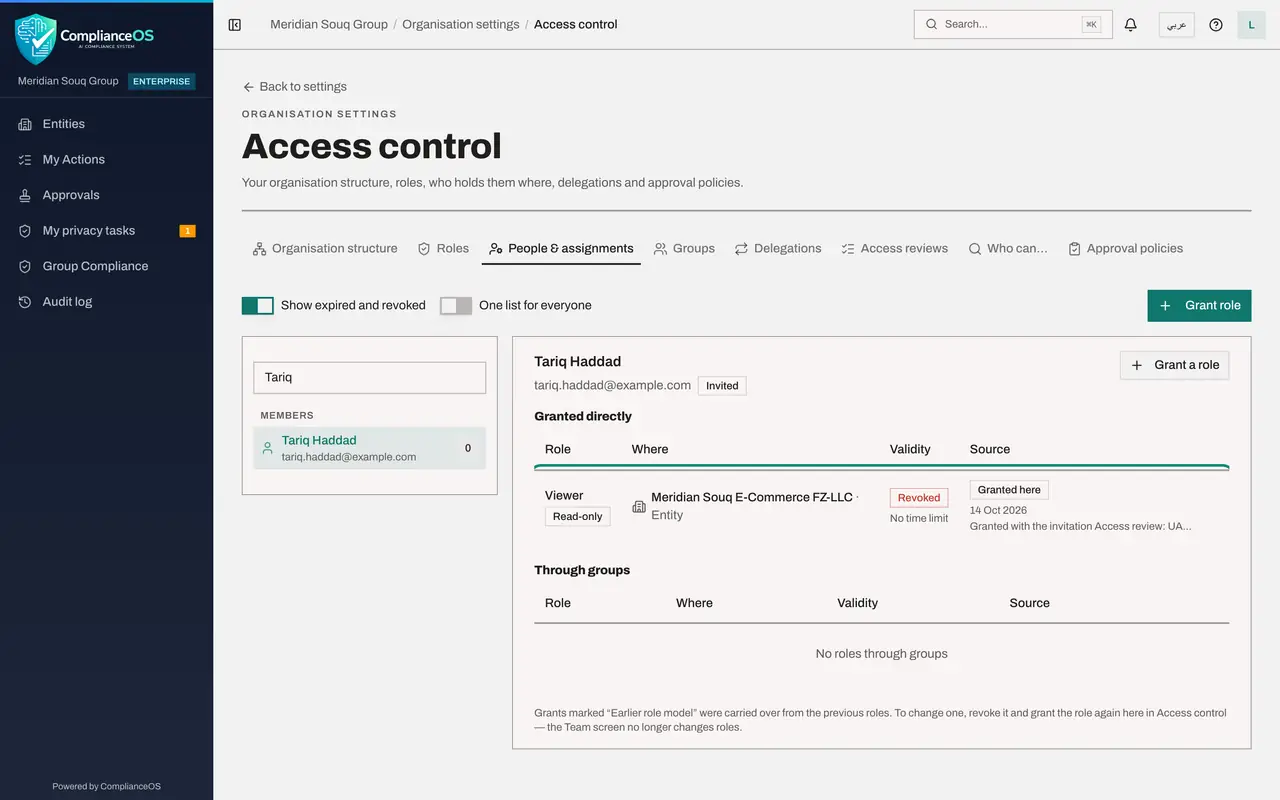
People and assignments: the revoked contractor
Switch on Show expired and revoked, then find Tariq Haddad. His Viewer role is shown as Revoked, with the date. The access review took it away, and the record of it stays.
- Select Show expired and revoked
- Type Search people…:
Tariq
- 4
Approval policies: the rules you saved
Select Approval policies. Three actions show 1 saved: File a VAT or CT return, from Journey B; Post a journal entry, from this journey; and Grant a role, which sent the privileged role to a second administrator.
- Select Approval policies
- 5
Access reviews: the closed review
Select Access reviews and switch on Show closed reviews. The review of UAE Online is kept with its totals of kept and revoked.
- Select Access reviews
- 6
Audit log: six journeys in one list
Finally, select Audit log in the left menu. Scroll through it. A supplier was contracted, screened, assessed and paid. A sale was recorded, posted, collected and filed. An employee joined, was paid, and left. A breach was reported and a customer erased. An audit asked for the proof and got it. And the group was given its structure, its roles and its rules. Every line has a name and a time. That is how it all fits together.
- Select Audit log
How to check it worked
You can find the region and its company, the regional manager's two roles, the contractor's revoked role, the saved approval rules, the closed review, and all of it in the audit log.
Common mistakes
- Treating structure, roles and rules as set-up to do once. People join, move and leave; review access on a schedule.
- Granting widely to save time. Every journey in this course worked with roles scoped to one company or one unit.
- Looking at modules one at a time only. The group view and the audit log are where the whole picture is.
Check your understanding
1. Across all six journeys, what did every hand-off between two people have in common?
- A.It was done by e-mail
- B.The work appeared for the next person in their own list, and the decision was recorded with a name and a time
- C.An administrator had to move it
Show answer
Answer: B. The work appeared for the next person in their own list, and the decision was recorded with a name and a time
My Actions, Approvals, My audit requests and My privacy tasks are the four lists; the audit log is the record.
2. Where do you look to see what a person may do, and why?
- A.Their e-mail signature
- B.Access control, People and assignments: each role, where it applies, who granted it and the reason
- C.The Team list only
Show answer
Answer: B. Access control, People and assignments: each role, where it applies, who granted it and the reason
Each grant shows its scope, its validity, its source and the reason given. Revoked grants are kept and can be shown.