Lesson 6 of 63
Journey A, part 6: A second Data Protection Officer approves
What you will be able to do
ComplianceOS binds the preparer and the approver everywhere: the person who prepared a piece of work sees a note, and a second person decides. In this part the second Data Protection Officer finds the request in Approvals, checks the score and the finding, and approves. Approval gives the supplier its risk tier and its next review date.
Before you start
- Part 5 is done: the first Data Protection Officer requested approval.
- You are signed in as the second Data Protection Officer, who did not prepare the review.
Steps
- 1
Open Approvals
Select Approvals in the left menu. The number beside it counts the requests waiting for you. The inbox opens on To decide, and everything waiting for your decision, from any module, is listed here.
- 2
Read the request
The card names the record, the company it belongs to and when it was submitted. It shows the facts you need for the decision: the residual risk tier, how critical the supplier is, and the number of open findings. Strict maker and checker means the person who prepared the review cannot be the one who approves it.
- 3
Select Open record
Select Open record. The assessment opens in Data Protection, under Vendor risk. Read the risk score and the tier it leads to. This is the tier the supplier will carry if you approve.
- Select Open record
- 4
Read the finding your colleague raised
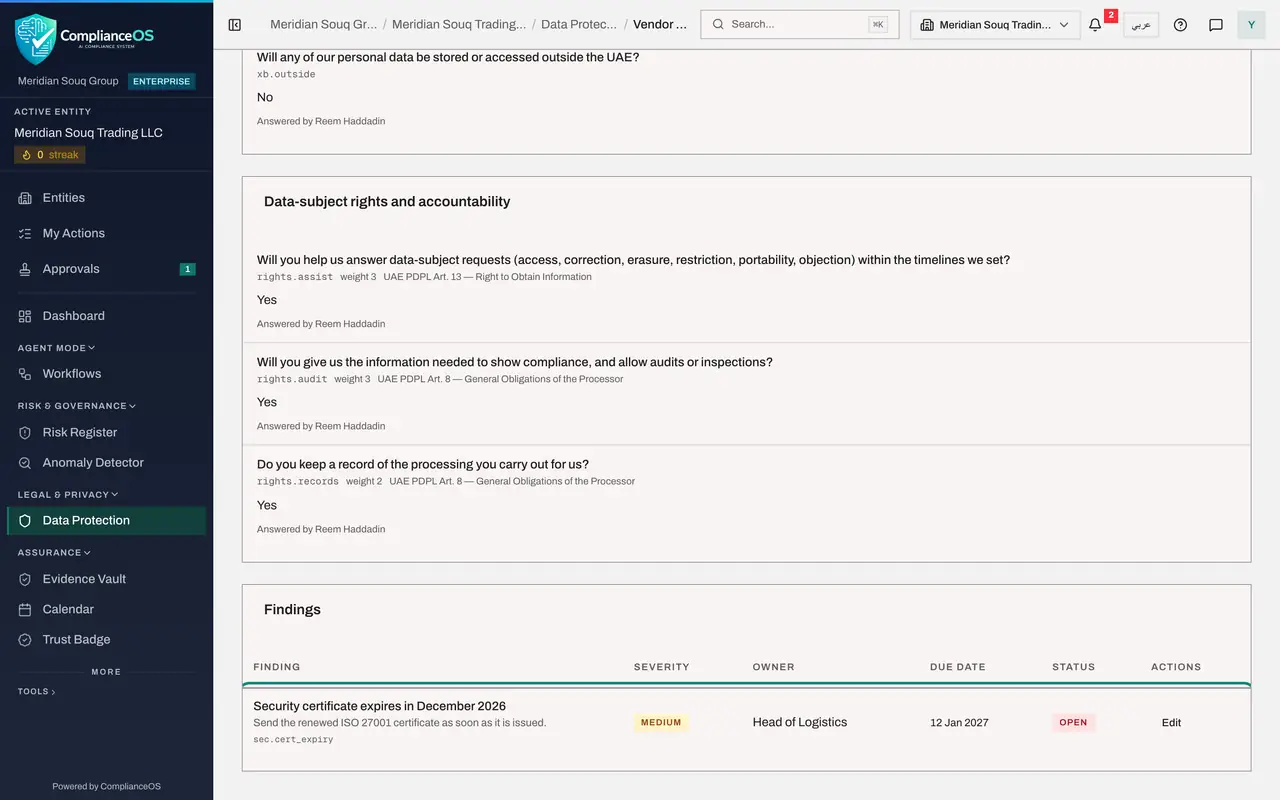
Scroll to Findings at the bottom. Check that the gap has an owner, a due date and a clear action for the supplier.
- 5
Select Approve
Go back to the top and select Approve. The window shows the tier that approval will set. If the review were not good enough, you would select Reject and give your reason.
- Select Approve
- 6
Add a comment and confirm
Add a short comment for the record, then select Approve in the window.
- Type Comment:
Agreed. Certificate renewal to be followed up under the open finding. - Select Approve
- Type Comment:
- 7
Check the supplier's risk status
Select Back to Najm Al Sahra Fulfilment LLC. Risk status now shows the tier, the date it was set, Last assessed and Next review. The open finding stays on the supplier until it is closed. The supplier is now cleared by anti-money laundering and by data protection; next, legal counsel links the contract to its record.
- Select Back to Najm Al Sahra Fulfilment LLC
How to check it worked
The assessment shows Approved, and the supplier's Risk status shows its tier, the date it was set, and the next review date.
Common mistakes
- Approving without reading the findings. Your name is on the decision.
- Expecting the preparer to finish the job. The preparer has no Approve button; if you do not act, the supplier stays unrated.
- Rejecting without a reason. The preparer needs to know what to fix.
Check your understanding
1. Who can approve a supplier assessment?
- A.The person who prepared the review
- B.Anyone in the company
- C.A second person with the approval permission, not the preparer
Show answer
Answer: C. A second person with the approval permission, not the preparer
Maker and checker are always different people. The preparer sees a note instead of the buttons.
2. What does approval set on the supplier?
- A.Its risk tier and next review date
- B.Its payment terms
- C.Nothing; it only closes the questionnaire
Show answer
Answer: A. Its risk tier and next review date
The tier comes from the residual risk, and the higher the tier, the sooner the next review.