Lesson 53 of 63
Journey E, part 9: The HR director fixes the finding and marks it resolved
What you will be able to do
The compliance officer raised a finding and made the HR director its owner. He cannot open the Audit Hub, and he does not need to. In this part he finds the finding in My Actions, records what was done about it, and marks it resolved. Closing it stays with the people who run the audit.
Before you start
- Part 6 is done: the finding was raised with the HR director as its owner.
- The fix has been made: the bank confirmations are in a shared folder.
- You are signed in as the HR director.
Steps
- 1
Open My Actions
Select My Actions in the left menu. It opens on Assigned to me. One item has the type Audit finding, from the Audit Hub, with its priority and the date it must be fixed by.
- Select My Actions
- 2
Select Open
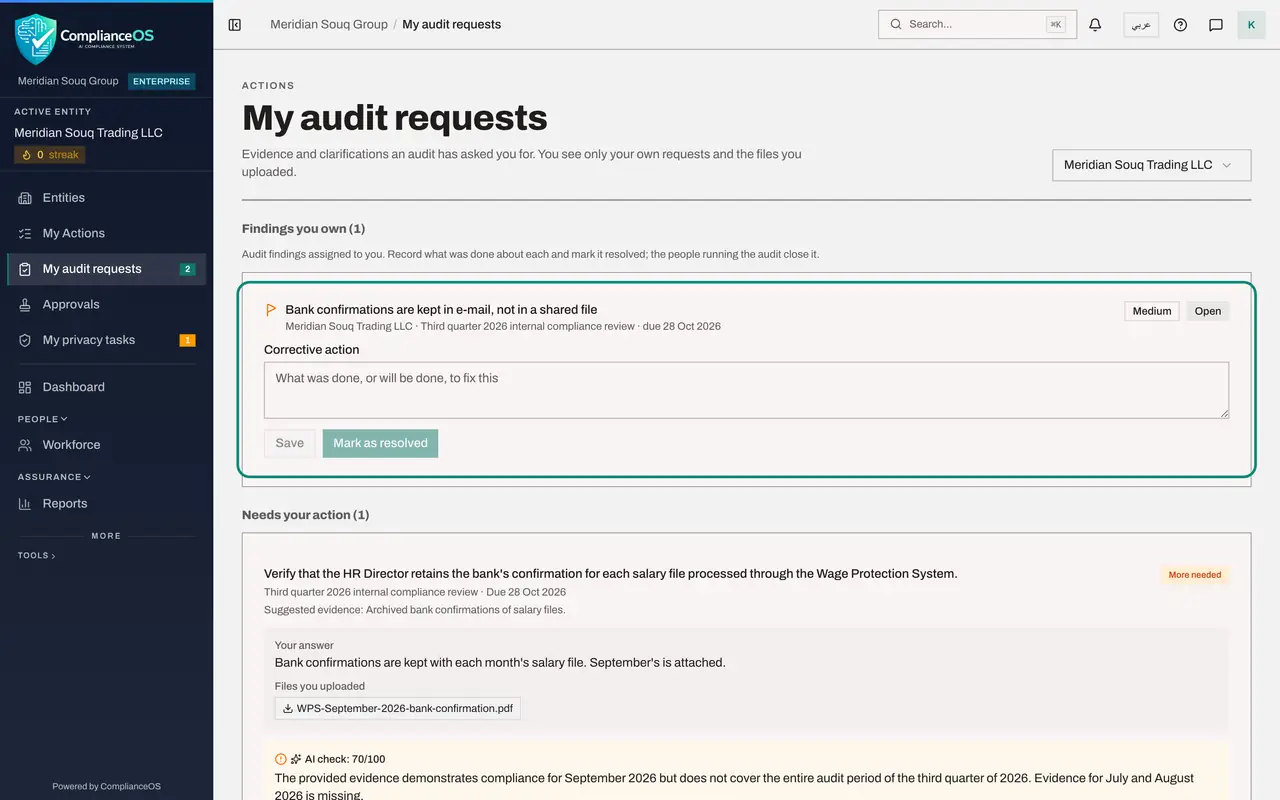
Select Open at the end of that line. My audit requests opens. At the top, Findings you own lists the finding with the audit it came from, Third quarter 2026 internal compliance review, the severity, the date and the status Open.
- Select Open
- 3
Write the corrective action
In Corrective action, write what was done to fix it, and where the proof can be seen. Mark as resolved becomes available once there is text in the box.
- Type Corrective action:
From October 2026 each bank confirmation is saved in the shared payrol…
- Type Corrective action:
- 4
Select Mark as resolved
Select Mark as resolved. The status changes to Resolved and your text is kept with the finding. You cannot close it: the compliance officer does that when she has seen the fix. Next, she closes the finding and completes the audit.
- Select Mark as resolved
How to check it worked
Under Findings you own, the finding shows Resolved with your corrective action saved, and it has left your My Actions list.
Common mistakes
- Marking it resolved before the fix is real. The compliance officer will look before she closes it.
- Leaving Corrective action empty. Mark as resolved stays greyed out until you have written what was done.
- Expecting to close it yourself. An owner resolves; the people who run the audit close.
Check your understanding
1. Where does the owner of an audit finding work on it?
- A.In the Audit Hub
- B.Under Findings you own on My audit requests, reached from My Actions as well
- C.By e-mail
Show answer
Answer: B. Under Findings you own on My audit requests, reached from My Actions as well
The owner needs no access to the Audit Hub. The finding is listed above the requests on My audit requests.
2. Who can set a finding to Closed?
- A.Its owner
- B.The people who run the audit
- C.Anyone in the company
Show answer
Answer: B. The people who run the audit
The page says so: record what was done and mark it resolved; the people running the audit close it.