Lesson 31 of 63
Journey C, part 10: The former employee asks for her data, and the request is assigned
What you will be able to do
A week after leaving, Aisha Farouk e-mails from her personal address to ask for a copy of the personal data the company holds about her. That is a data subject request, or DSR, and the law gives a fixed time to answer. In this part the Data Protection Officer logs the request and assigns it to a colleague, who will find it waiting in My Actions.
Before you start
- You are signed in as a Data Protection Officer.
- You have the request in front of you: who it is from, how it arrived and when.
Steps
- 1
Open the list of requests
In Data Protection, select DSRs in the list of sections. It holds every request from a person about their own data, however it arrived. Then select the button Log DSR.
- Select DSRs0 (0)
- Select Log DSR
- 2
Choose the request type
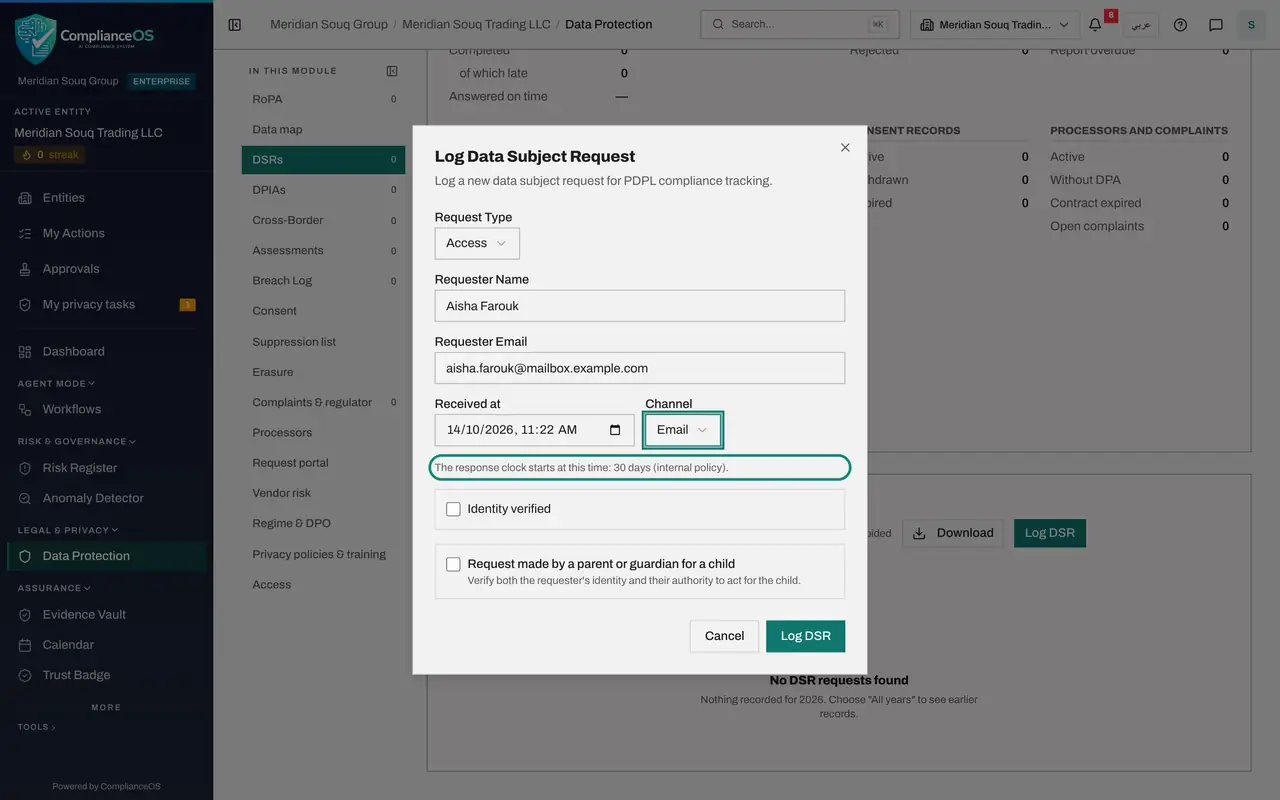
In Request Type choose Access: she wants to know what you hold and receive a copy. The other types are Rectification, Erasure, Restriction, Portability and Objection.
- Select Select request type
- Choose Access
- 3
Enter who is asking
In Requester Name type Aisha Farouk. In Requester Email type the address she wrote from. It is her personal address now, not her old work one. The e-mail address is used to search your systems for her records and to send her the outcome.
- Type Requester Name:
Aisha Farouk - Type Requester Email:
aisha.farouk@mailbox.example.com
- Type Requester Name:
- 4
Choose the channel and read the clock
Received at is filled with the current time; change it if the request arrived earlier. In Channel choose Email. The line underneath says how many days you have to respond, counted from Received at.
- Select Not recorded
- Choose Email
- 5
Select Log DSR to save
Leave Identity verified unticked; the colleague who works the request will record that check. Select Log DSR at the bottom of the form. The request joins the list as Received and Unassigned.
- Select Log DSR
- 6
Select View
Select View on the request. The record opens. The line Assigned to shows Unassigned.
- Select View: Aisha Farouk
- 7
Assign the request
Open Assigned to and choose Yusuf Rahman, the second Data Protection Officer. The change is saved at once and a message confirms it. There is no Save button for this box.
- Select Assigned to
- Choose Yusuf Rahman
- 8
Close and check the list
Select Close. The Assigned to column now shows Yusuf Rahman, and Time left counts down the days. In the next part he picks the request up from My Actions.
- Select Close
How to check it worked
The request is in the DSRs list as Access, Received, with Yusuf Rahman under Assigned to and a due date thirty days after it arrived.
Common mistakes
- Answering from your own mailbox without logging the request. The clock, the identity check and the proof of your answer all hang off the logged record.
- Setting Received at to today when the request arrived earlier. The response time is counted from when it reached the company.
- Leaving the request unassigned. A request nobody owns is the one that goes overdue.
Check your understanding
1. Where will the colleague you assign the request to see it?
- A.Only in the DSRs list
- B.In My Actions, under Assigned to me
- C.In their e-mail only
Show answer
Answer: B. In My Actions, under Assigned to me
Assigned requests appear in the assignee's My Actions with the type DSR, as the next part shows.
2. Does it matter that the requester no longer works for the company?
- A.Yes, former employees have no rights
- B.No, a former employee is still a data subject and the same clock applies
- C.Only if she left more than a year ago
Show answer
Answer: B. No, a former employee is still a data subject and the same clock applies
The company still holds her employment and payroll records, and she has the same right to a copy.