Lesson 39 of 63
Journey D, part 6: The Data Protection Officer re-assesses the supplier
What you will be able to do
The treatment plan on the breach risk says: re-assess the fulfilment supplier. The compliance officer has asked the Data Protection Officer to do it. In this part she sends the supplier where the breach happened a fresh due diligence questionnaire. Neither the breach nor the risk is linked to the supplier's record by the system, so she makes that connection herself.
Before you start
- Part 5 is done: the risk has an owner and a treatment plan.
- The compliance officer has told you what the plan asks of you.
- You are signed in as a Data Protection Officer.
Steps
- 1
Go to the supplier in Vendor risk
Open Data Protection, then Vendor risk. Najm Al Sahra Fulfilment LLC is in the register with the Low tier it was given in Journey A, and a next review date two years away. The breach changes that: re-assess now.
- 2
Select Send questionnaire and choose the questionnaire
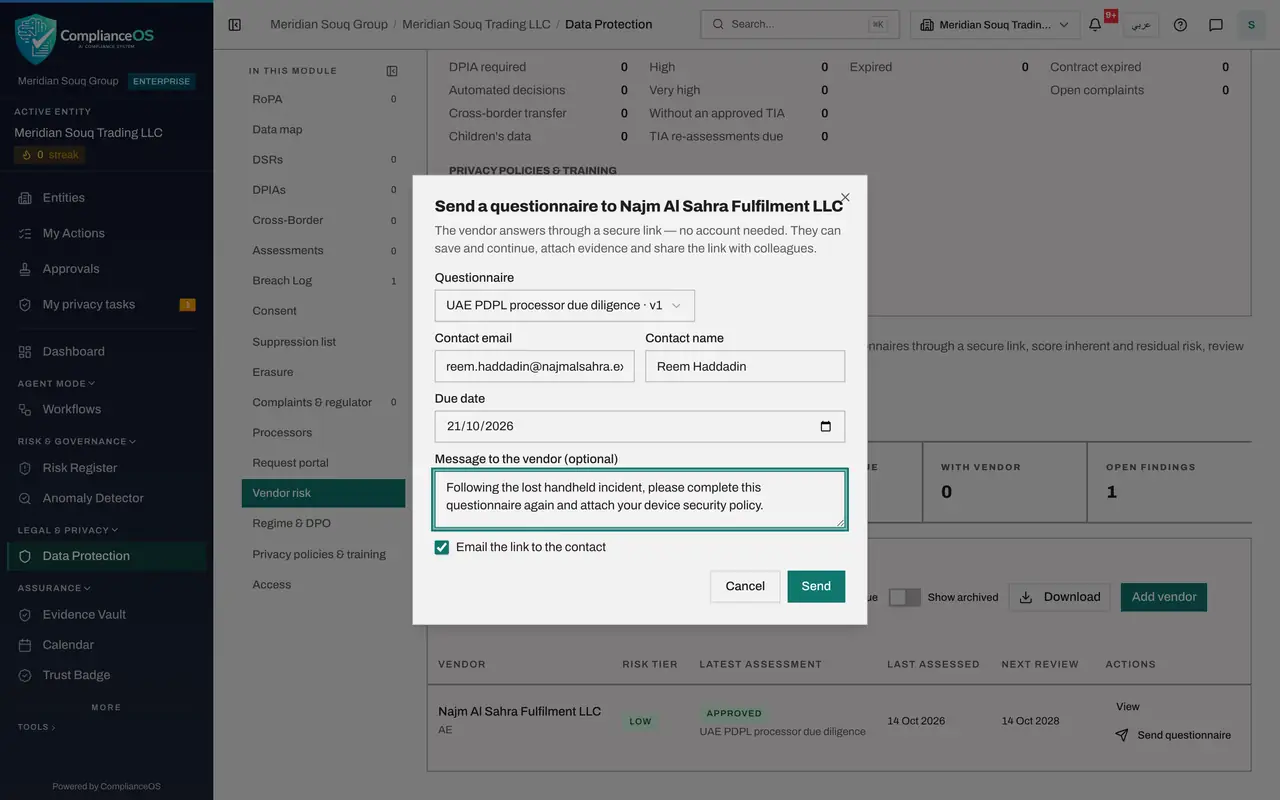
Select Send questionnaire on the supplier's row. Choose UAE PDPL processor due diligence again; PDPL is the Personal Data Protection Law. The supplier answers the same questions afresh, so you can compare.
- Select Send questionnaire
- Select Questionnaire
- Choose UAE PDPL processor due diligence · v1
- 3
Set a short due date and say why
Set the due date one week ahead. In the message, say that this follows the incident and what you need to see.
- Type Due date:
2026-10-21 - Type Message to the vendor (optional):
Following the lost handheld incident, please complete this questionnai…
- Type Due date:
- 4
Untick the e-mail box and select Send
Untick Email the link to the contact, because e-mail is switched off here, and select Send. The secure link is shown; select Copy link and pass it to the supplier yourself.
- Select Email the link to the contact
- Select Send
- Select Copy link
- 5
Select Done and check the register
Select Done. The supplier's row shows the new questionnaire as Sent, and the With vendor tile counts it. When the answers come back they are reviewed and approved exactly as in Journey A, and the supplier's tier is set again from the new answers.
- Select Done
How to check it worked
The supplier's row in Vendor risk shows a new questionnaire as Sent, and the With vendor tile counts it.
Common mistakes
- Looking for the supplier on the breach record. A breach has no supplier field today; note the supplier's name in the description, as was done here, and go to Vendor risk yourself.
- Waiting for the supplier's next scheduled review. A breach is a reason to re-assess now.
- Leaving Email the link ticked when e-mail is not set up. Untick it and send the link yourself.
Check your understanding
1. The supplier was rated Low a few weeks ago. Why assess it again now?
- A.The rating has expired
- B.A breach at the supplier is new information; the tier should be set again from fresh answers
- C.The system requires it monthly
Show answer
Answer: B. A breach at the supplier is new information; the tier should be set again from fresh answers
The next review date is a latest date, not a reason to wait. An incident is a reason to re-assess at once.
2. Does logging a breach mark the supplier involved for re-assessment?
- A.Yes, automatically
- B.No; the two are not linked today, so you send the questionnaire yourself
- C.Only for critical breaches
Show answer
Answer: B. No; the two are not linked today, so you send the questionnaire yourself
This is a hand-off a person makes. The lesson shows it being made.