Lesson 18 of 63
Journey B, part 7: The finance manager signs off and the return is filed
What you will be able to do
The return is waiting on its second step. In this part the finance manager finds the request in his Approvals inbox, opens the return, checks the figures, and signs. Between checking and signing, the return is submitted to the Federal Tax Authority on its own portal, which is outside ComplianceOS; the acknowledgement that comes back is attached here. His signature is what files the return in ComplianceOS and locks the quarter.
Before you start
- Part 6 is done: the tax manager submitted the return for sign-off.
- The return has been submitted on the tax authority's portal and you have saved the acknowledgement as a PDF.
- You are signed in as the finance manager, who was given the Tax manager role in part 5.
Steps
- 1
Open Approvals
Select Approvals in the left menu. The request is waiting under To decide: File a VAT or CT return, VAT return 1 July to 30 September 2026, with the amount, 1,000.
- 2
Read where the request stands
The card says Waiting on step 2, Finance sign-off, and shows the progress. Step one was approved by Fatima Noor, the tax manager, marked Self-approved with justification, with her comment. Step two is yours.
- 3
Select Open record
Select Open record. Tax Intelligence opens on Returns. Choose Q3 under Quick select. The return the tax manager saved appears as she left it; you do not compute anything.
- Select Open record
- Select Q3
- 4
Check the figures
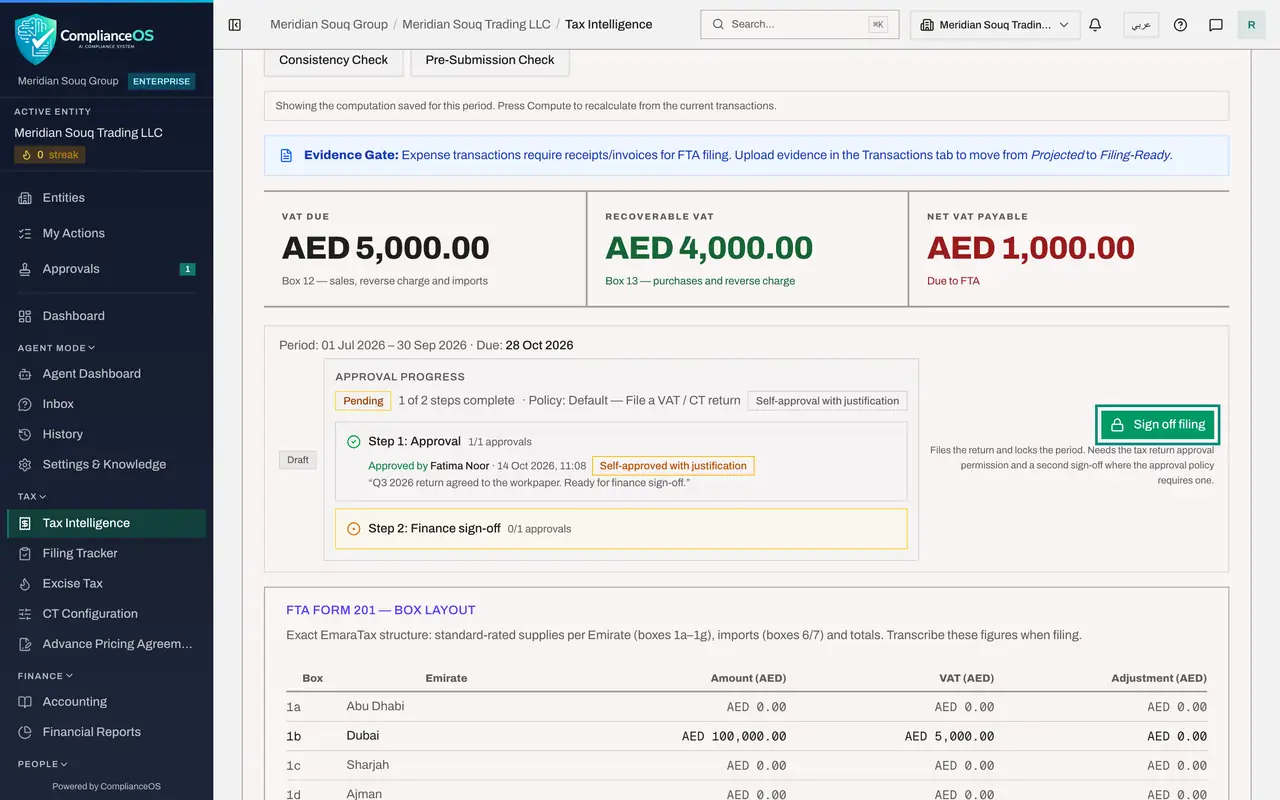
Compare the figures with the return as submitted to the authority: VAT due 5,000, recoverable VAT 4,000, net VAT payable 1,000. Under them, Approval progress shows the tax manager's step complete and yours as the current step, with the button Sign off filing.
- 5
Select Sign off filing and attach the acknowledgement
Select Sign off filing. Under Supporting documents, choose the acknowledgement from the authority's portal, here VAT-2026-Q3-acknowledgement.pdf. In FTA filing reference, type the submission reference printed on it.
- Select Sign off filing
- Upload Supporting documents *:
VAT-2026-Q3-acknowledgement.pdf - Type FTA filing reference (optional):
VAT-2026-Q3-0048213
- 6
Add your comment and confirm: the return is filed
In Comment, record what you checked. Select Confirm, File and Lock. You did not prepare this return, so no justification is asked for. The status changes from Draft to Filed. The acknowledgement is sealed in the Evidence Vault, the quarter's VAT treatment is frozen, and the filing deadline is completed. A green note confirms that computing again from today's data gives the same figures as filed. A filed return is corrected only through a Voluntary Disclosure.
- Type Comment:
Figures agree to the return submitted on EmaraTax. Acknowledgement att… - Select Confirm, File & Lock
- Type Comment:
- 7
Check your inbox is clear
Select Approvals again. Nothing is waiting for you. The request has moved out of To decide because both steps are complete. Next, the tax manager sees the effect in the Filing Tracker.
- Select Approvals
How to check it worked
The return shows Filed, both approval steps are complete, and the quarter is locked.
Common mistakes
- Signing without the acknowledgement. The filing record is only as good as the proof attached to it; the file you attach is sealed in the Evidence Vault for seven years.
- Signing figures you have not compared with what was submitted to the authority. After locking, a correction needs a Voluntary Disclosure.
- Selecting Compute VAT Return to see the figures. Choosing the quarter brings up the saved return; you are the reviewer, not the preparer.
Check your understanding
1. What files the return in ComplianceOS and locks the quarter?
- A.The tax manager's computation
- B.The last approval step, signed with the acknowledgement attached
- C.Closing the accounting period
Show answer
Answer: B. The last approval step, signed with the acknowledgement attached
The return is filed only when every step of the approval policy is complete. The second signer's confirmation does it.
2. A mistake is found after the quarter is locked. How is it corrected?
- A.Edit the transactions and compute again
- B.Through a Voluntary Disclosure
- C.Delete the return
Show answer
Answer: B. Through a Voluntary Disclosure
A locked period's filed figures are frozen. The page offers Start Voluntary Disclosure for corrections.