Lesson 21 of 63
Journey B, recap: What just happened, and where to find it again
What you will be able to do
One sale has passed through Tax, the ledger, the bank, a two-person sign-off and the filing calendar. This recap walks back through each place once, as the compliance officer, and points at what was left there.
Before you start
- Parts 1 to 9 of Journey B are done.
- You are signed in as the compliance officer.
Steps
- 1
Tax: the sale, now locked
Start in Tax Intelligence. The sale, MST-2026-0147, is in Transactions at 100,000 dirhams, classified as Taxable Income at the standard rate. It is the 100,000 in box 1 of the return, and because the quarter is filed, its VAT treatment is frozen.
- 2
Accounting: the journal entries
Select Accounting, then Journals. Journey B added three entries: the sale, posted from Tax with the finance manager's approval; the customer's receipt, posted when the accountant matched the bank line; and the bank fee, posted by its category. With the bill and its payment from Journey A, the ledger tells the whole story.
- Select Accounting
- Select Journals
- 3
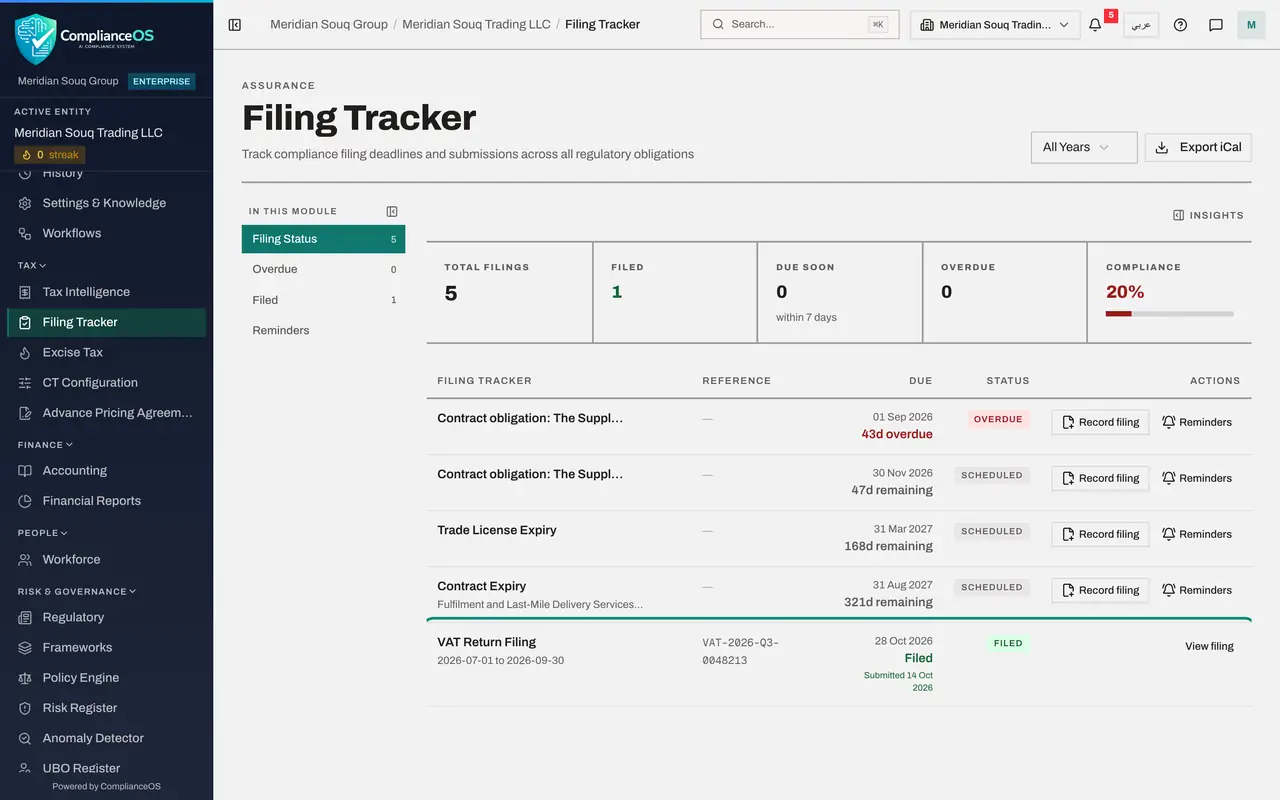
Filing Tracker: the deadline is Filed
Select Filing Tracker. VAT Return Filing for 1 July to 30 September 2026 shows Filed, with the authority's reference and the date it was submitted.
- Select Filing Tracker
- 4
Calendar: the same deadline
Select Calendar, then Sync Deadlines. The VAT return for the quarter, due on 28 October, is in the calendar as well, marked as completed. The Completed tile counts it. It is the same deadline as in the Filing Tracker, not a second copy to maintain.
- Select Calendar
- Select Sync Deadlines
- 5
Evidence Vault: the acknowledgement
Select Evidence Vault. The acknowledgement the finance manager attached, VAT-2026-Q3-acknowledgement.pdf, is sealed here under the seven-year tax retention policy, beside the computed return itself.
- Select Evidence Vault
- 6
Audit log: who did what
Select Audit log. The newest lines are the period close and the two sign-offs on the return, each with a name and a time. Further down are the journal approvals and the sale itself. That closes Journey B: a sale, recorded, posted, collected, reported and filed, with a second person at each sign-off. Journey C follows a person: a new employee, from hire to leaving.
- Select Audit log
How to check it worked
You can find the sale in Tax, its journal entries, the Filed deadline, the sealed acknowledgement and the sign-off trail.
Common mistakes
- Treating the filed return as the end of the evidence. The auditor will ask for the chain: the sale, its posting, the receipt, the workpaper, the sign-offs and the acknowledgement. Each has its place.
- Assuming the calendar and the Filing Tracker are two lists to keep in step. They show the same deadline; filing the return completes it in both.
- Forgetting that a self-approval is flagged. The preparer gave a written reason for signing her own work, and it stays in the audit log.
Check your understanding
1. Which single action completed the VAT deadline in the Filing Tracker and the calendar?
- A.Computing the return
- B.The second sign-off, which filed and locked the return
- C.Closing the accounting period
Show answer
Answer: B. The second sign-off, which filed and locked the return
The deadline follows the return's status. It completed when the return became Filed.
2. Where would you look to see who signed the return and what reason each gave?
- A.The trial balance
- B.The audit log and the approval progress on the return
- C.The bank statement
Show answer
Answer: B. The audit log and the approval progress on the return
Each decision is recorded with the person, the time, the comment and the justification.