Lesson 24 of 63
Journey C, part 3: HR prepares the salary file and records that it was paid
What you will be able to do
Salaries in the UAE are paid through the Wage Protection System, or WPS. Each month the employer sends its bank a Salary Information File, or SIF, with one line per employee. In this part the HR director sets up the employer's details once, completes the payment details of the other employee, prepares the file for September 2026, and records that the bank paid it on time.
Before you start
- Parts 1 and 2 are done: Hessa Al Marri is registered with her payment details.
- You have the company's MOHRE establishment number and its salary bank's routing code and IBAN.
Steps
- 1
Open the payment records
In Workforce, select the tab WPS Payment Records. A note says the details of the employer must be completed before a file can be generated. Select the button Edit set-up.
- Select WPS Payment Records
- Select Edit set-up
- 2
Enter the employer's details
Type the 13-digit MOHRE establishment ID, the 9-digit routing code of the bank that acts as your salary agent, the company's IBAN, and the bank's name. In Payment deadline type 10: salaries must be paid by the tenth day of the following month. Select Save.
- Type MOHRE establishment ID:
1000000170001 - Type Employer's agent routing code:
999170001 - Type Employer IBAN:
AE730330000017000004471 - Type Salary agent (bank / exchange house):
Al Waha Commercial Bank - Type Payment deadline:
10 - Select Save
- Type MOHRE establishment ID:
- 3
Complete the other employee's payment details
Every enrolled employee needs payment details. Aisha Farouk's are missing. Open the Employees tab, select her name, select the WPS tab and Edit details, then type her person code, routing code and IBAN, and select Save.
- Select Employees
- Select Aisha Farouk
- Select WPS
- Select Edit details
- Type MOHRE person code:
10017020000025 - Type Salary agent routing code:
999170001 - Type IBAN:
AE499990000017020005678 - Select Save
- 4
Select Prepare SIF
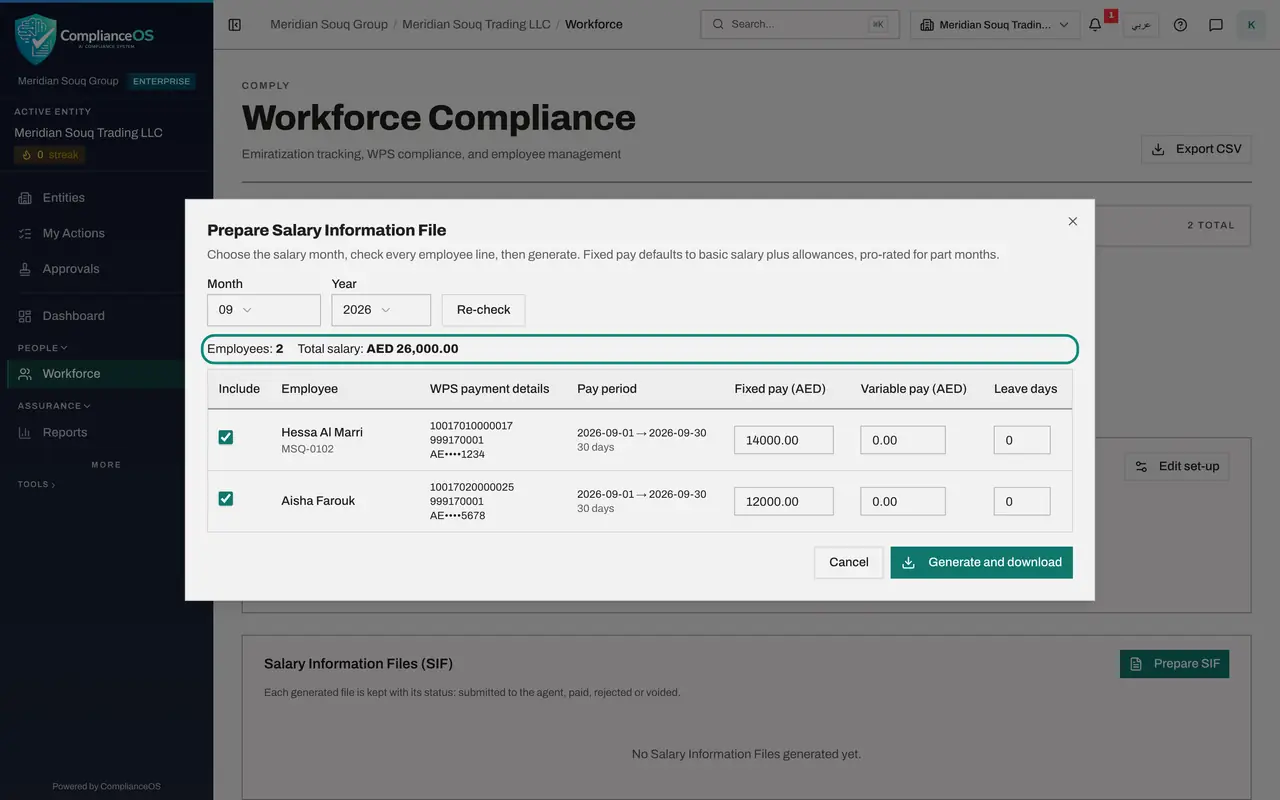
Go back to Workforce, WPS Payment Records, and select Prepare SIF. Month and Year start on last month, September 2026. Select Check. A line is built for every employee who is enrolled and was employed in that month.
- Select WPS Payment Records
- Select Prepare SIF
- Select Check
- 5
Read the lines
There are two lines: Hessa Al Marri and Aisha Farouk, each with payment details, the pay period of 1 to 30 September, and fixed pay taken from the basic salary. Employees shows 2 and Total salary 26,000 dirhams. Variable pay is for overtime or commission, and Leave days for days of leave in the month. Untick Include to leave someone out of this file.
- 6
Select Generate and download
Select Generate and download. The file is saved to your downloads folder, named with the establishment number and the date and time, and ending in SIF. It joins the list with the status Generated. Nothing has been sent to the bank.
- Select Generate and download
- 7
Select Mark submitted
Now upload the file on your bank's own portal; that happens outside ComplianceOS. When you have done it, select Mark submitted on the file's line, add a note, and select Confirm. The status changes to Submitted.
- Select Mark submitted
- Type Note:
Uploaded to the bank's payroll portal on 6 October 2026. - Select Confirm
- 8
Select Mark paid and enter the date
When the bank confirms the salaries were credited, select Mark paid. In Paid date enter the day the bank credited them, 8 October 2026, which is before the deadline of the tenth. Select Confirm.
- Select Mark paid
- Type Paid date:
2026-10-08 - Type Note:
Bank confirmation received. - Select Confirm
- 9
Check the payment records and the compliance rate
Under WPS Payment Records, September 2026 now shows two employees and 26,000 dirhams. Select the Overview tab: WPS Compliance has a rate for the first time, because both salaries were paid before the deadline.
- Select Overview
How to check it worked
Salary Information Files lists the September 2026 file for two employees and 26,000 dirhams with the status Paid, and WPS Payment Records shows September 2026 for two employees.
Common mistakes
- Generating the file before checking every line. A red line means that employee would be missing from the bank's payment.
- Thinking Generate and download pays the salaries. Nothing is sent anywhere: you upload the file on your bank's own portal.
- Recording today's date as the paid date out of habit. Enter the date the bank credited the salaries; it decides whether the month counts as paid on time or late.
Check your understanding
1. What does ComplianceOS send to the bank when you generate the salary file?
- A.The salary payments
- B.Nothing; you upload the file to the bank's portal yourself
- C.An e-mail with the file
Show answer
Answer: B. Nothing; you upload the file to the bank's portal yourself
The file is saved to your computer and kept in the list. Mark submitted and Mark paid record what you then did outside.
2. What does Mark paid update?
- A.Only the file's label
- B.Each employee's WPS record for the month, as on time or late against the payment deadline
- C.The employees' bank accounts
Show answer
Answer: B. Each employee's WPS record for the month, as on time or late against the payment deadline
The paid date is compared with the deadline day in the employer set-up, and the WPS compliance rate follows.