Lesson 33 of 63
Journey C, recap: What just happened, and where to find it again
What you will be able to do
Two people passed through this journey: a joiner and a leaver. Between them they touched Workforce, sanctions screening, the salary file, ESG, the calendar, privacy policies, the ledger, access control and data subject requests. This recap visits each place once, as the compliance officer, and also names the two hand-offs that the system does not make for you.
Before you start
- Parts 1 to 11 of Journey C are done.
- You are signed in as the compliance officer.
Steps
- 1
Workforce: one joiner, one leaver
Open Workforce and select Employees. Hessa Al Marri, who joined in part 1, is the only active employee. Tick Show Terminated and Aisha Farouk appears, greyed, as Terminated. The Emiratisation rate at the top has moved again, to 100 percent, because it counts active employees only.
- Select Employees
- Select Show Terminated
- 2
Workforce: the salary file
Select WPS Payment Records. The September salary file is listed as Paid, with the date the bank credited the salaries. This is the record an inspector asks for.
- Select WPS Payment Records
- 3
Accounting: the gratuity in the ledger
Select Accounting, then Journals. Two entries came from the leaver: the gratuity recognised on her last day, and its payment from the bank. HR made both happen from the employee record; nobody in finance typed them.
- Select Accounting
- Select Journals
- 4
ESG: check the workforce figures against Workforce
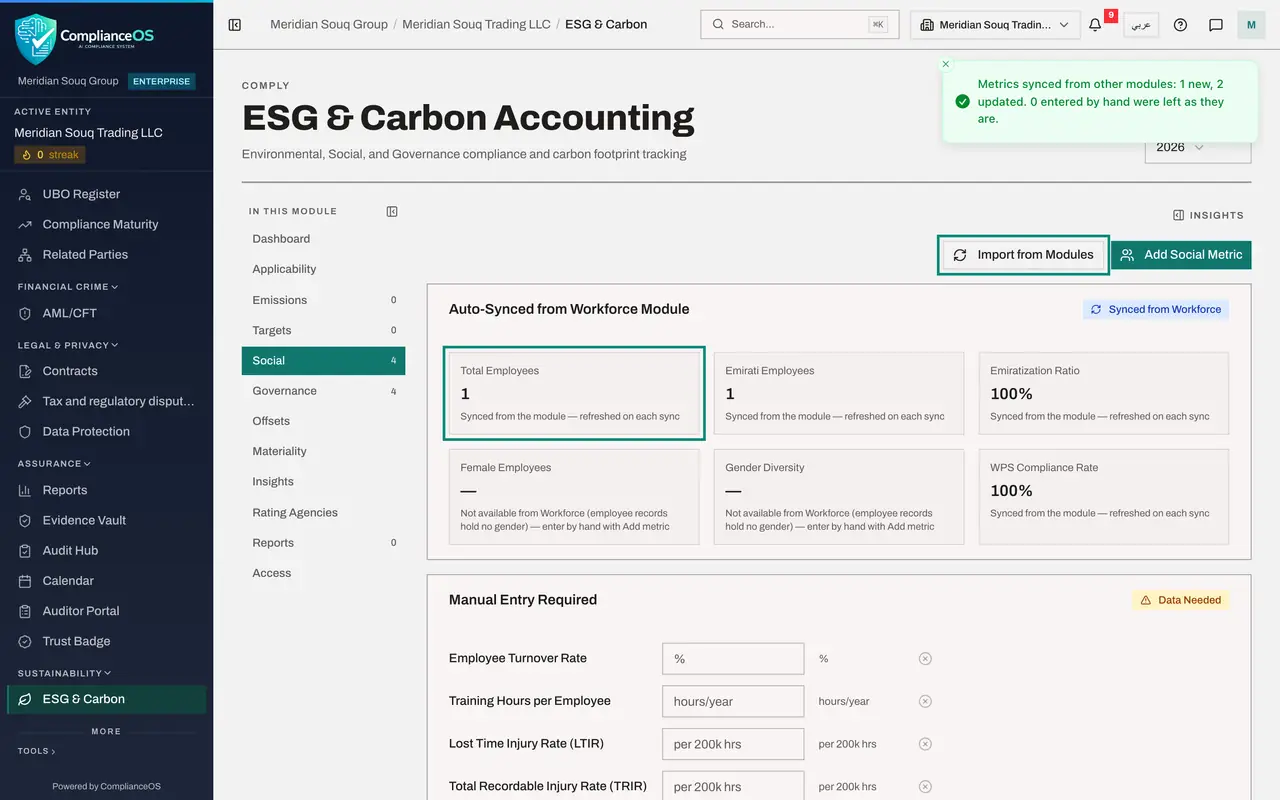
Select ESG and Carbon, then Social. The figures synced from Workforce were filled in after the hire: Total Employees 2 and an Emiratization Ratio of 50 percent. On this system they have not changed since the leaver was recorded, even after Import from Modules. A figure that is already filled in for the year is kept. So before you report, compare these figures with Workforce, and use Edit on the metric to correct one that is out of date.
- Select ESG & Carbon
- Select Social
- 5
Data Protection: the completed request
Select Data Protection, then DSRs. The former employee's access request shows Completed, with the officer it was assigned to. Select View to see the identity check and the response notes. Nothing here points at her employee record: the request and the record are joined only by her name.
- Select Data Protection
- Select DSRs0 (0)
- 6
Data Protection: who has read the policy
Select Privacy policies and training, then Attestation campaigns, and open the campaign. The tiles show how many people were assigned and how many have completed. The employee's acknowledgement from part 7 is counted, and each person's line shows whether they have read the policy yet.
- Select Privacy policies & training
- Select Attestation campaigns
- Select Acceptable use policy, October 2026
- 7
Audit log: the hand-offs, with names
Select Audit log. Type employee in the search box to narrow the list. The hire and the termination are there with the HR director's name. Clear the search and the other steps of the journey are there too, each with the person who did it. That closes Journey C. Journey D follows something nobody plans for: a personal data incident.
- Select Audit log
- Type Search by action name:
employee
How to check it worked
You can point to the joiner's record, the leaver's gratuity entries in the ledger, the workforce figures in ESG, the completed request, and the revoked role in the audit log.
Common mistakes
- Assuming a leaver's access ends when HR records the termination. It does not; an administrator revokes it. Put both steps in one leaver checklist.
- Assuming a data subject request is linked to the employee record. It is not; the request names the person, and whoever works it asks HR for the records.
- Trusting the workforce figures in ESG after a leaver without checking them. A figure already filled in for the year is not refreshed by itself; compare it with Workforce.
Check your understanding
1. Which two hand-offs in this journey had to be made by people, because the modules are not linked?
- A.Salary file to bank, and sale to tax
- B.Leaver recorded in Workforce to access removed in Access control; and data subject request to the employee's records
- C.Hire to sanctions screening, and hire to ESG
Show answer
Answer: B. Leaver recorded in Workforce to access removed in Access control; and data subject request to the employee's records
Screening and the first ESG figures followed the hire by themselves. Removing access and gathering the leaver's records for her request did not.
2. Where do you see that the gratuity was both recognised and paid?
- A.On the employee's Gratuity tab, and as two entries in Journals
- B.In the Filing Tracker
- C.In My privacy tasks
Show answer
Answer: A. On the employee's Gratuity tab, and as two entries in Journals
The Gratuity tab names both journal entries, and Journals lists them: one at termination and one at payment.