Lesson 44 of 63
Journey D, recap: What just happened, and where to find it again
What you will be able to do
One lost device led to a breach record, two approved notices, a risk with an owner, a supplier re-assessment, an erasure and a report. This recap visits each place once, as the compliance officer, and names the hand-offs that people, not the system, had to make.
Before you start
- Parts 1 to 10 of Journey D are done.
- You are signed in as the compliance officer.
Steps
- 1
Breach Log: reported, with the clock stopped
Start in Data Protection, Breach Log. Delivery handheld lost at Najm Al Sahra shows Reported to regulator, and the Regulator report due column shows Reported. The tiles count one breach, one reported, none overdue. When the investigation is finished, Update sets the status to Closed.
- 2
Risk Register: the breach as a risk
Select Risk Register. The breach is there as a data privacy risk, with the source Data Breach, the score it was given from its severity, its owner, the status Mitigating and the due date. It will close by itself at the first sync after the breach is closed.
- Select Risk Register
- 3
Vendor risk: the supplier's new questionnaire
Select Data Protection, then Vendor risk. Najm Al Sahra Fulfilment LLC shows a questionnaire as Sent: the re-assessment the Data Protection Officer started because of the breach. Nothing on the breach points here; a person made the link.
- Select Data Protection
- Select Vendor risk
- 4
DSRs: the completed erasure
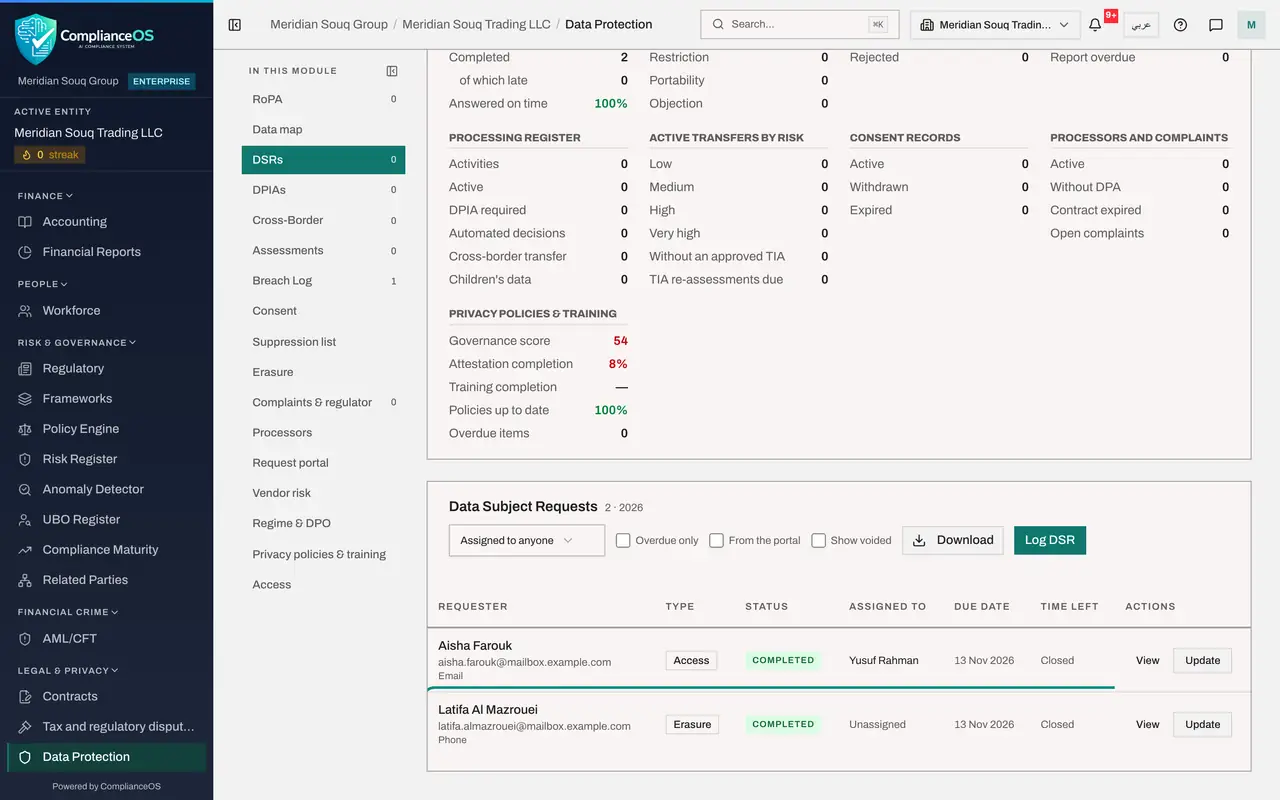
Select DSRs. The erasure request from Latifa Al Mazrouei shows Completed. View holds the search, the plan with its five stages, the evidence trail and the letter to the customer.
- Select DSRs0 (0)
- 5
Suppression list: she stays erased
Select Suppression list. Her e-mail address and phone number are listed with the source Erased. Any later notice, campaign or import skips them.
- Select Suppression list
- 6
Reports: the board's report and its schedule
Select Reports under Assurance. The Full Compliance Report is under Generated Reports, and the monthly schedule is under Scheduled Reports with the date of its next run.
- Select Reports
- 7
Audit log: every decision, with a name
Select Audit log and type breach in the search box. The log shows who logged the breach, who drafted, approved and sent each notice, and when. That closes Journey D. Journey E looks at all of this from the outside: an audit.
- Select Audit log
- Type Search by action name:
breach
How to check it worked
You can find the reported breach, the risk it raised, the supplier's new questionnaire, the completed erasure with its suppression entries, the report, and the trail in the audit log.
Common mistakes
- Closing the risk by hand. Close the breach in the Breach Log when the investigation is finished; the next sync closes the risk.
- Assuming the breach told the supplier's record anything. It did not; the re-assessment was sent by a person.
- Relying on the public portal before it is live. Without outbound e-mail it cannot be opened; log requests by hand.
Check your understanding
1. Which hand-off in this journey did the system make by itself?
- A.Breach to supplier re-assessment
- B.Breach to Risk Register, through Sync Modules
- C.Telephone request to the DSRs list
Show answer
Answer: B. Breach to Risk Register, through Sync Modules
The breach arrives in the Risk Register scored from its severity. The supplier re-assessment and the hand-logged erasure request were made by people.
2. An auditor asks for proof that the regulator was told in time. Where is it?
- A.On the breach: detected time, sent time, channel and the regulator's reference; and in the notice's history
- B.In the trial balance
- C.In Workforce
Show answer
Answer: A. On the breach: detected time, sent time, channel and the regulator's reference; and in the notice's history
The breach detail shows when the regulator was told and the reference, and each notice keeps a history of drafting, approval and sending.