Lesson 25 of 63
Journey C, part 4: What the hire and the payroll changed in other modules
What you will be able to do
HR worked only in Workforce. In this part the compliance officer follows the effects outwards: the Emiratisation ratio, the sanctions check on the new employee, the workforce figures in the sustainability module, known as ESG, which stands for environmental, social and governance, the calendar, and the Evidence Vault. None of these were typed in a second time.
Before you start
- Parts 1 to 3 are done: the employee is registered, her documents are recorded, and September's salaries are marked paid.
- You are signed in as the compliance officer.
Steps
- 1
Workforce: the Emiratisation ratio moved
Open Workforce. Before the hire the Emiratisation rate was zero. With one Emirati among two employees it is now 50 percent, against the target shown beside it, and the status is Compliant. WPS Compliance shows 100 percent, because September was paid on time.
- 2
AML/CFT: the new employee was screened
Select AML/CFT, then the Screening tab. Hessa Al Marri is in the list with the type Employee and the status Cleared. The check ran when HR saved her record.
- Select AML/CFT
- Select Screening
- 3
ESG: open the Social section
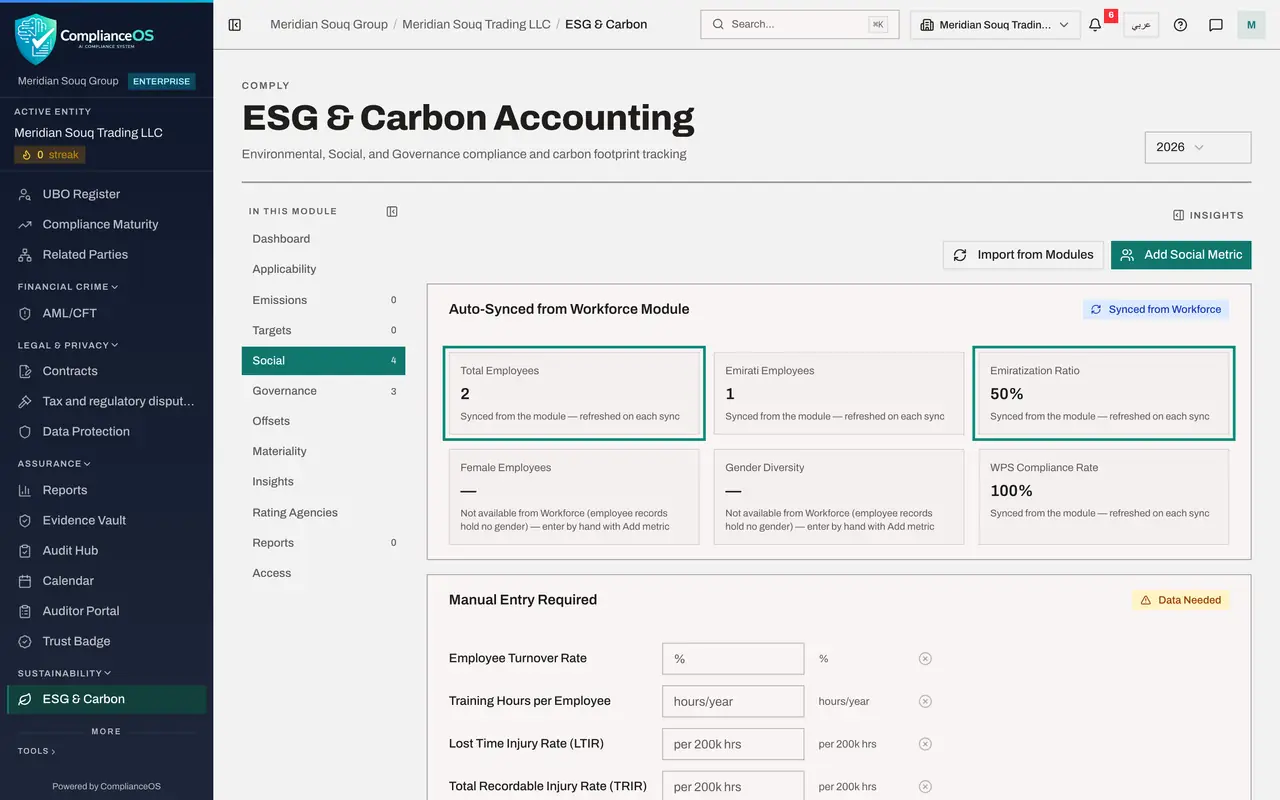
Select ESG and Carbon under Sustainability, then Social in the module's own list. The first block is headed Auto-Synced from Workforce Module.
- Select ESG & Carbon
- Select Social
- 4
Read the synced figures
Total Employees is 2, Emirati Employees is 1, the Emiratization Ratio is 50 percent, and the WPS Compliance Rate is shown as well. These are the figures a sustainability report asks for. The boxes under Manual Entry Required, such as training hours and injury rates, are the ones a person still has to supply.
- 5
See them in the list of metrics
Scroll down to All Social Metrics. Each synced figure is a row for the year, with the note AUTO_MODULE to show that it came from another module and was not typed in. Import from Modules, at the top, refreshes them on demand.
- 6
Calendar: the document expiry and the salary deadline
Select Calendar, then Sync Deadlines. Two entries come from Workforce. Under Upcoming Deadlines is Emirates ID expiry for employee number MSQ-0102, on 30 November. Under October is WPS Salary for September, marked Completed, because HR recorded the payment.
- Select Calendar
- Select Sync Deadlines
- 7
Evidence Vault: the hire is on record
Select Evidence Vault. A record named Employee Created, from the source Workforce, was sealed when HR registered her. Next, the Data Protection Officer makes sure staff have read the privacy policy.
- Select Evidence Vault
How to check it worked
You have seen the same hire in five places: the Emiratisation ratio at 50 percent, a Cleared screening check, the Social figures in ESG, two calendar entries, and a sealed record in the vault.
Common mistakes
- Typing headcount into ESG by hand. The figures marked as synced from Workforce are kept up to date for you; a hand-typed copy goes stale.
- Treating the Emiratisation ratio as an HR-only number. It is reported in ESG and checked against a legal target.
- Ignoring the calendar entry for a document expiry because HR will handle it. The calendar is where everyone sees that it is coming.
Check your understanding
1. Where does ESG get its Total Employees and Emiratisation figures?
- A.Someone types them each year
- B.They are synced from the Workforce module
- C.From the tax return
Show answer
Answer: B. They are synced from the Workforce module
The Social section has a block headed Auto-Synced from Workforce Module, and each of those metrics is tagged as coming from a module.
2. HR marked September's salary file as paid on 8 October. What did the calendar do?
- A.Nothing
- B.It showed the WPS salary deadline for September as completed
- C.It created a new deadline for the tax return
Show answer
Answer: B. It showed the WPS salary deadline for September as completed
The salary deadline is tied to the payment records, in the same way the VAT deadline is tied to the return.