Lesson 20 of 63
Journey B, part 9: The finance manager closes the quarter and checks the trial balance
What you will be able to do
The VAT return for the quarter is filed. In this part the finance manager closes the accounting period for July to September, so that nothing more can be posted into the quarter, and opens the trial balance to confirm that the ledger still balances after everything Journeys A and B posted.
Before you start
- Part 7 is done: the VAT return for the quarter is filed.
- You are signed in as the finance manager.
Steps
- 1
Open Periods
In Accounting, select Periods in the section list. An accounting period is a span of dates that can be closed. None has been defined yet.
- Select Periods0 (0)
- 2
Create the period for the quarter
Select New Period. In Period Name type Q3 2026, July to September. Set Start Date to 1 July 2026 and End Date to 30 September 2026. Notes is optional.
- Select New Period
- Type e.g. Q1 2026:
Q3 2026, July to September - Type Start Date *:
2026-07-01 - Type End Date *:
2026-09-30 - Type Notes:
VAT return filed 13 October 2026
- 3
Select Create Period
Select Create Period. The period is listed with the status Open and a Close button.
- Select Create Period
- 4
Select Close and read the confirmation
Select Close on the period's line. The window says that after closing, nothing can be posted to or changed in this period until it is reopened. It also says what will be posted: here, nothing, because the period does not end on the financial year-end.
- Select Close
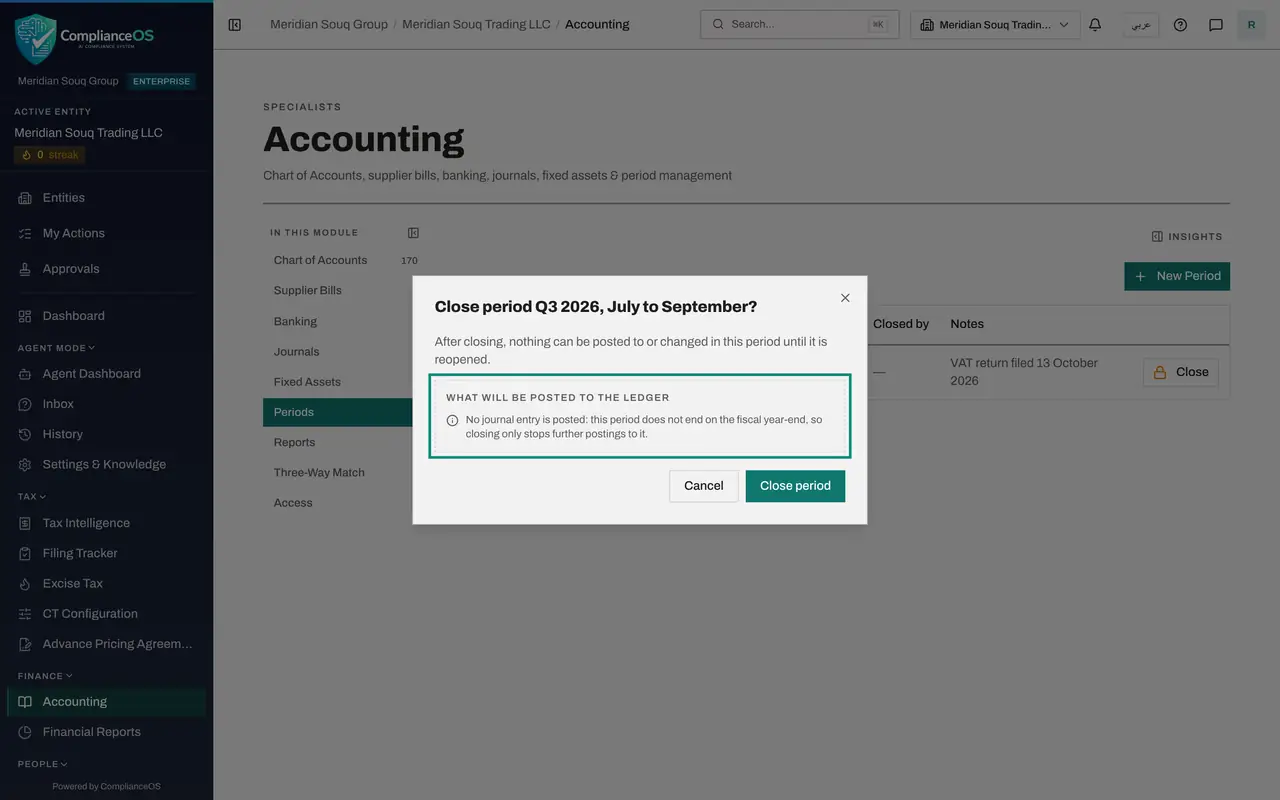
- 5
Select Close period
Select Close period. The status changes to Closed, with your name under Closed by. The line now offers Reopen and Lock. Leave them: Lock cannot be undone.
- Select Close period
- 6
Open the trial balance
Select Reports in the section list. Report Type is Trial Balance, as of today. It lists every account that has been posted to, with its debits, its credits and its balance.
- Select Reports
- 7
Read the accounts the two journeys touched
Accounts Receivable shows 105,000 on each side and a balance of zero: the sale, less the customer's payment. Accounts Payable is also zero: the supplier's bill and its payment. The bank account holds the receipt less the payment and the fee.
- 8
Check that it balances
Look at the Totals line. Total debits equal total credits and the line says Balanced. Every entry in both journeys was posted by a step someone took on a document, and the books still balance. The note underneath reminds you that the report is built from posted journal entries only.
How to check it worked
Periods shows the quarter as Closed, and the trial balance ends with the word Balanced, debits equal to credits.
Common mistakes
- Closing the period before the quarter's entries are in. Once closed, nothing can be posted to it until it is reopened.
- Selecting Lock without meaning to. Closing can be undone with Reopen; a locked period cannot be reopened.
- Reading the trial balance as including everything in Tax. It is built from posted journal entries only; tax activity with no journal entry is listed separately underneath.
Check your understanding
1. What does closing an accounting period do?
- A.Files the tax return
- B.Stops further postings to that period until it is reopened
- C.Deletes the period's draft entries
Show answer
Answer: B. Stops further postings to that period until it is reopened
For a period that does not end on the financial year-end, closing posts nothing; it only stops further postings.
2. The sale put 105,000 into Accounts Receivable and the customer then paid 105,000. What is the balance of that account?
- A.105,000
- B.5,000
- C.Zero
Show answer
Answer: C. Zero
The receipt entry credits the receivable with the same amount the sale debited, which is why the trial balance shows a balance of zero on that account.