Lesson 23 of 63
Journey C, part 2: HR records her documents and payment details
What you will be able to do
A record is not finished until two things are on it. The first is the employee's identity documents with their expiry dates, so that reminders go out before one runs out. The second is her salary payment details, without which she cannot be in the monthly salary file. In this part the HR director adds both and sees the document appear in the list of those expiring soon.
Before you start
- Part 1 is done: Hessa Al Marri is registered.
- You have her Emirates ID and passport, her labour card number, and her bank's details.
Steps
- 1
Open the Documents tab
On Hessa's record, select the Documents tab. It holds the residence visa, Emirates ID, labour card and passport. Nothing is recorded yet. Select Add document.
- Select Documents
- Select Add document
- 2
Record the Emirates ID
In Document choose Emirates ID. Number is optional and is stored encrypted. In Expiry date enter the date printed on the card, here 30 November 2026. Select Save.
- Select Choose a document
- Choose Emirates ID
- Type Number:
784-1994-1704102-7 - Type Expiry date *:
2026-11-30 - Select Save
- 3
Record the passport
Select Add document again. Choose Passport, enter its expiry date, 14 March 2031, and select Save. Both documents are now listed with their expiry dates. An Emirati employee has no residence visa or labour card to record.
- Select Add document
- Select Choose a document
- Choose Passport
- Type Expiry date *:
2031-03-14 - Select Save
- 4
Open the WPS tab
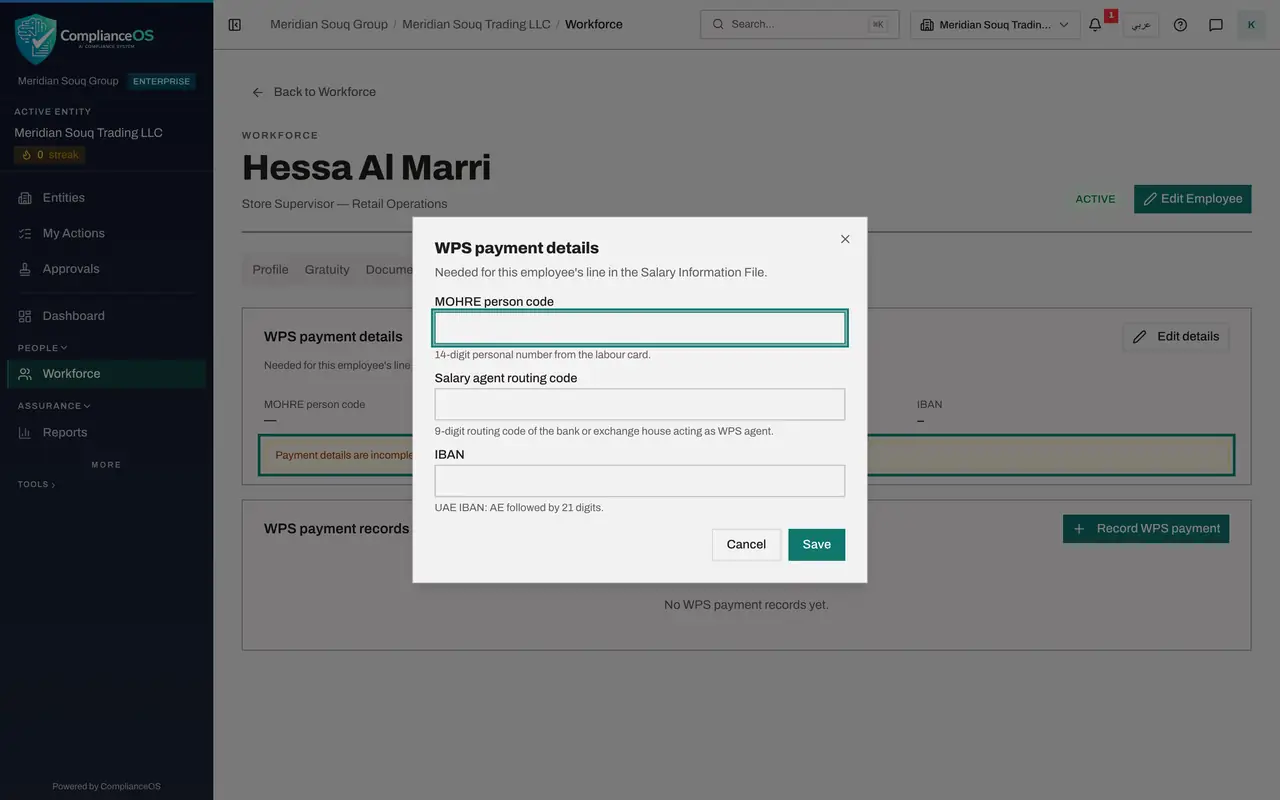
Select the WPS tab. A note says the payment details are incomplete and that this employee cannot be included in a salary file until they are filled in. Select Edit details.
- Select WPS
- Select Edit details
- 5
Enter the payment details
Type the MOHRE person code, the 14-digit personal number from the labour card; MOHRE is the Ministry of Human Resources and Emiratisation. Type the 9-digit routing code of her bank or exchange house. Type her IBAN, which starts with AE and has 21 digits after it.
- Type MOHRE person code:
10017010000017 - Type Salary agent routing code:
999170001 - Type IBAN:
AE639990000017010001234
- Type MOHRE person code:
- 6
Select Save
Select Save. The tab now shows the person code, the routing code and the IBAN, masked to its last four digits. The warning has gone: she can be included in the next salary file.
- Select Save
- 7
See the document under Expiring documents
Select Back to Workforce, then the Expiring documents tab. It lists the documents of current employees that have expired or expire within the chosen period, soonest first. Hessa's Emirates ID is there, with the days left. Reminders go out before each expiry without anyone having to look.
- Select Back to Workforce
- Select Expiring documents
How to check it worked
Her Documents tab lists an Emirates ID and a passport with expiry dates, her WPS tab shows the person code, routing code and a masked IBAN, and the Expiring documents tab of Workforce lists the Emirates ID.
Common mistakes
- Typing an IBAN with a wrong digit. The IBAN is checked; if it is not valid the details are not saved, and the message does not say which field is wrong.
- Adding a new document record when a document is renewed. Edit the existing record with the new expiry date, so the history stays in one place.
- Leaving payment details for later. The employee is silently left out of the salary file until they are complete.
Check your understanding
1. Why record an expiry date for each document?
- A.It is printed on payslips
- B.Reminders go out before the document expires, and it appears under Expiring documents
- C.It sets the salary
Show answer
Answer: B. Reminders go out before the document expires, and it appears under Expiring documents
Working with an expired visa or Emirates ID is an offence for the employer. The reminder gives HR time to renew.
2. An employee's payment details are incomplete. What happens at payroll?
- A.She is paid in cash
- B.She cannot be included in the salary file until they are filled in
- C.The file is rejected by the bank
Show answer
Answer: B. She cannot be included in the salary file until they are filled in
Her WPS tab says so in plain words. The salary file check shows a red line for anyone with missing details.