Lesson 41 of 63
Journey D, part 8: The Data Protection Officer logs the erasure request and prepares the plan
What you will be able to do
The customer has telephoned to say she asked for her data to be deleted. In this part the Data Protection Officer logs the erasure request by hand, searches for the customer's records, builds an erasure plan from the search, runs a dry-run that changes nothing, and submits the plan for approval. Erasure never happens on one person's decision.
Before you start
- Part 7 is done: the public portal is not available, and the customer has telephoned.
- You are signed in as a Data Protection Officer and have the customer's name, e-mail address and phone number.
Steps
- 1
Open the list of requests
In Data Protection, select DSRs, the list of data subject requests. Then select the button Log DSR.
- Select DSRs0 (0)
- Select Log DSR
- 2
Enter the request
In Request Type choose Erasure. Type the customer's name and e-mail address. In Channel choose Phone, because that is how the request finally reached you.
- Select Select request type
- Choose Erasure
- Type Requester Name:
Latifa Al Mazrouei - Type Requester Email:
latifa.almazrouei@mailbox.example.com - Select Not recorded
- Choose Phone
- 3
Select Log DSR to save
Select Log DSR at the bottom. The request joins the list with the type Erasure and the status Received.
- Select Log DSR
- 4
Select View and find the two erasure panels
Select View on the request. An erasure request has two panels below its details. Find this person's data runs the search. Automated erasure builds the plan from that search; its button, Create erasure plan, is greyed out until a search has finished.
- Select View: Latifa Al Mazrouei
- 5
Select Search and add the phone number
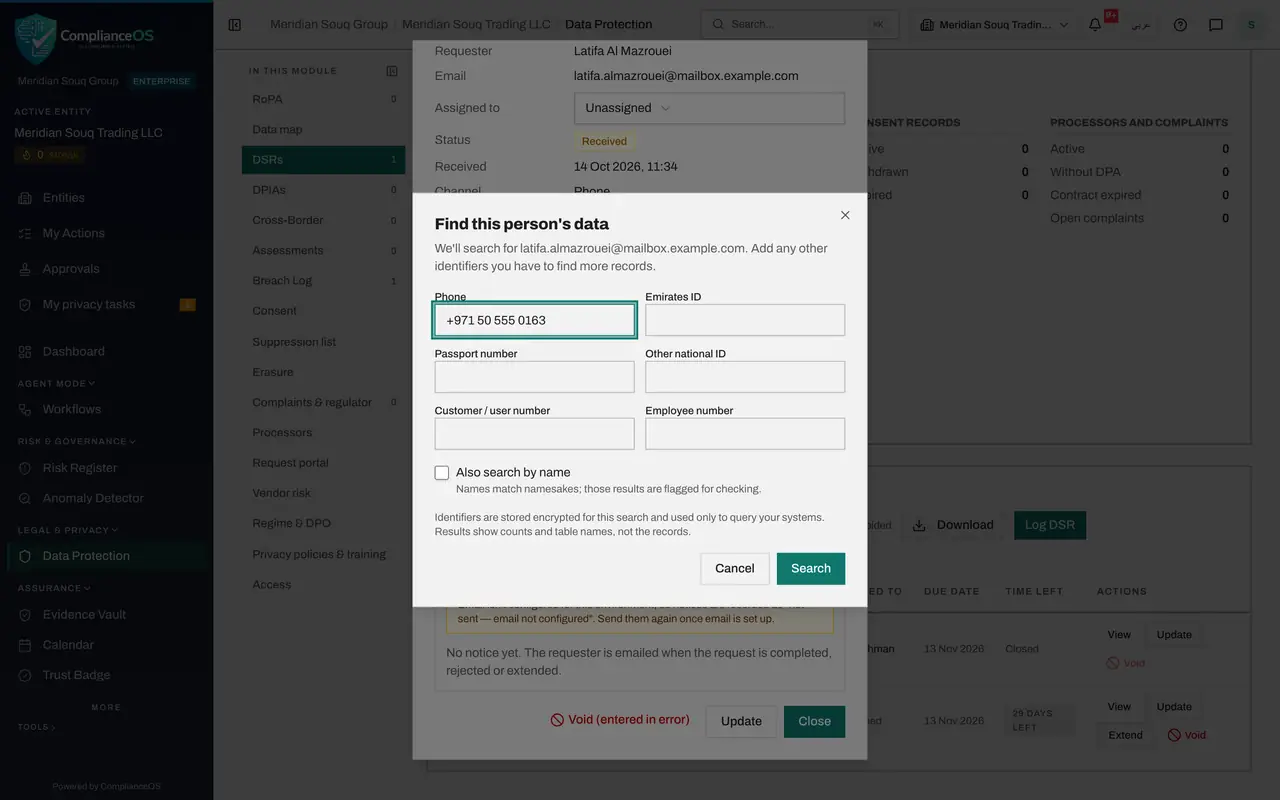
Select Search. The search always uses the e-mail address on the request. Add her mobile number in Phone, so records filed under the number are found as well. Every identifier you search with is also added to the suppression list when the erasure finishes.
- Select Search
- Type Phone:
+971 50 555 0163
- 6
Run the search and read the result
Select Search. When it has finished, the panel shows Done. The result reads found in zero of zero tables searched: this company has not connected any system to its data map yet. So there is nothing ComplianceOS can erase by itself. Her records at the fulfilment supplier and in the order system must be removed by their owners, and you record that on the request.
- Select Search
- 7
Select Create erasure plan
Create erasure plan is now available. Select it. The plan gets a reference that starts with DSR, the status Draft, and five stages: Plan, Dry-run, Approval, Execute and Verify.
- Select Create erasure plan
- 8
Read the plan
The plan shows four figures: Tables found by the search, Rows selected by the dry-run, Rows changed by the erasure, and Retained. Retained counts tables that are kept because of a legal hold or a legal duty, such as tax invoices, which must be kept for the tax retention period. With connected systems, each table is listed with its action: delete, anonymise, retain, or a work order for a person.
- 9
Select Run dry-run
Select Run dry-run. A dry-run only reads: it counts the rows that would be erased and changes nothing. When it finishes, the plan shows Ready for approval, and Valid until shows how long the dry-run can be relied on.
- Select Run dry-run
- 10
Select Submit for approval
Select Submit for approval. The plan changes to Awaiting approval. A note says that you prepared it, so someone else has to approve or reject it, and that it is in the approvers' inbox. The second Data Protection Officer takes it from there.
- Select Submit for approval
How to check it worked
The erasure request is in the DSRs list, and its plan shows Awaiting approval with a note that someone else has to approve it.
Common mistakes
- Deleting records in the source systems yourself before the plan is approved. The plan, the dry-run and the approval are the proof that the right records were removed, and nothing else.
- Searching with the e-mail address only. Add the phone number and any customer number, or records filed under those are missed.
- Reading zero tables found as nothing to do. It means no connected system holds her records; records kept by hand or by a supplier still have to be removed by their owners.
Check your understanding
1. What does a dry-run do?
- A.It deletes the records
- B.It only reads: it counts what would be erased and changes nothing
- C.It e-mails the customer
Show answer
Answer: B. It only reads: it counts what would be erased and changes nothing
The dry-run gives the approver real figures to check before anything is written.
2. Who can approve the erasure plan you prepared?
- A.You
- B.A second person; the plan goes to the approvers' inbox
- C.The customer
Show answer
Answer: B. A second person; the plan goes to the approvers' inbox
After Submit for approval, a note says you prepared it, so someone else has to approve or reject it.