Lesson 22 of 63
Journey C, part 1: HR registers a new employee
What you will be able to do
Journey C follows people: a joiner, a monthly payroll, and a leaver. It starts with a new store supervisor, Hessa Al Marri, who joined on 1 September 2026. In this part the HR director registers her. The record is the root of everything that follows: her line in the salary file, the company's Emiratisation ratio, the workforce figures in the sustainability report, and a sanctions check on her name.
Before you start
- You are signed in as the HR director.
- You have the new employee's details: full name as on her Emirates ID, start date, basic salary and contract type.
Steps
- 1
Open Workforce
In the left menu, under People, select Workforce. The top of the page shows one active employee, an Emiratisation rate of zero percent against a target, and no salary payments recorded yet. Emiratisation is the share of UAE nationals among your employees.
- 2
Open Employees and select Register Employee
Select the Employees tab. One person is listed. Select Register Employee; a form opens for one person.
- Select Employees
- Select Register Employee
- 3
Enter the name and nationality
In Full Name type the name exactly as it is on the Emirates ID: Hessa Al Marri. In Nationality type UAE. The name is stored encrypted.
- Type Full Name *:
Hessa Al Marri - Type Nationality:
UAE
- Type Full Name *:
- 4
Enter the job title and department
Type the job title and the department. Use the same wording for everyone in a team, so that lists and reports group them together.
- Type Job Title:
Store Supervisor - Type Department:
Retail Operations
- Type Job Title:
- 5
Set the employment date and the basic salary
Employment Date is the first day of work, 1 September 2026. Length of service and gratuity are counted from it. Basic Salary is the monthly basic pay in dirhams, without allowances: 14,000.
- Type Employment Date *:
2026-09-01 - Type Basic Salary (AED):
14000
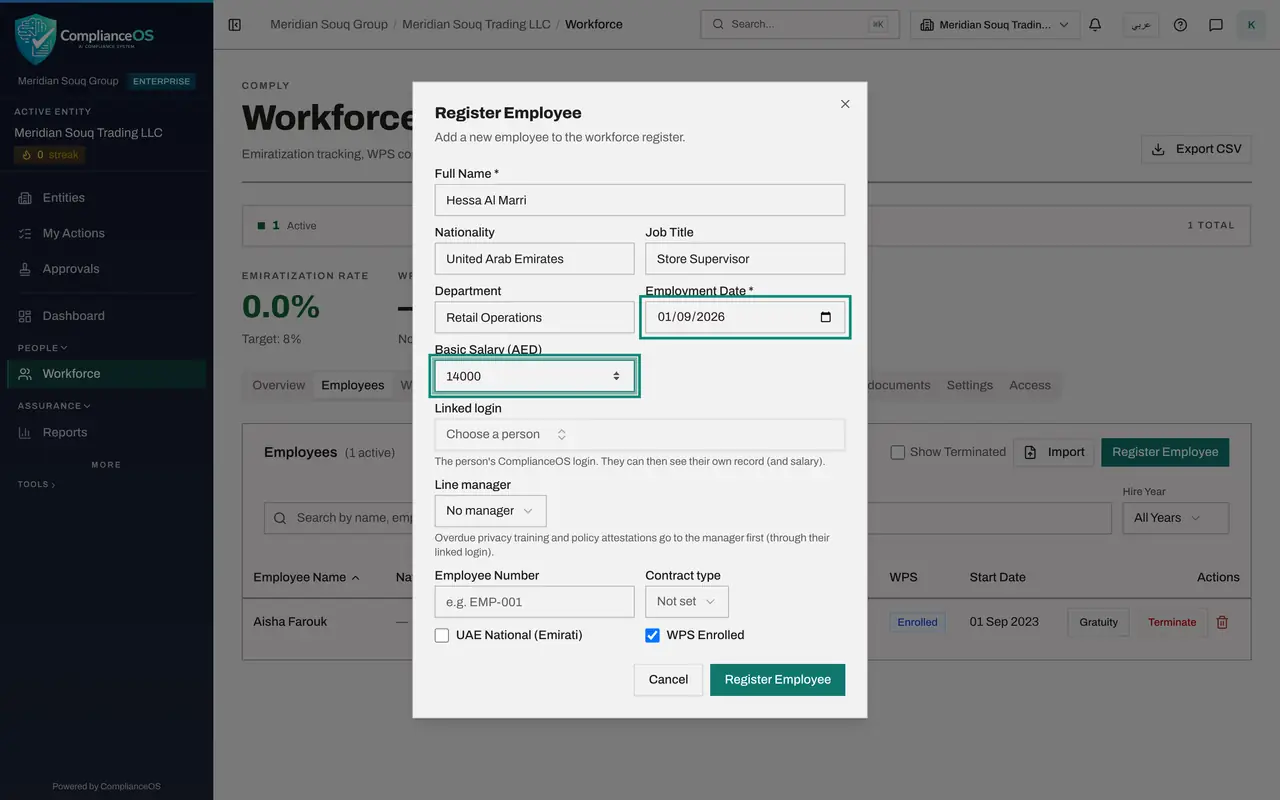
- Type Employment Date *:
- 6
Choose the line manager
Linked login connects the record to the person's own ComplianceOS sign-in. Hessa has no sign-in yet, so leave it. In Line manager choose Aisha Farouk. Overdue privacy training and policy acknowledgements are escalated to the line manager first.
- Select No manager
- Choose Aisha Farouk
- 7
Enter the employee number and the contract type
Type the employee number, MSQ-0102; it must be unique in the company. In Contract type choose Unlimited. The other choices are Limited, which is a fixed term, Full-time, Part-time, Temporary and Flexible.
- Type Employee Number:
MSQ-0102 - Select Not set
- Choose Unlimited
- Type Employee Number:
- 8
Tick UAE National
Tick UAE National, Emirati, because Hessa is a UAE citizen. WPS Enrolled is already ticked. WPS is the Wage Protection System, through which salaries in the UAE are paid and reported. Leave it on.
- Select UAE National (Emirati)
- 9
Select Register Employee
Select Register Employee at the bottom of the form. The form closes, and Hessa joins the list as Active, with Yes under Emirati and Enrolled under WPS. Her name was also screened against the sanctions lists as the record was saved.
- Select Register Employee
- 10
Open her record
Select her name. The Profile tab shows what you entered: employment date, contract type, line manager and employee number. The salary shows as dots until you choose to reveal it. The other tabs, Gratuity, Documents and WPS, are filled in next.
- Select Hessa Al Marri
How to check it worked
Hessa Al Marri is in the Employees list as Active, with Yes under Emirati and Enrolled under WPS, and her record shows the contract type Unlimited and her line manager.
Common mistakes
- Typing a short or familiar name. Use the full name on the Emirates ID or passport; it is screened against the sanctions lists and printed in the salary file.
- Forgetting to tick UAE National for an Emirati employee. The Emiratisation ratio, and the figures other modules take from it, would be wrong.
- Entering total pay in Basic Salary. Basic salary is the pay without allowances; gratuity is worked out from it.
Check your understanding
1. Which other parts of ComplianceOS use the record you create here?
- A.None; Workforce stands alone
- B.The salary file, the Emiratisation ratio, the workforce figures in ESG, and sanctions screening
- C.Only the audit log
Show answer
Answer: B. The salary file, the Emiratisation ratio, the workforce figures in ESG, and sanctions screening
The next lessons show each one: the WPS file, the ratio on the overview, the Social section of ESG, and the Screening tab.
2. What is the Linked login field for?
- A.The employee's bank login
- B.The employee's own ComplianceOS sign-in, so that they can see their own record
- C.The HR director's password
Show answer
Answer: B. The employee's own ComplianceOS sign-in, so that they can see their own record
With a linked login the employee sees their own record and salary, and their privacy tasks. It can be added later.