Lesson 30 of 63
Journey C, part 9: The administrator removes the leaver's access
What you will be able to do
Recording a leaver in Workforce does not touch her sign-in. These two are not linked today: HR records that the person has left, and an administrator removes the access. In this part the administrator finds Aisha Farouk in Access control and revokes her role, which ends her access at once and leaves a record of who removed it and when.
Before you start
- Part 8 is done: HR has recorded the leaver.
- HR has told you the person has left. Nothing in ComplianceOS tells you.
- You are signed in as an organisation administrator.
Steps
- 1
Open Access control, People and assignments
Open the account menu, choose Organisation settings, then Access control, and select the People and assignments tab. Everyone with a sign-in is listed, with the number of roles each one holds.
- Select People & assignments
- 2
Select the leaver
Select Aisha Farouk. She holds one role, granted directly: Employee, self-service, on Meridian Souq Trading. It is still Active, although HR has recorded her as a leaver. Through groups is empty.
- 3
Select Revoke on the role
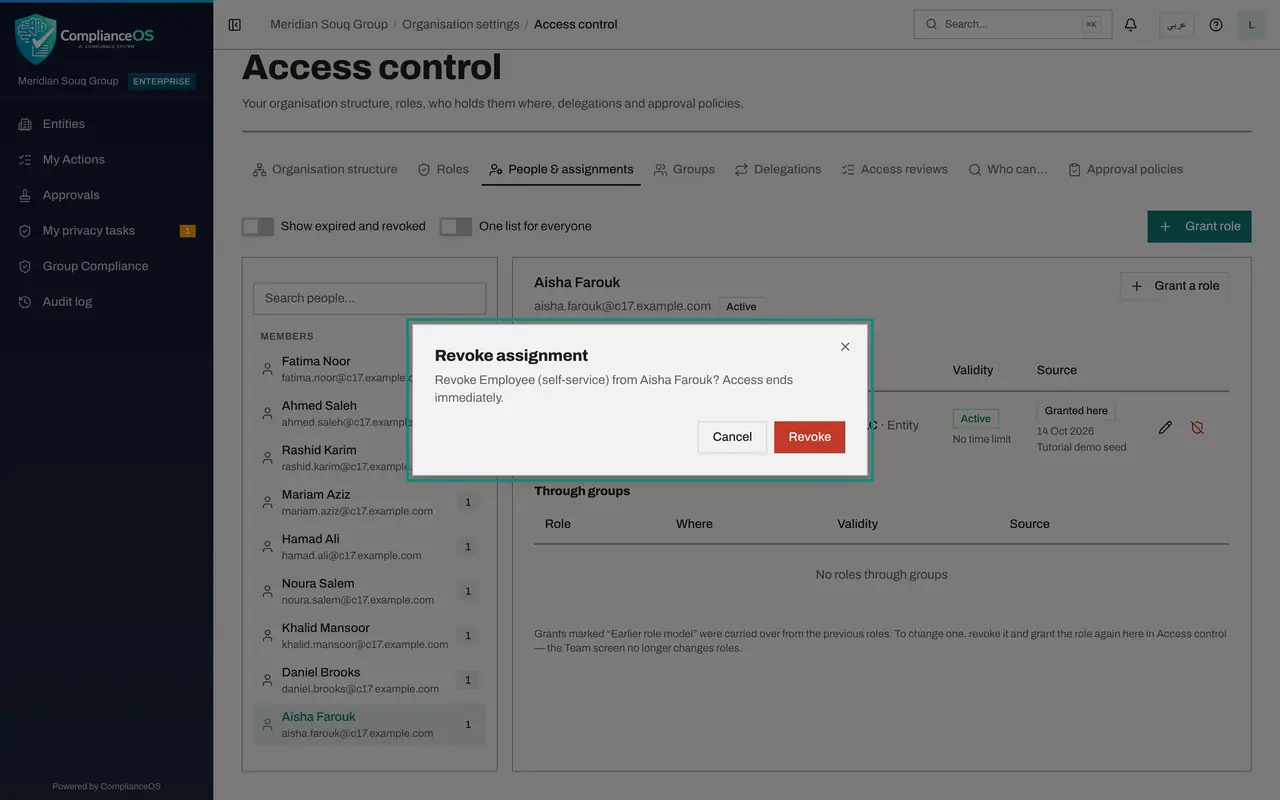
At the end of the role's line there are two small buttons: the pencil edits the grant and the other revokes it. Select Revoke. A window asks you to confirm and says that access ends immediately.
- Select Revoke Employee (self-service)
- 4
Confirm
Select Revoke. The role disappears from her list, and the number beside her name drops to zero. From this moment her sign-in opens nothing.
- Select Revoke
- 5
Switch on Show expired and revoked
Switch on Show expired and revoked, above the list. The role is shown again, marked Revoked, with the date. Nothing is erased: an auditor can see that she held the role, and when it was taken away. The leaver process is now complete on both sides.
- Select Show expired and revoked
How to check it worked
With Show expired and revoked switched on, Aisha Farouk's Employee role shows as Revoked, and she holds no active role.
Common mistakes
- Waiting for the system to remove access when HR records a leaver. It does not happen by itself; make it a step in your leaver checklist.
- Deleting the person. Revoke the roles and keep the person, so that the history of what she did stays readable.
- Forgetting roles held through a group. Check the Through groups list as well as Granted directly.
Check your understanding
1. HR terminates an employee in Workforce. What happens to her ComplianceOS access?
- A.It ends automatically
- B.Nothing, until an administrator revokes her roles
- C.It is suspended for 30 days
Show answer
Answer: B. Nothing, until an administrator revokes her roles
The two are not linked today. This lesson is the administrator's half of the leaver process.
2. When does a revoked role stop working?
- A.At midnight
- B.Immediately
- C.After a second administrator approves
Show answer
Answer: B. Immediately
The confirmation says Access ends immediately. Granting a privileged role needs a second administrator; taking a role away does not.