Lesson 19 of 63
Journey B, part 8: The filing deadline completes itself
What you will be able to do
Nobody ticked a box to say the VAT return was filed. Filing it, in part 7, completed the deadline. In this part the tax manager checks the Filing Tracker and finds the locked package with the acknowledgement.
Before you start
- Part 7 is done: the finance manager signed off and the return is Filed.
- You are signed in as the tax manager.
Steps
- 1
Open the Filing Tracker
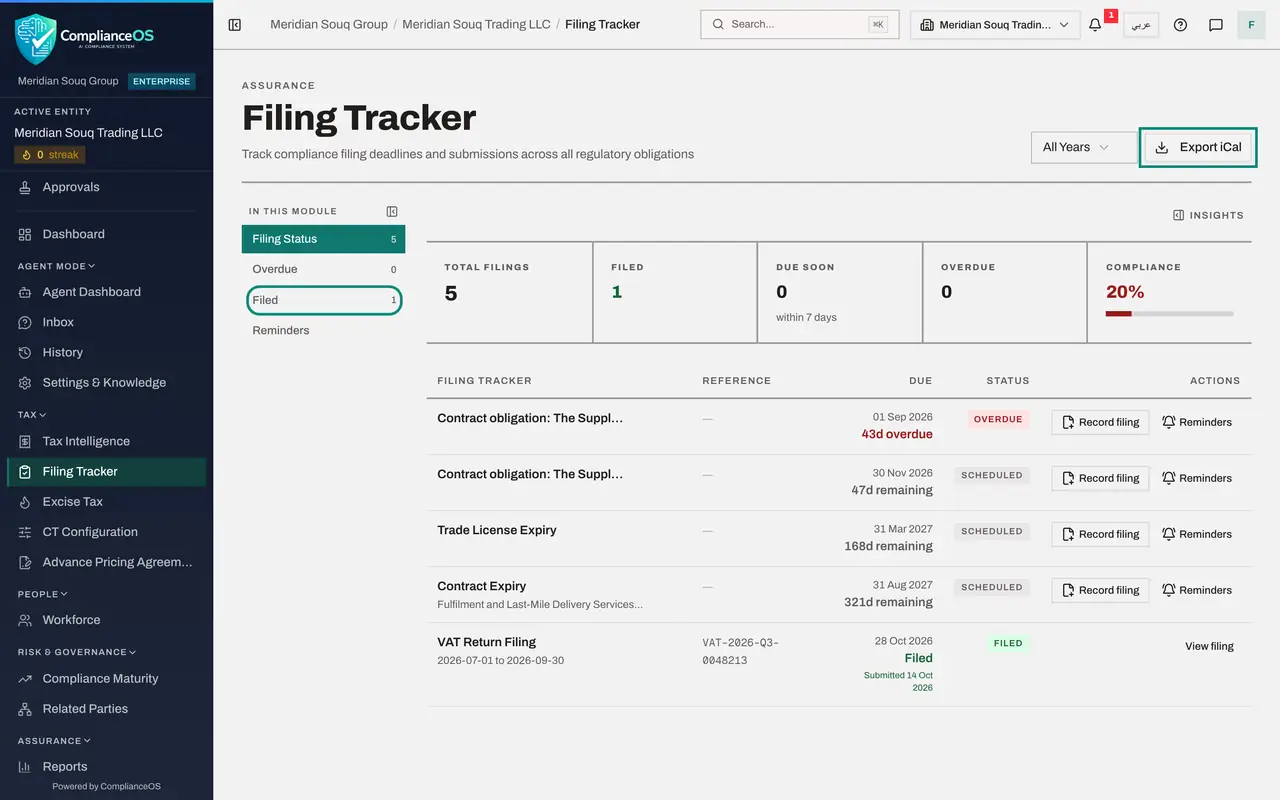
In the left menu, under Tax, select Filing Tracker. It lists every filing deadline for the company. The tiles count the filings, how many are filed, and how many are due soon or overdue.
- 2
Read the line for the quarter
The line VAT Return Filing, 1 July to 30 September 2026, shows the reference VAT-2026-Q3-0048213, the due date 28 October 2026, and the status Filed, with the date it was submitted. Before the sign-off this line said Upcoming and offered File the return.
- 3
Read the tiles
The tiles above agree: one filing in total, one filed, none due soon, none overdue, and Compliance at one hundred percent. Export iCal, at the top right, puts the deadlines into your own calendar application.
- 4
Open Submitted Packages
In Tax Intelligence select More, then Submitted Packages. Each filed and locked period is listed with its type, the date it was filed, the authority's reference and the number of documents. The quarter shows Locked.
- 5
Open the package
Select View on the package. It shows how many transactions the lock froze, and under Vaulted documents the acknowledgement that was attached at the final sign-off, with the start of its fingerprint. This is what you show an auditor who asks for proof of filing. Next, finance closes the books for the quarter.
- Select View
How to check it worked
The Filing Tracker shows VAT Return Filing for 1 July to 30 September 2026 as Filed with the reference, and Submitted Packages lists the period as Locked with one document.
Common mistakes
- Looking for a button to mark the deadline as filed. There is none: a tax deadline completes when its return is submitted and locked.
- Recomputing a filed return to change it. The filed figures do not change; a difference is shown beside them and a correction needs a Voluntary Disclosure.
- Keeping the acknowledgement only in e-mail. The copy attached at sign-off is the sealed one an auditor will be shown.
Check your understanding
1. How did the Filing Tracker learn that the return was filed?
- A.The tax manager updated it
- B.It follows the return: submit and lock completes the deadline
- C.The authority's portal told it
Show answer
Answer: B. It follows the return: submit and lock completes the deadline
The tracker's line for the quarter is tied to the return. While the return is a draft it offers File the return; once filed it shows Filed and View filing.
2. Where is the acknowledgement kept?
- A.With the locked package, sealed in the Evidence Vault
- B.Nowhere
- C.In the Compliance Calendar
Show answer
Answer: A. With the locked package, sealed in the Evidence Vault
Submitted Packages lists the locked period with its documents, and the Evidence Vault holds the sealed file.