Lesson 58 of 63
Journey F, part 3: The second administrator approves the privileged role
What you will be able to do
A role that lets someone manage access is never given on one person's decision. In this part the second administrator finds the request in his Approvals inbox, reads who is to get which role, where and why, and approves it. The role is granted the moment he does.
Before you start
- Part 2 is done: the first administrator requested Org unit administrator for Hana Qasim.
- You are signed in as the second administrator.
Steps
- 1
Select Approvals in the left menu
Select Approvals. The To decide tab lists requests waiting on a step you may decide, and the number on the tab counts them.
- Select Approvals1
- 2
Read the request
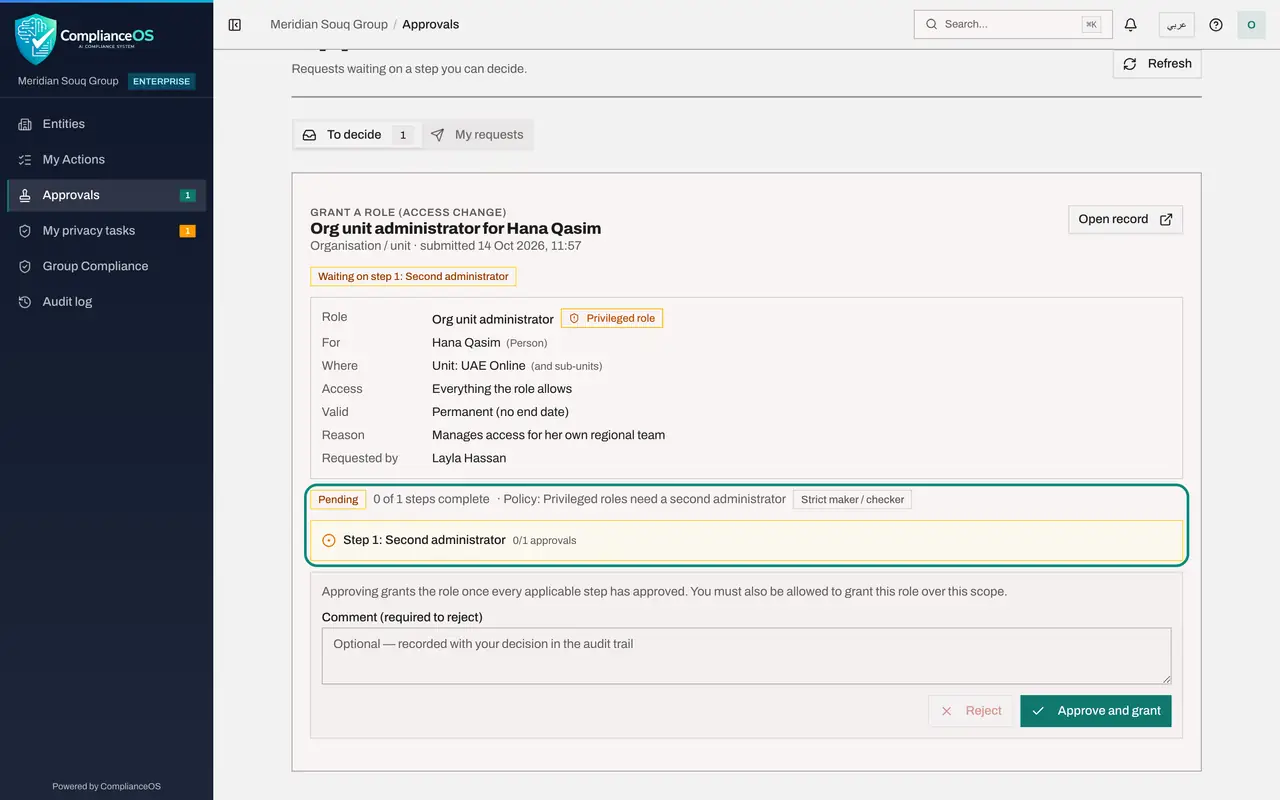
The card names the role and the person. The details mark the role as Privileged role, show Where it applies, the unit UAE Online, and give the reason the requester wrote.
- 3
Read the progress line
Under the details, the progress line shows the policy that applies and the step the request is waiting on: Second administrator, with no approvals yet.
- 4
Add a comment and select Approve and grant
Type a short comment; it is kept with your decision in the audit trail. Then select Approve and grant. The message Access granted appears and the request leaves your list.
- Type Comment (required to reject):
Confirmed with the head of e-commerce: Hana leads compliance for UAE O… - Select Approve and grant
- Type Comment (required to reject):
- 5
Open Access control, People and assignments
To confirm, open the account menu, choose Organisation settings, select Access control and then the People and assignments tab.
- Select Account menu
- Select Organisation settings
- Select Access control
- Select People & assignments
- 6
Select the person and check her roles
Search for Hana and select her. Under Granted directly she now holds two roles on UAE Online: Compliance officer, granted at once, and Org unit administrator, granted by your approval, each with its reason.
- Type Search people…:
Hana
- Type Search people…:
How to check it worked
The request has left your inbox, and Hana Qasim's card in Access control lists Org unit administrator on UAE Online as Active.
Common mistakes
- Approving without checking Where. The same role on the whole organisation would be a very different grant.
- Rejecting without a comment. A comment is required when you reject, so the requester knows what to change.
- Leaving requests to age. The person cannot do the job until you decide.
Check your understanding
1. Who can approve a request to grant a privileged role?
- A.The administrator who requested it
- B.A second administrator who holds the permission to manage access
- C.The person receiving the role
Show answer
Answer: B. A second administrator who holds the permission to manage access
The requester is the maker; the checker must be someone else.
2. When does the role take effect?
- A.At midnight
- B.As soon as the request is approved
- C.When the person next signs in after a week
Show answer
Answer: B. As soon as the request is approved
The button is called Approve and grant: approval and the grant are one action.