Lesson 16 of 63
Journey B, part 5: The administrator sets who signs off a tax return
What you will be able to do
Before the first VAT return is filed, the organisation decides who must sign it. In this part the administrator sets a two-step approval rule for filing a return: the tax manager who prepared it, then a second sign-off from finance. She also gives the finance manager the tax role he needs to open a return. This matters on this system for a practical reason, explained in the first steps.
Before you start
- You are signed in as an organisation administrator with full access.
- You know who should give the second sign-off on tax returns: here, the finance manager, Rashid Karim.
Steps
- 1
Open Organisation settings
Select your initial at the top right of the screen to open the account menu, then choose Organisation settings.
- Select Account menu
- Select Organisation settings
- 2
Open Access control, then Approval policies
Select Access control. It holds the organisation structure, roles, who holds them, and the approval policies. Select the Approval policies tab. Every action that needs an approval is listed on the left, each marked Default until you save a rule of your own.
- Select Access control
- Select Approval policies
- 3
Select File a VAT or CT return
Select File a VAT / CT return, where CT is corporate tax. The line under the heading states the default: one approver who holds Tax, Returns, Approve on the same entity, with strict maker and checker. Strict means nobody approves a record they created or edited.
- 4
Choose Self-approval with justification
Here is the practical problem. To see a return on screen you must compute it, and computing it records you as a preparer. Under the strict rule, every person who could file would be refused. So choose Self-approval with justification: the preparer may approve their own step, but only with a written reason, which is flagged in the audit log and on access reviews.
- 5
Add a second step
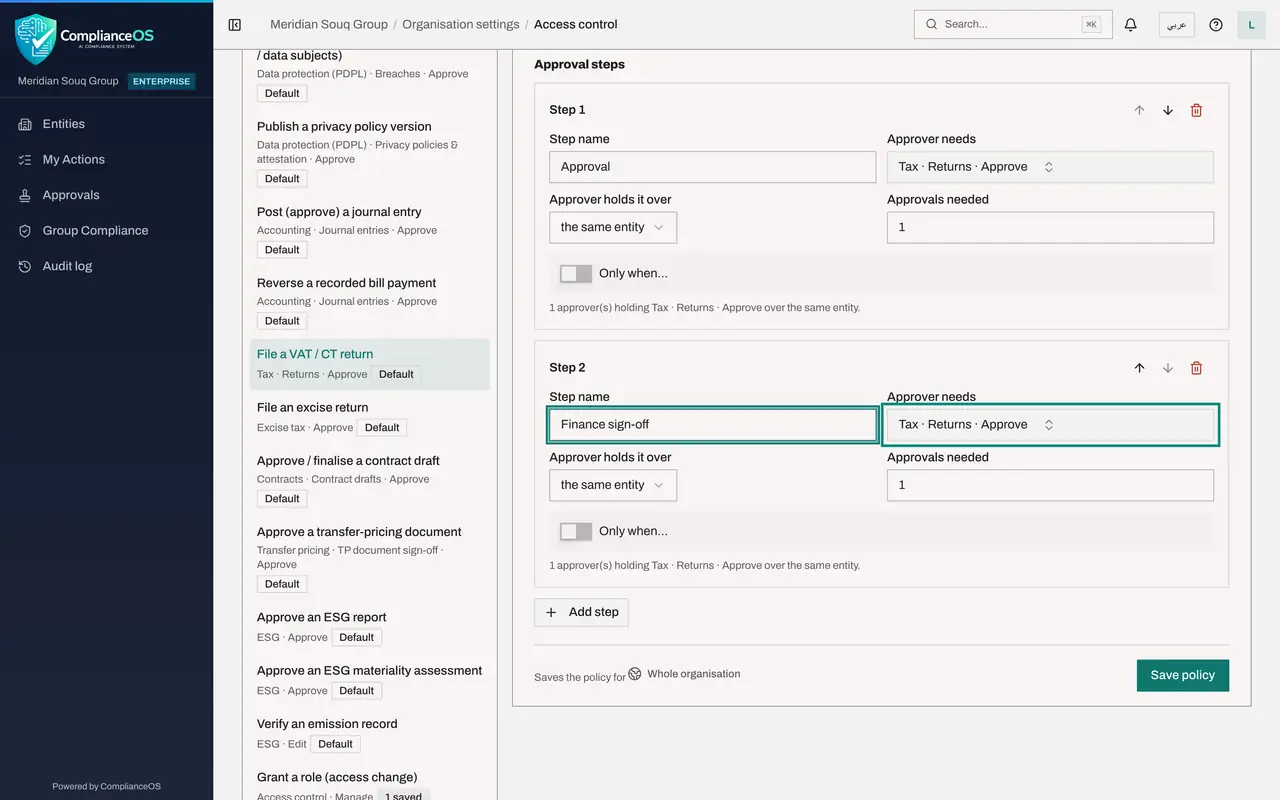
One step would now let one person prepare and file alone. Select Add step. In the new step's name, type Finance sign-off. Approver needs stays on Tax, Returns, Approve, held over the same entity, with one approval needed.
- Select Add step
- Type Step name:
Finance sign-off
- 6
Check that each step needs a different person
Scroll up to the switches. A different person for each step is on, so whoever approves step one cannot approve step two. Policy active is on. Together, the two steps mean a return is filed only when the preparer and a second person have both signed.
- 7
Select Save policy
Scroll down and select Save policy. The policy is saved for the whole organisation, and the action in the list on the left now shows 1 saved.
- Select Save policy
- 8
Open People and assignments and select the finance manager
The second signer must be able to open the return. The Finance manager role does not include tax returns, so select the People and assignments tab and select Rashid Karim. His one role, Finance manager on Meridian Souq Trading, is listed.
- Select People & assignments
- 9
Select Grant a role and choose the role and the place
Select Grant a role. The person is already filled in. In Role choose Tax manager. In Where choose Meridian Souq Trading LLC, so the role applies to this one company and not to the whole organisation.
- Select Grant a role
- Select Choose a role
- Select Whole organisation
- Choose Meridian Souq Trading LLCHead office
- 10
Give the reason and select Grant
Leave Read-only off and the validity dates empty, which means no time limit. In Reason, say why; the reason is kept with the grant. Select Grant. A message confirms it, and Rashid Karim now holds two roles on the company. Roles marked as privileged would wait for a second administrator; this one takes effect at once.
- Type Reason:
Gives the second sign-off on VAT returns and must be able to open them… - Select Grant
- Type Reason:
How to check it worked
Approval policies shows 1 saved beside File a VAT or CT return, with two steps, and Rashid Karim holds both Finance manager and Tax manager on Meridian Souq Trading.
Common mistakes
- Leaving the default rule in place for tax returns. Under strict maker and checker, anyone who opens a return to file it has computed it, and so counts as a preparer; nobody could file.
- Choosing self-approval with justification and keeping a single step. One person could then prepare and file alone. The second step is what keeps two people in the decision.
- Granting the tax role across the whole organisation when one company is enough. Grant access at the narrowest place that does the job.
Check your understanding
1. Why does this organisation let the preparer approve the first step with a written reason?
- A.To let one person file alone
- B.Because opening a return on screen means computing it, which makes every signer a preparer; the second step still requires a different person
- C.Because tax returns need no review
Show answer
Answer: B. Because opening a return on screen means computing it, which makes every signer a preparer; the second step still requires a different person
The written reason is recorded and flagged in the audit log, and A different person for each step guarantees two people sign.
2. Where do you give one person an extra role on one company only?
- A.Team settings
- B.Access control, People and assignments, Grant a role, with Where set to that company
- C.The person's profile
Show answer
Answer: B. Access control, People and assignments, Grant a role, with Where set to that company
A grant names the person, the role and the place it applies: the whole organisation, a unit, or one entity.