Lesson 13 of 63
Journey B, part 2: The accountant posts the sale to the ledger
What you will be able to do
A sale recorded in Tax is one amount for tax purposes; it is not yet in the books. In this part the accountant turns it into a journal entry from Financial Reports and sends it to the finance manager for approval, then categorises the bank fee left from Journey A.
Before you start
- Part 1 is done: the sale is classified in Tax.
- The bank statement from Journey A is imported, with the customer's transfer and a bank fee still Unmatched.
- You are signed in as the accountant.
Steps
- 1
Generate the trial balance
In the left menu, under Finance, select Financial Reports and select Generate. Under the report is an amber panel: Tax-module activity not in the ledger. It counts one transaction, income of 100,000 dirhams, that Tax knows about and the books do not.
- Select Financial Reports
- Select Generate
- 2
Select Post to ledger and tick the sale
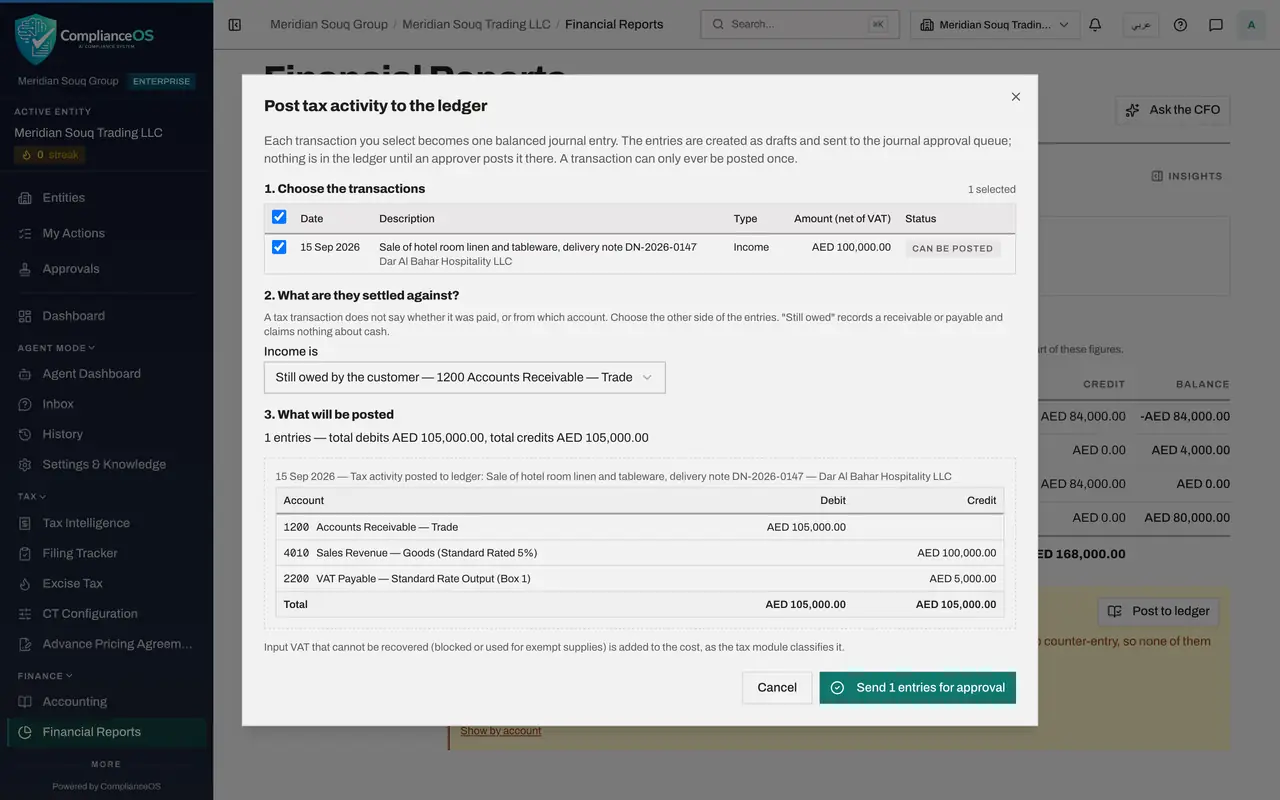
Select Post to ledger. The window explains the rules: each transaction becomes one balanced journal entry, the entries go to the journal approval queue, and a transaction can only be posted once. The sale is listed as Can be posted. Tick it.
- Select Post to ledger
- 3
Say what the income was settled against
A tax transaction does not say whether it was paid. Open Income is. The choices are Still owed by the customer, Paid through the bank, and Settled by the owner personally. On 15 September the customer had not paid, so choose Still owed by the customer, which uses Accounts Receivable.
- 4
Read what will be posted
Step three shows the entry before anything is created. Accounts Receivable is debited 105,000. Sales Revenue is credited 100,000, and output VAT 5,000. The VAT comes from the classification made in Tax.
- 5
Send the entry for approval
Select Send 1 entries for approval. The panel now reads Not posted, zero, and Awaiting approval, one. Nothing is in the ledger yet.
- Select Send 1 entries for approval
- 6
Open the bank account
Now the bank. Select Accounting, then Banking, then the card for Al Waha Commercial Bank. The supplier payment from Journey A shows Auto matched. Two lines are still Unmatched: the customer's transfer of 105,000 dirhams, and a bank fee.
- Select Banking3 (3)
- Select Bank account Al Waha Commercial Bank ****4471
- 7
Categorise the bank fee
Start with the fee. It has no document behind it. On that line select the tag, Categorize. In Category choose Bank Charges and Fees. The window shows what will be posted: 25 dirhams to bank charges, 1.25 of input VAT, and 26.25 out of the bank account. Select Categorize.
- Select Categorize
- Select Category
- Choose Bank Charges / Fees
- Select Categorize
- 8
Leave the customer's transfer for now
One line is still Unmatched: the customer's transfer of 105,000 dirhams. It pays the receivable you have just sent for approval. A bank line can only be matched to an entry that is in the ledger, so it waits until the finance manager has approved the sale. Next, he does.
How to check it worked
Financial Reports shows the sale as Awaiting approval, and on the bank account the fee is Categorized while the customer's transfer is still Unmatched.
Common mistakes
- Categorising the customer's transfer as Revenue. The sale is already posted from Tax, so that would count the revenue and the VAT twice.
- Choosing Paid through the bank for a sale that was paid weeks later. Still owed by the customer records the receivable on the day of the sale.
- Thinking Send for approval puts the entry in the ledger. Nothing is posted until an approver posts it.
Check your understanding
1. A sale was posted to the ledger from Tax as still owed by the customer. The money then arrives. Why not categorise the bank line as Revenue?
- A.Because bank lines cannot be categorised
- B.Because it would post the revenue and the VAT a second time
- C.Because the bank would reject it
Show answer
Answer: B. Because it would post the revenue and the VAT a second time
The preview shows it: Revenue credits sales and output VAT again. The receipt only moves the amount from the receivable to the bank.
2. Why does the customer's transfer stay Unmatched at the end of this part?
- A.Because the bank has not confirmed it
- B.Because a bank line can only be matched to an entry that is already in the ledger, and the sale is still waiting for approval
- C.Because receipts are never matched
Show answer
Answer: B. Because a bank line can only be matched to an entry that is already in the ledger, and the sale is still waiting for approval
Once the finance manager approves the sale, the receivable is in the ledger and the transfer can be matched to it.