Lesson 7 of 63
Journey A, part 7: Legal links the contract to the supplier's record
What you will be able to do
When the contract was uploaded, the supplier had no record, so Key details said Not linked. The Data Protection Officer has since created the supplier in the vendor directory. In this part legal counsel links the contract to that record, so that the contract, the privacy assessment and the supplier's bills all hang off one supplier, and marks the questionnaire obligation as done.
Before you start
- Parts 3 to 6 are done: the supplier is in the vendor directory and its assessment is approved.
- You are signed in as legal counsel.
Steps
- 1
Open the supply contract
In Contracts, select the supply contract to open it. In Key details, Vendor record still says Not linked.
- 2
Select Edit in Key details
Select Edit at the right of Key details. The window lets you correct any key detail by hand. What you type replaces the value the analysis extracted and is marked as confirmed. Leave the contract details and the parties as they are.
- Select Edit
- 3
Find the supplier in the vendor directory
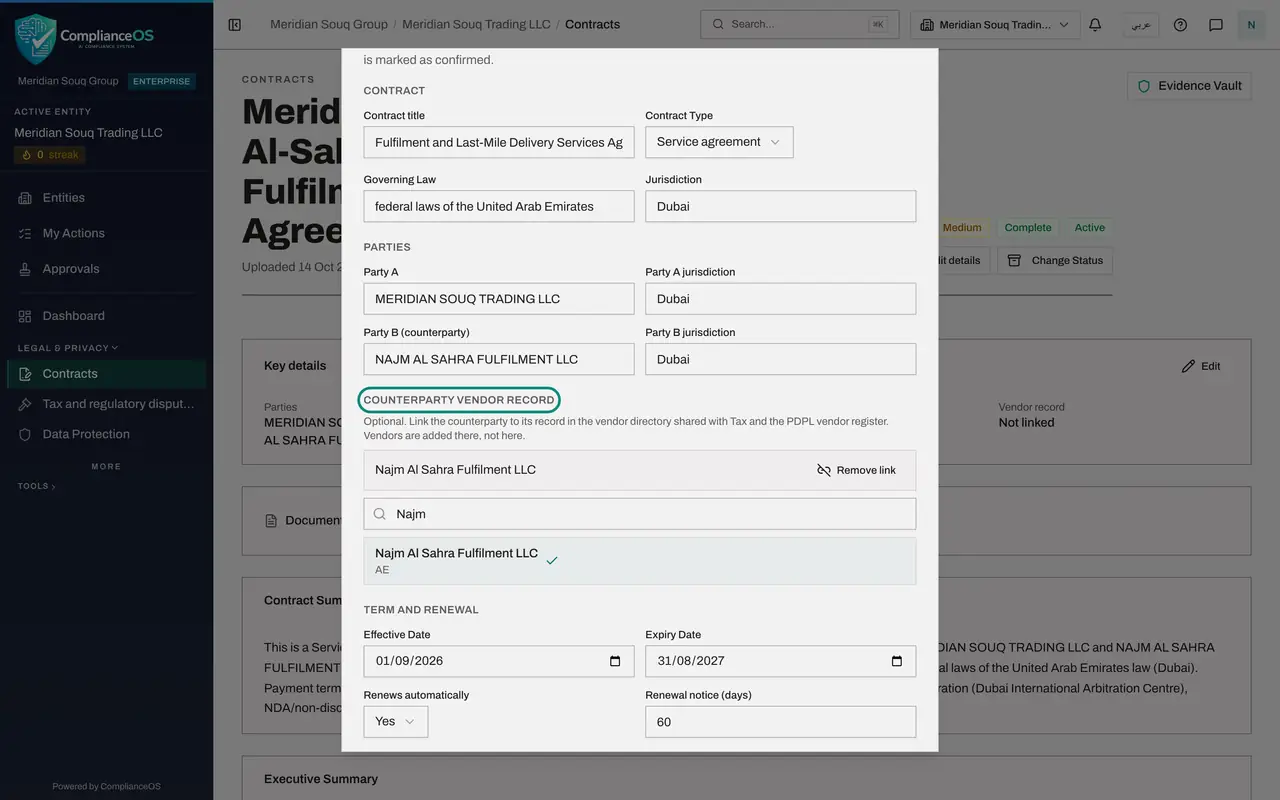
Scroll to Counterparty vendor record. The directory is shared with Tax and with the vendor register in Data Protection. Type the first letters of the supplier's name in the search box. The record the Data Protection Officer created is listed underneath.
- Type Search vendors by name or TRN:
Najm
- Type Search vendors by name or TRN:
- 4
Select the supplier
Select the supplier in the list. The box above the search now shows its name in place of No vendor linked.
- Choose Najm Al Sahra Fulfilment LLC, AE
- 5
Select Save
Scroll to the bottom of the window and select Save. Key details now shows the supplier's name under Vendor record. The contract and the supplier are joined.
- Select Save
- 6
Find the questionnaire obligation
Select Deep Analysis and find the obligation that says the supplier shall complete the customer's data protection questionnaire. The supplier has done exactly that, and a second Data Protection Officer has approved the result.
- Select Deep Analysis
- 7
Select Mark done
Select Mark done on that obligation. It is now shown as completed and no longer counts as open. Legal's part is finished; next, the accountant records the supplier's first bill.
- Select Mark done
How to check it worked
Key details shows the supplier's name under Vendor record, and the questionnaire obligation is marked done.
Common mistakes
- Looking for an Add vendor button in the contract. Suppliers are not created from a contract; they are created in Data Protection's vendor register or by the first bill or transaction.
- Changing a date or the value in the same window by accident. Changing those re-runs the compliance checks and the risk score.
- Marking an obligation done without proof. Mark it when you have seen the evidence, here the approved questionnaire.
Check your understanding
1. Why could the contract not be linked to the supplier on the day it was uploaded?
- A.Legal counsel has no permission to link
- B.The supplier had no record in the vendor directory yet
- C.Contracts can never be linked
Show answer
Answer: B. The supplier had no record in the vendor directory yet
The link points at a vendor directory record, and that record was created later by the Data Protection Officer.
2. Which details, if you change them, make the contract's checks and risk score run again?
- A.The vendor link only
- B.Type, governing law, dates, value or a clause
- C.None
Show answer
Answer: B. Type, governing law, dates, value or a clause
The window says so above the Save button. Linking a vendor record does not change the terms.