Lesson 11 of 63
Journey A, recap: What just happened, and where to find it again
What you will be able to do
One supplier has now passed through six people and six modules. This recap walks back through each module once, as the compliance officer, and points at the record that was left there: the contract, the screening checks, the risk assessment, the paid bill, the tax transaction, the calendar deadline, the sealed evidence and the trail in the audit log.
Before you start
- Parts 1 to 10 of Journey A are done.
- You are signed in as the compliance officer, who can see every module of this company.
Steps
- 1
Contracts: the signed agreement
Start in Contracts, under Legal and Privacy. The supply agreement, Meridian-Najm-Al-Sahra-Fulfilment-Agreement.pdf, is listed with its risk score, its expiry date and its reviewer. Legal counsel uploaded it in part 1 and linked it to the supplier's record in part 7.
- 2
AML/CFT: the screening checks
Select AML/CFT under Financial Crime, then the Screening tab. The contract's two parties were screened automatically, and the anti-money-laundering officer screened the general manager by hand in part 2. Three more checks have the type Vendor: the supplier was screened again by later steps of this journey, when it was registered as a vendor and when its bill was recorded. All are Cleared.
- Select AML/CFT
- Select Screening
- 3
Data Protection: the supplier's risk tier
Select Data Protection, then Vendor risk. The supplier is in the register with the risk tier that the second Data Protection Officer approved in part 6, the date it was last assessed and the date of its next review. Open findings counts the certificate renewal.
- 4
Accounting: the paid bill
Select Accounting, then Supplier Bills. Bill NSF-2026-0091 is Verified, with its journal number, and Paid. The accountant did both in parts 8 and 9.
- Select Accounting
- Select Supplier Bills1 (1)
- 5
Tax: the purchase
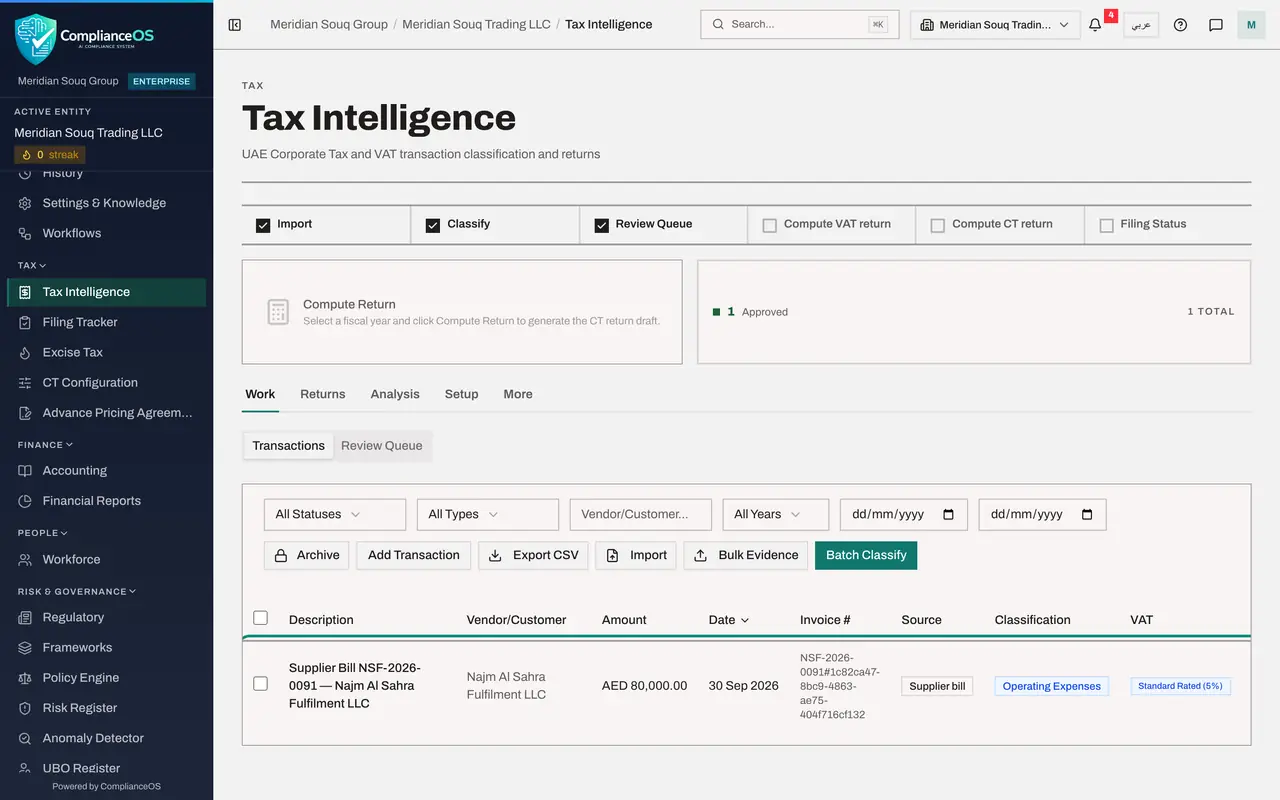
Select Tax Intelligence. The same bill is in Transactions as a purchase from Najm Al Sahra Fulfilment LLC, with its VAT treatment, ready for the VAT return. Nobody keyed it a second time.
- Select Tax Intelligence
- 6
Calendar: the contract's deadlines
Select Calendar under Assurance, then Sync Deadlines to pull the latest dates from every module. Under Upcoming Deadlines is the contract obligation for the insurance certificate, due on 30 November 2026. The contract's expiry in August 2027 appears when you switch the year at the top to 2027.
- Select Calendar
- Select Sync Deadlines
- 7
Evidence Vault: the sealed records
Select Evidence Vault. Records arrive here by themselves as the work is done, each sealed with a fingerprint so that it cannot be changed quietly. The Source column says which module each one came from. Two belong to this journey: the security certificate the supplier attached to its questionnaire, and the record created when the contract finished processing.
- Select Evidence Vault
- 8
Audit log: the whole trail
Select Audit log in the left menu. Each line is one action: when it happened, what it was, which kind of record, and who did it. Reading from the bottom up you can follow the supplier's journey from the contract upload to the payment, with a name against every step.
- Select Audit log
- 9
My Actions: what is waiting for you
Finally, select My Actions. This is where work assigned to you by name appears, whichever module it comes from. That closes Journey A: one supplier, six people, and a record in every module that anyone with access can find again. Journey B follows a sale in the other direction, from its record in Tax to a filed VAT return.
- Select My Actions
How to check it worked
You can open each of the eight places in this lesson and find the supplier's record in it.
Common mistakes
- Keeping a private spreadsheet of the supplier's status. Each module already holds its part, and the audit log ties them together.
- Expecting one screen to show everything about a supplier. Today the link between modules is the shared vendor record and the supplier's name; you look in each module for its part.
- Forgetting the calendar. Dates from the contract only help if someone looks at them; synchronise the deadlines and check the calendar each week.
Check your understanding
1. Which single record do Contracts, Data Protection and Tax all point at for this supplier?
- A.The supplier's bill
- B.The vendor directory record
- C.The sanctions check
Show answer
Answer: B. The vendor directory record
The Data Protection Officer created it, legal counsel linked the contract to it, and Tax lists it under Setup, Vendors.
2. An auditor asks who uploaded the contract and when. Where do you look?
- A.The audit log
- B.The supplier's bill
- C.The compliance calendar
Show answer
Answer: A. The audit log
The audit log records each action with the person, the time, and the record it touched.