Lesson 15 of 63
Journey B, part 4: The accountant matches the customer's payment
What you will be able to do
The sale is in the ledger as money the customer owes. Her transfer has been on the bank statement since 10 October. In this part the accountant matches the bank line to that receivable. The match posts the receipt by itself: the bank goes up and the receivable is cleared.
Before you start
- Part 3 is done: the sale entry is approved and posted.
- You are signed in as the accountant.
Steps
- 1
Open the bank account
In Accounting, select Banking, then the card for Al Waha Commercial Bank. The customer's transfer of 105,000 dirhams is the one line still Unmatched.
- Select Banking3 (3)
- Select Bank account Al Waha Commercial Bank ****4471
- 2
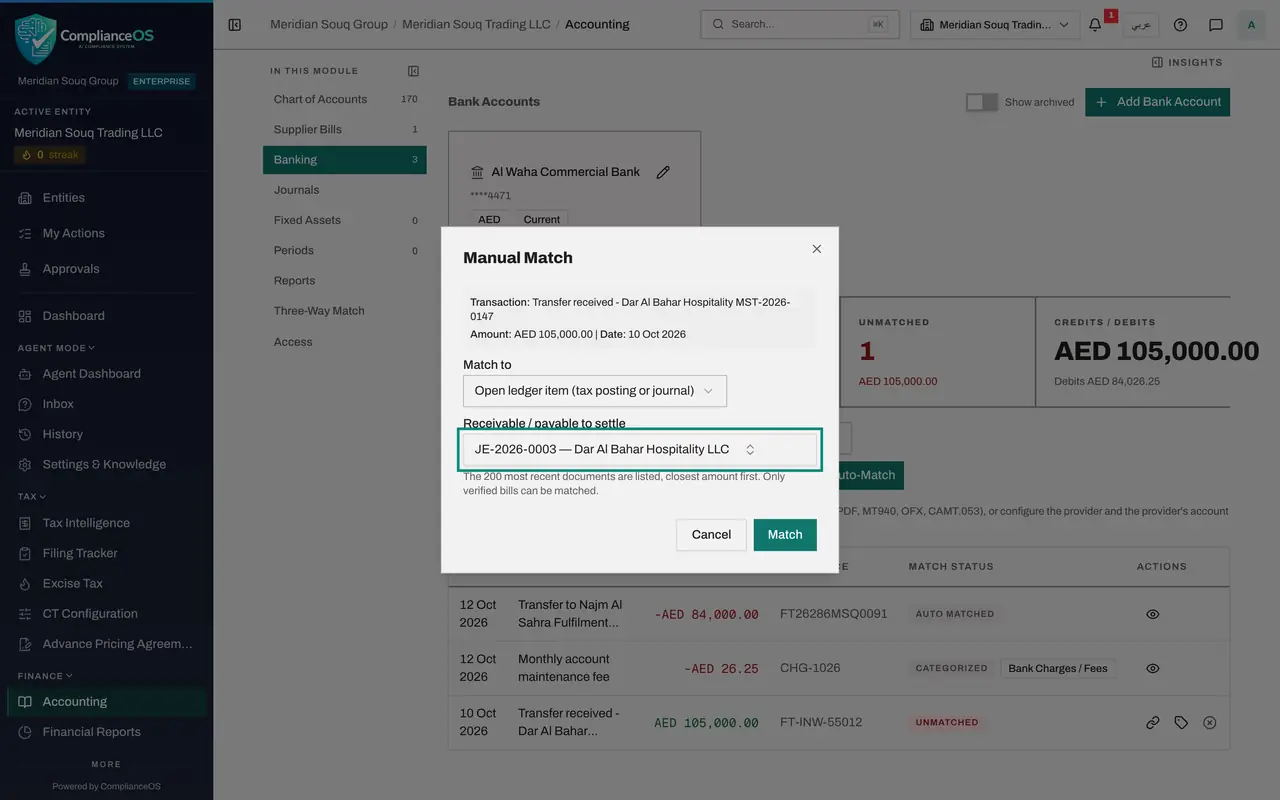
Select Manual match and choose an open ledger item
On the transfer, select the chain link, Manual match. Open Match to and choose Open ledger item, tax posting or journal. It settles an item already in the ledger, such as the sale posted from Tax.
- Select Manual match
- Select Match to
- Choose Open ledger item (tax posting or journal)
- 3
Choose the receivable
Under Receivable or payable to settle, open the list. The sale from part 2 is there with its entry number, the customer's name, 105,000 dirhams and the date of the sale. Choose it.
- Select Choose a document
- 4
Select Match
Select Match. A message confirms the match, and the line's status changes to Manual matched. The tiles above the list now show nothing Unmatched.
- Select Match
- 5
See the receipt in Journals
Select Journals. A new entry says Receipt settles, with the number of the sale entry. It is already Posted: the bank account is debited and Accounts Receivable is credited 105,000.
- Select Journals
- 6
Check the trial balance
In the left menu select Financial Reports and select Generate. Accounts Receivable now shows 105,000 on each side and a balance of zero: the customer has paid. The sale is complete in the books. Next, the administrator decides who signs off the VAT return.
- Select Financial Reports
- Select Generate
How to check it worked
The customer's transfer shows Manual matched, nothing on the statement is Unmatched, Journals lists the receipt as Posted, and Accounts Receivable is back to zero.
Common mistakes
- Categorising the transfer as Revenue instead. The sale is already in the ledger, so that would count the revenue and the VAT twice.
- Matching before the sale is approved. Only entries already in the ledger are offered.
- Choosing the wrong item when several are open. The list puts the closest amount first; check the customer's name and the date as well.
Check your understanding
1. What does Match to, Open ledger item, offer?
- A.Any draft journal entry
- B.Receivables and payables already in the ledger that are not yet settled, including those posted from Tax
- C.Only supplier bills
Show answer
Answer: B. Receivables and payables already in the ledger that are not yet settled, including those posted from Tax
The window calls it Receivable or payable to settle. The sale posted from Tax is listed with its entry number and amount.
2. After the match, who has to approve the receipt?
- A.The finance manager, in the Approval Queue
- B.Nobody: the match posts the receipt, because it settles an entry that was already approved
- C.The tax manager
Show answer
Answer: B. Nobody: the match posts the receipt, because it settles an entry that was already approved
Journals shows the receipt as Posted straight away, with the type Auto payment.