Lesson 60 of 63
Journey F, part 5: A compliance officer sees the group view for her own companies only
What you will be able to do
The group view is not only for head office. A compliance officer whose role covers one company, or one country's companies, can open the same screen and see exactly those. In this part the compliance officer of Meridian Souq Trading opens Group Compliance and reads what it tells her, and what it says it is leaving out.
Before you start
- You are signed in as a compliance officer whose role covers one company.
Steps
- 1
Select Group Compliance
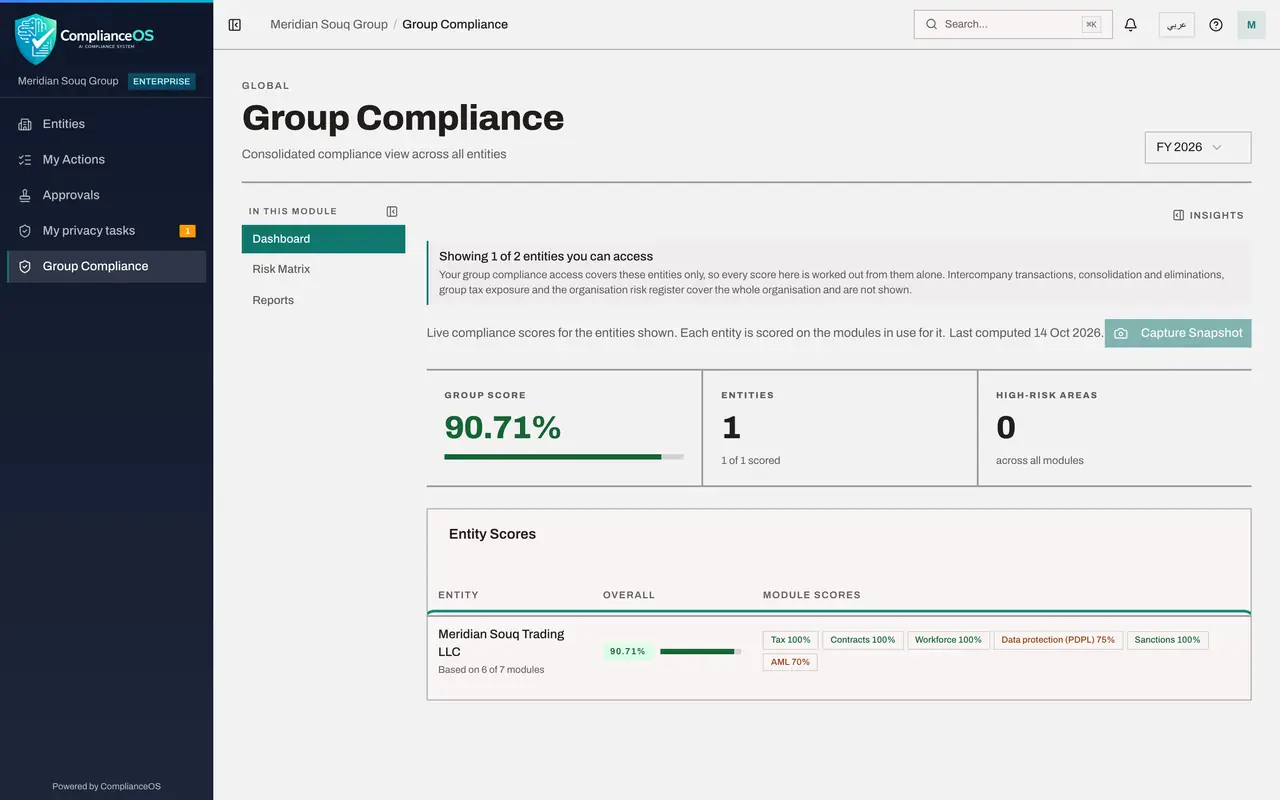
Select Group Compliance in the left menu. It gives one view across companies. The list on the left of the page has Dashboard, Risk Matrix and Reports.
- Select Group Compliance
- 2
Read the banner
The banner says Showing 1 of 2 entities you can access. Your access covers one company, so every score here is worked out from it alone. It also lists what is left out because it belongs to the whole organisation: intercompany transactions, consolidation, group tax exposure and the organisation's risk register.
- 3
Read the entity scores
Under Entity Scores, Meridian Souq Trading LLC is the only row. Its overall score is followed by the score of each module in use, the same modules the journeys in this course have been filling. Top Risk Areas, underneath, names the modules that pull the score down.
- 4
Open the Risk Matrix
Select Risk Matrix. Rows are companies and columns are modules. Each cell shows the score and the risk level, coloured, or Not in use. You see one row. An administrator sees a row for every company; that is the next part.
- Select Risk Matrix
- 5
See that the other company is not reachable
Select Entities in the left menu. Only your own company is listed. The e-commerce company exists in the organisation, but your role does not cover it, so it appears nowhere for you: not in lists, not in scores, not in search.
- Select Entities
How to check it worked
Group Compliance says Showing 1 of 2 entities you can access, and lists only Meridian Souq Trading, in both the dashboard and the risk matrix.
Common mistakes
- Reading the group score on this screen as the whole group's. It is worked out from the companies you can access, and the banner says so.
- Looking for intercompany or consolidation figures here. Those cover the whole organisation and are shown only to people with organisation-wide access.
- Assuming a blank module is good news. Not in use means the module does not count for that company, not that it is compliant.
Check your understanding
1. What does a person with access to one company see in Group Compliance?
- A.Nothing; the page is refused
- B.The same screens, limited to the companies they can access, with a banner saying so
- C.Every company in the group
Show answer
Answer: B. The same screens, limited to the companies they can access, with a banner saying so
The banner reads Showing 1 of 2 entities you can access, and every score is worked out from those alone.
2. What does a cell in the risk matrix show?
- A.A company's score in one module, with its risk level
- B.The number of users
- C.The size of the company
Show answer
Answer: A. A company's score in one module, with its risk level
Rows are companies, columns are modules; each cell holds a score and a level, or Not in use.