Lesson 26 of 63
Journey C, part 5: The Data Protection Officer drafts the privacy policy every employee must read
What you will be able to do
Every employee handles personal data: customers' addresses, colleagues' salaries. A joiner should read the rules and confirm that she has. In this part the Data Protection Officer drafts the company's acceptable use policy from a starter template and submits it for approval. A second person will approve and publish it, and then send it to all staff.
Before you start
- You are signed in as a Data Protection Officer.
- You know the title you want and the date the policy should take effect.
Steps
- 1
Open Privacy policies and training
Open Data Protection and select Privacy policies and training in the module's list. This area holds the policy library, the campaigns that ask people to acknowledge a policy, and privacy training.
- Select Privacy policies & training
- 2
Select Policy library, then New policy
Select Policy library. No policy exists yet. Select New policy.
- Select Policy library
- Select New policy
- 3
Choose a starting point
Under the starting point, choose the template Acceptable use of personal data. The window describes what the template covers and reminds you that it is a starter: have counsel review it before publishing.
- Select Privacy notice
- Choose Acceptable use of personal data
- 4
Select Create draft
Select Create draft. The policy opens in the editor as version one, in draft, with the tag Template, needs legal review.
- Select Create draft
- 5
Give the policy your own title
Replace the English title with your own, and type the Arabic title beside it. Employees can switch between the two languages when they read the policy.
- Type Title (English):
Meridian Souq acceptable use of personal data - Type Title (Arabic):
سياسة ميريديان سوق للاستخدام المقبول للبيانات الشخصية
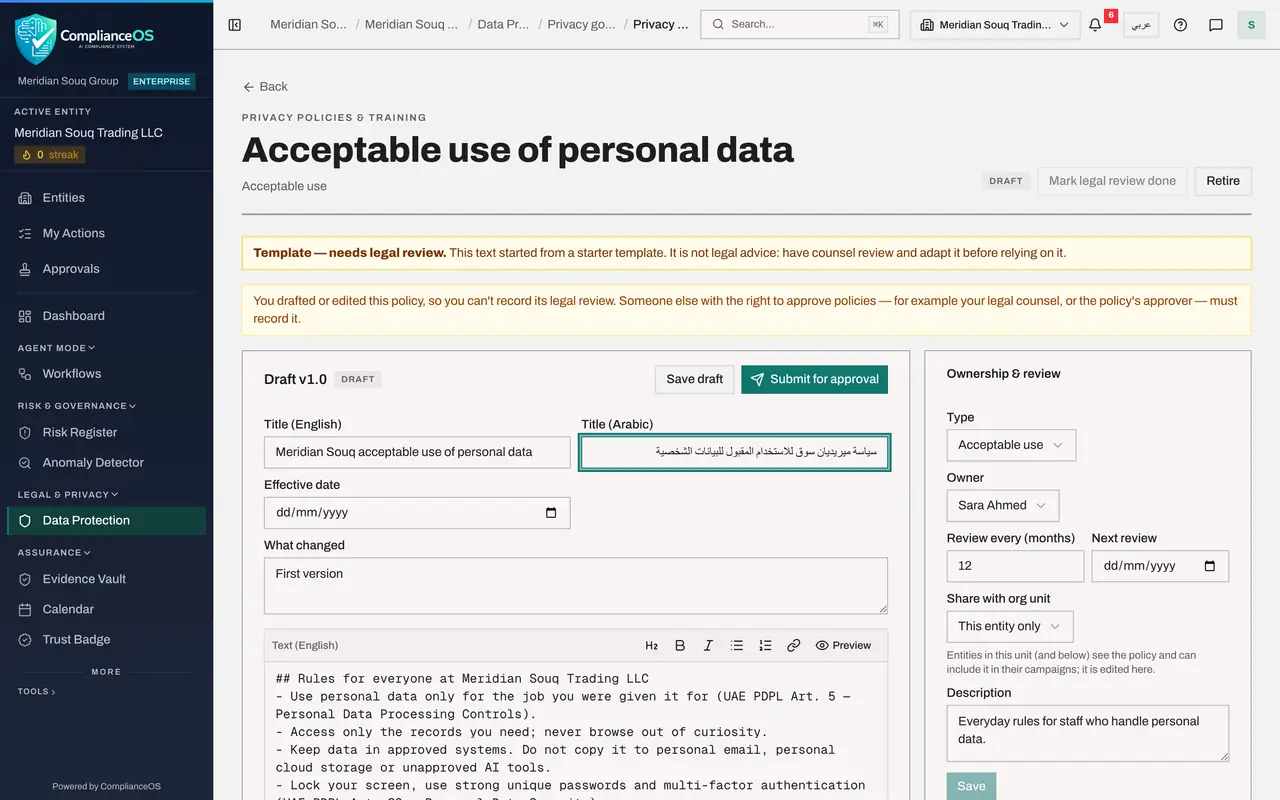
- Type Title (English):
- 6
Set the effective date and the summary
Set the date from which the policy applies, and in the summary say in a line what this version is. The text of the policy is below.
- Type Effective date:
2026-10-21 - Type What changed:
First version, adapted from the starter template.
- Type Effective date:
- 7
Replace the placeholder in the text
The template's text has one placeholder in square brackets: data protection contact. A policy cannot be submitted while a placeholder remains. In the English text and in the Arabic text, replace it with the real contact, here the Data Protection Officer by name.
- Type Text (English):
## Rules for everyone at Meridian Souq Trading LLC - Use personal data… - Type Text (Arabic):
## قواعد لجميع العاملين في Meridian Souq Trading LLC - استخدم البيانات…
- Type Text (English):
- 8
Select Save draft
Scroll to the top and select Save draft. The page now carries your title. The draft can be edited as often as you like until it is submitted.
- Select Save draft
- 9
Select Submit for approval
Select Submit for approval. A note explains that whoever wrote or edited this version cannot approve it. The request is now in the approvers' inbox.
- Select Submit for approval
- 10
Check the library
Select Back. The Policy library lists the policy with the status Awaiting approval. In the next part a second Data Protection Officer approves it and sends it to all staff.
- Select Back
How to check it worked
The Policy library lists the policy with the status Awaiting approval.
Common mistakes
- Publishing a starter template as it stands. It is a starting point; adapt it and have counsel review it. The system will not let it be approved until the legal review is recorded.
- Filling in only the English text. Staff can read the policy in Arabic, so keep the Arabic title and text in step.
- Trying to record the legal review yourself. The author cannot; the approver does it.
Check your understanding
1. Who can approve the policy you drafted?
- A.You, once it is saved
- B.A second person; whoever wrote or edited the version cannot approve it
- C.Any employee
Show answer
Answer: B. A second person; whoever wrote or edited the version cannot approve it
After Submit for approval the page says so in a note. The request goes to the approvers' inbox.
2. A policy was started from a template. What must happen before it can be approved?
- A.Nothing extra
- B.A legal review must be recorded
- C.It must be translated into three languages
Show answer
Answer: B. A legal review must be recorded
The draft carries the tag Template, needs legal review, until the approver selects Mark legal review done.