Lesson 32 of 33
Switch on the two specialist agents
What you will be able to do
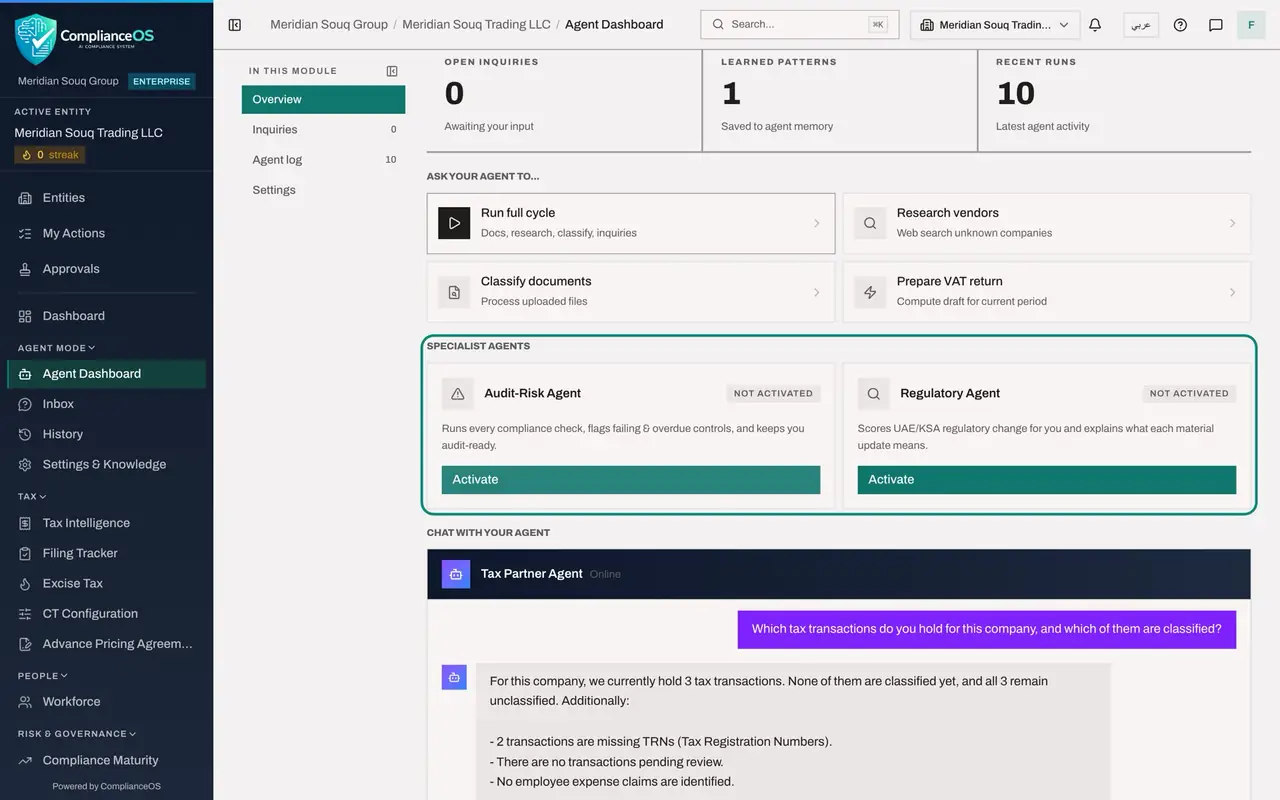
This lesson is for the person who manages the agents of an entity: here the tax manager. Beside the Tax Partner Agent, each entity can have two specialist agents. The Audit-Risk Agent runs the compliance checks and flags failing and overdue controls. The Regulatory Agent scores regulatory change and explains what each material update means. Like the Tax Partner Agent, each has to be switched on for the entity before it does anything. You will also use the action Classify documents, to see what an action reports when there is nothing for it to do.
Before you start
- You are signed in as the tax manager of Meridian Souq Trading LLC.
- The Tax Partner Agent is active. Both specialist agents read Not activated.
Steps
- 1
Select Classify documents
On the Agent Dashboard, under Ask your agent to, select Classify documents. This action processes uploaded files that are waiting. No document has been uploaded for this entity, so the message reads Classified 0 documents.
- 2
Go to Specialist agents
Scroll to Specialist agents. Two cards describe the Audit-Risk Agent and the Regulatory Agent. Both read Not activated, and each has an Activate button.
- 3
Activate the Audit-Risk Agent
Select Activate on the Audit-Risk Agent. A message confirms Agent activated. The card now reads Active, and its button has changed to Run monitor.
- Select Activate
- 4
Activate the Regulatory Agent
Select Activate on the Regulatory Agent as well. It confirms in the same way. Both specialist agents now exist for this entity. Run monitor starts one round of an agent's checks, and the result is recorded in the Agent log like every other run.
- Select Activate
How to check it worked
Both cards under Specialist agents read Active, and each shows a Run monitor button in place of Activate.
Common mistakes
- Activating a specialist agent on every entity without deciding who will read what it flags. An agent that nobody follows up is noise.
- Expecting an agent to act the moment it is activated. Activation creates it. Its work starts with Run monitor or on its schedule.
- Reading Classified 0 documents as a failure. It means there were no uploaded documents waiting to be processed.
Check your understanding
1. What does the Regulatory Agent do?
- A.It files returns
- B.It scores regulatory change for the entity and explains what each material update means
- C.It approves contracts
- D.It answers customer emails
Show answer
Answer: B. It scores regulatory change for the entity and explains what each material update means
The card describes it: it scores regulatory change and explains material updates. Deciding what to do about them stays with people.
2. After Activate, which button does a specialist agent's card show?
- A.Delete
- B.Run monitor
- C.File return
- D.Nothing
Show answer
Answer: B. Run monitor
An active specialist agent offers Run monitor, which starts one round of its checks.