Lesson 24 of 33
Ask the agent to record a data subject request, and trace it
What you will be able to do
This lesson is for the compliance officer, whose role covers both tax and data protection. The agent's chat also has tools for data protection, for people who hold those rights. You will ask it for a summary, then instruct it to log a data subject request, or DSR, which is a person asking what the company holds about them. Then you will trace the action: the new record in Data Protection, the run in the agent log, and the entry in the organisation's Audit log.
Before you start
- You are signed in as the compliance officer of Meridian Souq Trading LLC. This role may view tax records and may create records in Data Protection.
- Data Protection holds one processing activity from lesson 3 and no requests.
Steps
- 1
Ask the agent for the data protection position
On the Agent Dashboard, go to the chat and type: Give me a summary of our data protection records.
- Type Ask your agent anything:
Give me a summary of our data protection records.
- Type Ask your agent anything:
- 2
Send it and read the summary
Select the arrow. In this example the agent reports one processing activity, no data subject requests, no impact assessments and no open breaches. That matches what the company holds after lesson 3. It also states the response period for requests: this company answers within 30 days, extendable once by 30 days, which is the default the product applies, not a period fixed by the law itself.
- Select Send (the arrow beside the box)
- 3
Instruct the agent to log a request
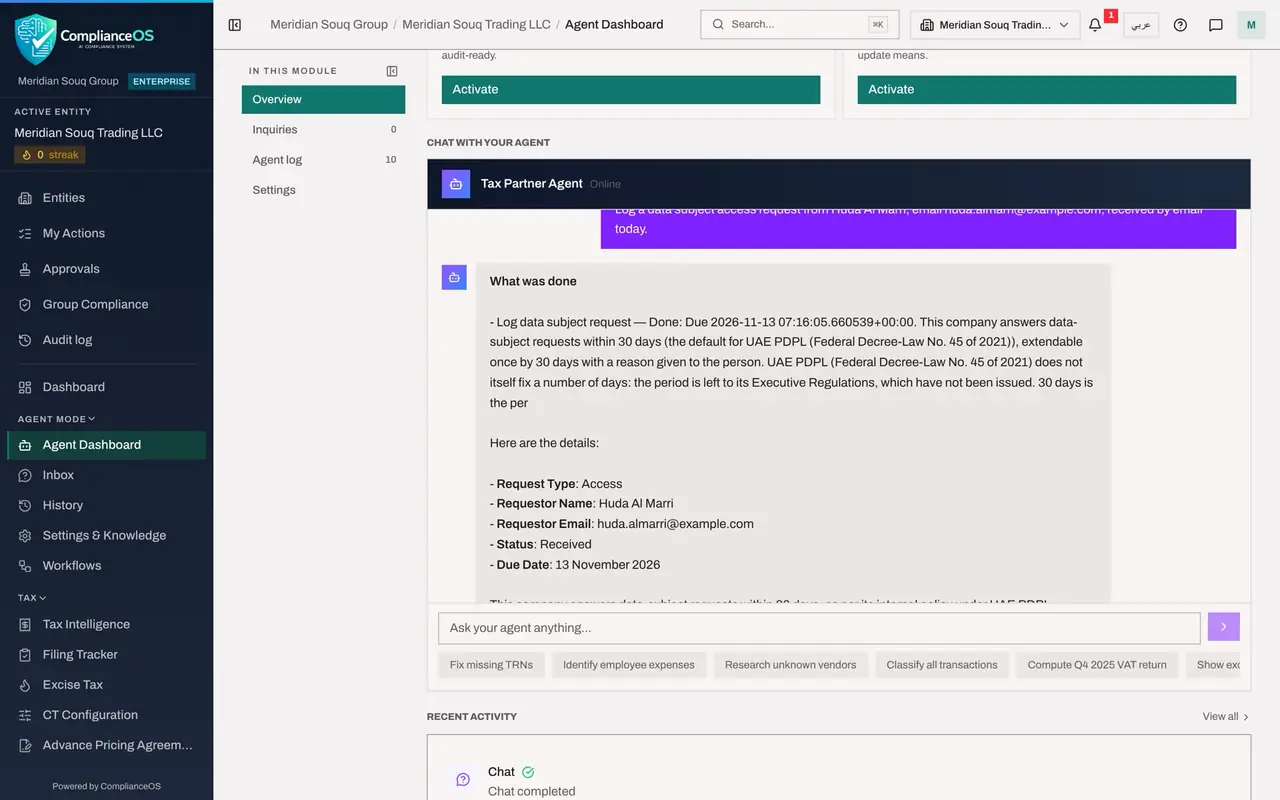
Now an instruction that creates a record. Type it with everything the record needs: the kind of request, who it is from, and how it arrived. Log a data subject access request from Huda Al Marri, email huda.almarri@example.com, received by email today. The person is invented for this course.
- Type Ask your agent anything:
Log a data subject access request from Huda Al Marri, email huda.almar…
- Type Ask your agent anything:
- 4
Send it and read the reply
Select the arrow. The reply starts with What was done: Log data subject request, Done, due 13 November 2026, with the same statement about the 30-day period. Then the details: type Access, the name and email, status Received. Notice what did not happen: the agent did not ask you to confirm first. In the chat, a clear instruction from a person who holds the right is the confirmation, so word instructions with care.
- Select Send (the arrow beside the box)
- 5
Find the record in Data Protection
Check the claim. Choose Data Protection in the left menu and select DSRs in the section list. The request is there: Huda Al Marri, Access, Received, not yet assigned, due on 13 November 2026. From here the request is handled by people, as the Data Protection course teaches.
- Select Data Protection
- Select DSRs1 (1)
- 6
Find the run in the agent log
Choose History in the left menu and open the run whose message begins Log a data subject access request. It has two steps. Get PDPL summary read the module first. Log data subject request shows In, what the agent passed to the tool: the type, the name and the email, and Out, what came back: the new record's identifier, the due date and the status Received. Requested by names you.
- Select History
- Select The run: Log a data subject access request
- 7
Look for the action in the Audit log
Choose Audit log in the left menu. The newest entry reads Data subject request: Logged, for this entity. In the Actor column it names you, Mariam Aziz, with the words via agent beneath. So the Audit log records both who asked and that the agent did the work, and the agent log holds the steps.
- Select Audit log
How to check it worked
Data Protection lists a request from Huda Al Marri under DSRs, the agent log holds the run with the tool that created it, and the Audit log holds the entry Data subject request: Logged, with your name and via agent.
Common mistakes
- Giving the agent real personal data to try it out. In training use an invented person, as here. In real work, give only what the record needs.
- Leaving it at the agent's confirmation. A data subject request starts a legal deadline. Open the record, check the type, the name and the due date, and assign it.
- Assuming the agent told the person or a regulator anything. It creates the record. Replying to the person is done by people, from the request's own page.
Check your understanding
1. The agent says it has logged the request. What do you check first?
- A.Nothing, the agent confirmed it
- B.The DSRs section of Data Protection: that the record exists, with the right type, name and due date
- C.The Compliance Calendar
- D.Your email
Show answer
Answer: B. The DSRs section of Data Protection: that the record exists, with the right type, name and due date
The record is the fact, and for a data subject request the due date matters from the first day.
2. Why could the compliance officer use the agent for a data protection record, when the tax manager could not?
- A.The agent prefers compliance officers
- B.The agent is offered the tools the signed-in person's permissions allow, and the compliance officer may create records in Data Protection
- C.It is random
- D.The tax manager's chat is broken
Show answer
Answer: B. The agent is offered the tools the signed-in person's permissions allow, and the compliance officer may create records in Data Protection
Tools are tied to permissions. A role without the right to create data protection records does not give the agent that tool.