Lesson 5 of 33
Ask about the law and read the answer properly
What you will be able to do
This lesson is for anyone who uses the Compliance Assistant. You will ask a question about a rule, in your own words, and then read everything that comes back with the answer: the Confidence figure, the Sources, and the follow-up questions. You will learn what each of them tells you, what it does not tell you, and how to check an answer against the law it names, including references the assistant itself marks as not verified against the knowledge base.
Before you start
- You are signed in as the compliance officer of Meridian Souq Trading LLC.
- You have opened the assistant once, as in lesson 4.
Steps
- 1
Open the AI Assistant page
Scroll the left menu to its end. Under More, select Tools to open the group, then choose AI Assistant. The page opens on a new, empty conversation: Start a conversation. On the right, Suggested prompts offers two general questions, and Session reads New.
- Select Tools
- Select AI Assistant
- 2
Type your question
Select the box at the bottom and type the question in your own words. Describe the situation as you would to an adviser, and ask for the articles that set the rule. This question is about the risk recorded in lesson 2: a supplier invoice with no tax registration number. Never paste real personal data, passwords or customer names into the box.
- Type Question box:
Can we recover input VAT on a purchase when the supplier's tax invoice…
- Type Question box:
- 3
Select Send and wait for the answer
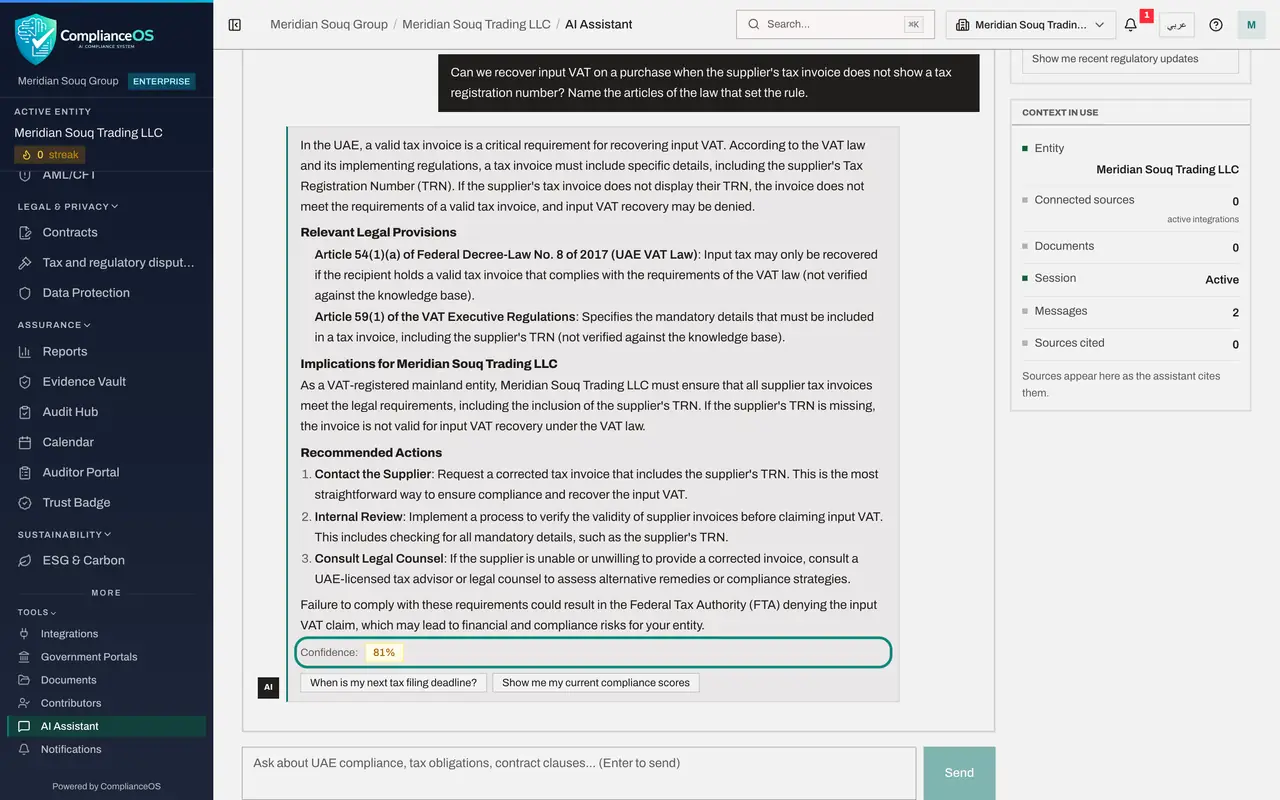
Select Send. The assistant takes from a few seconds to a minute. When the answer arrives, the conversation shows your question on the right and the answer under it, starting with the rule and then the reasoning.
- Select Send
- 4
Read which law the answer relies on
Read the answer for the rule it states and the law it names. Here it says that an invoice without the supplier's tax registration number is not a valid tax invoice, so the input VAT may be refused. Under Relevant Legal Provisions it names Article 54 of the VAT law, Federal Decree-Law number 8 of 2017, and Article 59 of the VAT Executive Regulations, which lists what a tax invoice must show. Each reference ends with the words not verified against the knowledge base. Note those references: they are what you will check.
- 5
Read the Confidence figure
Scroll to the end of the answer. Confidence is the assistant's own estimate of how firm the answer is, here 81 per cent. It is worked out from the wording: cited articles raise it, and cautious phrases lower it. It is not a measure of whether the answer is right.
- 6
Read the Sources
Look for a line called Sources under the answer. There is none. Sources lists only the passages of the product's own legal knowledge base that an answer actually used, and this answer used none. That is why the assistant marked both articles as not verified: they come from the model itself, and each must be looked up in the official text. Looking them up is worth it. Article 59 of the Executive Regulations does list the supplier's registration number among the contents of a tax invoice, and the conditions for recovering input tax, including holding a valid tax invoice, are set out in Article 55 of the VAT law, next to the article the answer names.
- 7
Look at Sources cited on the right
On the right, under Context in use, Sources cited counts the knowledge-base passages used so far in this conversation and lists them. It reads zero, which agrees with what you just saw: nothing in this answer was taken from the knowledge base.
- 8
Select a follow-up question
Under the Confidence figure, the assistant offers follow-up questions. Select When is my next tax filing deadline? It is put in the question box, exactly as a suggested prompt is.
- Select When is my next tax filing deadline?
- 9
Send the follow-up
Select Send. This is a question about your own company, not about a rule, so the assistant looks in the company's records. It reports that the compliance calendar holds no tax filing deadline, and then explains the general filing rules. This time a Sources line appears under the answer, with two passages from the knowledge base on the corporate tax and VAT filing deadlines. Its two legal references carry no not-verified mark, because they match those passages. The next lesson is about questions on your own records.
- Select Send
How to check it worked
Your question has an answer that names the articles it relies on, each marked not verified against the knowledge base, with a Confidence figure under it. The follow-up answer shows a Sources line with two passages from the knowledge base.
Common mistakes
- Treating Confidence as a mark of correctness. It is an estimate taken from how the answer is worded. A confident answer can still be wrong, so check what matters.
- Treating every article an answer names as checked. A Sources chip appears only for a passage of the product's knowledge base that the answer actually used. An article the assistant could not match to the knowledge base is followed by the words not verified against the knowledge base. It comes from the model itself: look it up.
- Asking a vague question such as Tell me about VAT. Name the situation, as you would to an adviser: what was bought, what is missing, and what you want to know.
Check your understanding
1. An article in an answer is followed by the words not verified against the knowledge base, and no Sources line appears. What does that mean?
- A.The article is certainly correct
- B.The reference comes from the model itself, not from the product's knowledge base, so it must be looked up in the official text
- C.The sources are hidden
- D.The answer is certainly wrong
Show answer
Answer: B. The reference comes from the model itself, not from the product's knowledge base, so it must be looked up in the official text
Sources lists only the knowledge-base passages an answer actually used, and the assistant marks any article it could not match to them. Check such a reference in the official text before relying on it.
2. An answer shows Confidence 87 per cent. What does that mean?
- A.87 per cent of the answer is correct
- B.The assistant's own estimate, based on how firmly the answer is worded and whether it cites articles
- C.A regulator has approved the answer
- D.The answer may be used without checking
Show answer
Answer: B. The assistant's own estimate, based on how firmly the answer is worded and whether it cites articles
The figure is an estimate. It does not replace checking the answer against the law and against your records.