Lesson 21 of 33
What the tax manager cannot change: the agent's AI budget
What you will be able to do
This lesson is for the tax manager, and for the administrator who is asked to raise a budget. The tax manager decides how the agent behaves, but the amount of AI the agent may consume each month is money, and that decision belongs to an organisation administrator. You will try to change the Monthly AI Budget as the tax manager and read what the product answers.
Before you start
- You are signed in as the tax manager of Meridian Souq Trading LLC.
- The agent's Monthly AI Budget is 5000 credits, the value it was created with.
Steps
- 1
Open Settings and Knowledge
In the left menu, under Agent Mode, choose Settings and Knowledge. Under Configuration, Monthly AI Budget reads 5000, with the credits used so far beneath it.
- Select Settings & Knowledge
- 2
Type a different budget
Select the Monthly AI Budget box and type 3000 in place of 5000.
- Type Monthly AI Budget:
3000
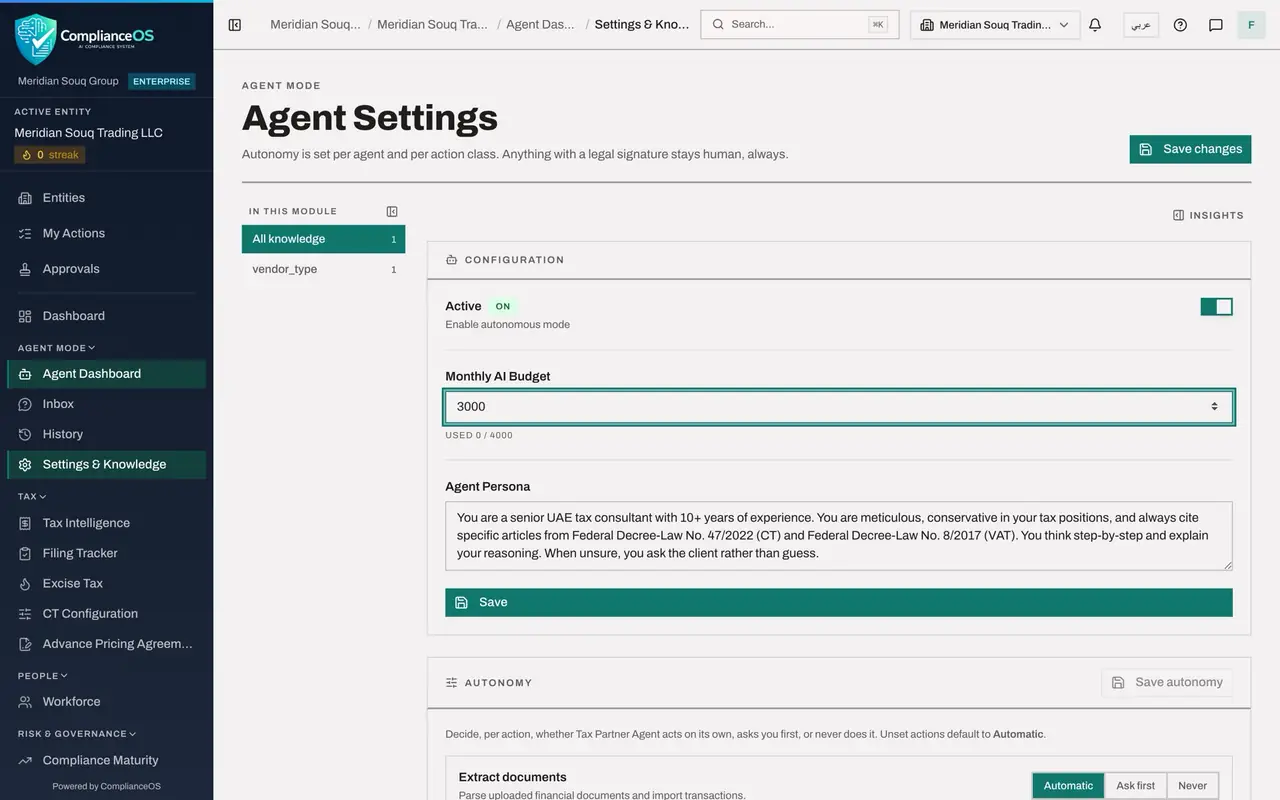
- Type Monthly AI Budget:
- 3
Select Save and read the message
Select Save, under Agent Persona. A message reads: The agent's settings were not saved. The agent's monthly AI budget can only be changed by an organisation administrator. Your other changes were not saved either. Ask Layla Hassan, Omar Khalid. The budget is spending on AI, and setting it is reserved for an organisation administrator, as the next lesson shows.
- Select Save
- 4
Reload the page
The box still shows the 3000 you typed, so reload the page to see what is stored. Monthly AI Budget reads 5000 again. Nothing was changed.
How to check it worked
After you select Save, a message says that only an organisation administrator can change the agent's monthly AI budget and names who to ask, and after a reload the Monthly AI Budget still reads 5000.
Common mistakes
- Assuming the change was saved because the number is still in the box. The box keeps what you typed. Reload the page to see the stored value.
- Asking an access administrator for the tax manager role again. The role is right. The budget is simply reserved for organisation administrators.
- Using the Save button in Configuration to save autonomy. Autonomy has its own button, Save autonomy.
Check your understanding
1. Who can change an agent's Monthly AI Budget?
- A.Anyone who can chat with the agent
- B.The tax manager
- C.An organisation administrator
- D.The agent itself
Show answer
Answer: C. An organisation administrator
The budget controls spending on AI, so the product reserves it for organisation administrators.
2. You typed 3000 and the save was refused. Which value is stored?
- A.3000
- B.5000, the value before your attempt
- C.Zero
- D.It is unknown
Show answer
Answer: B. 5000, the value before your attempt
The change was refused, so the stored budget is unchanged. A reload shows it.