Lesson 2 of 33
Give the assistant something to read: a risk and a deadline
What you will be able to do
This lesson is for the compliance officer. You will record one risk in the Risk Register and one deadline on the Compliance Calendar. Both are small, real records that later lessons ask the assistant about, so that you can see what it finds, what it does not find, and how to check its answer on the screen that holds the record.
Before you start
- You are signed in as the compliance officer of Meridian Souq Trading LLC.
- Lesson 1 is done: Tax Intelligence holds three transactions.
Steps
- 1
Open the Risk Register and select Add Risk
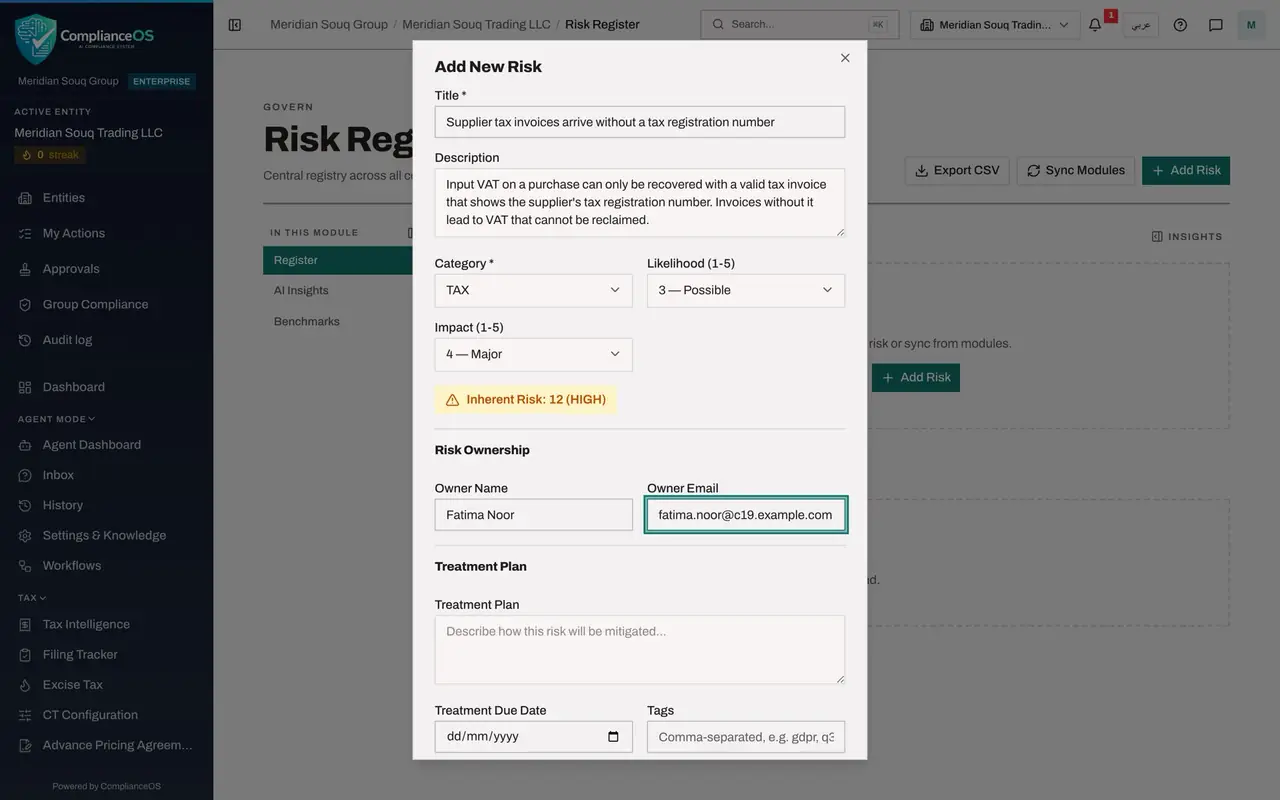
In the left menu, under Risk and Governance, choose Risk Register. It is empty. Select Add Risk at the top right. The Add New Risk form opens. Only Title is required.
- Select Add Risk
- 2
Type the title
In Title, say what could go wrong in one line. This risk is tied to the purchases the tax manager entered in lesson 1: supplier invoices that arrive without a tax registration number.
- Type Title *:
Supplier tax invoices arrive without a tax registration number
- Type Title *:
- 3
Describe the risk
In Description, add the consequence. A clear description is what lets a colleague, an auditor or the assistant understand the risk without asking you.
- Type Description:
Input VAT on a purchase can only be recovered with a valid tax invoice…
- Type Description:
- 4
Choose the category and the scores
Open Category and choose Tax. Then choose 3 for Likelihood and 4 for Impact. The form multiplies them and shows Inherent Risk 12.
- Choose Category *:
TAX - Choose Likelihood (1-5):
3 — Possible - Choose Impact (1-5):
4 — Major
- Choose Category *:
- 5
Name the owner
Under Risk Ownership, type the name and the work email of the person accountable. Here it is the tax manager.
- Type Owner Name:
Fatima Noor - Type Owner Email:
fatima.noor@c19.example.com
- Type Owner Name:
- 6
Select Create Risk
Select Create Risk at the bottom of the form. A message confirms Risk created, and the risk appears in the list with the score three times four equals twelve.
- Select Create Risk
- 7
Open the Calendar and select Add Custom Deadline
In the left menu, under Assurance, choose Calendar. Select Add Custom Deadline at the top right. A small form opens with Title, Due Date and Description.
- Select Add Custom Deadline
- 8
Type the title and set the due date
In Title, name what is due. In Due Date, choose the last day on which it can be done: here twenty days from today.
- Type Title *:
Renew the Deira warehouse trade licence - Type Due Date *:
2026-11-03
- Type Title *:
- 9
Describe what has to be done
In Description, say what the deadline involves and what must be arranged beforehand.
- Type Description:
Annual renewal with Dubai Economy and Tourism. The tenancy contract mu…
- Type Description:
- 10
Select Add Deadline
Select Add Deadline. A message confirms Custom deadline added, and the deadline appears under Upcoming Deadlines with the label Manual. The company now holds a risk and a deadline for the assistant to find.
- Select Add Deadline
How to check it worked
The Risk Register lists Supplier tax invoices arrive without a tax registration number with the score 12, and the Compliance Calendar shows Renew the Deira warehouse trade licence under Upcoming Deadlines with the label Manual.
Common mistakes
- Writing a risk title that only names a topic, such as Suppliers. Say what could go wrong, so that a person, or the assistant, reading the title alone understands it.
- Leaving the deadline's Description empty. The description is where a colleague learns what has to be arranged before the date.
- Expecting the assistant to know about a record you have not saved. It reads what is stored, not what is still open in a form.
Check your understanding
1. The form shows Inherent Risk 12 for Likelihood 3 and Impact 4. Where does the 12 come from?
- A.It is typed by hand
- B.Likelihood multiplied by impact
- C.Likelihood plus impact
- D.The assistant estimates it
Show answer
Answer: B. Likelihood multiplied by impact
The register multiplies likelihood by impact. Three times four is twelve.
2. Which label does a deadline you type yourself carry on the calendar?
- A.Synced
- B.Manual
- C.AI
- D.Draft
Show answer
Answer: B. Manual
A custom deadline is marked Manual, which tells it apart from deadlines the calendar creates from other modules.