Lesson 18 of 33
Answer one of the agent's questions and skip another
What you will be able to do
This lesson is for the tax manager. The full cycle of lesson 17 left two questions in the agent's Inbox, one for each supplier without a tax registration number. You will open the details of a question, answer one with the number from the supplier's invoice, skip the other, look at both in the All view, and then ask the agent which suppliers are still missing a number, to check that your answer was used.
Before you start
- You are signed in as the tax manager of Meridian Souq Trading LLC.
- Lesson 17 is done: the Inbox holds two questions about missing tax registration numbers.
Steps
- 1
Open the Inbox
In the left menu, under Agent Mode, choose Inbox. Two questions are open, one for each supplier without a tax registration number.
- Select Inbox
- 2
Open Transaction details
Under the Sidra Bay Interiors question, select Transaction details. It opens the facts the question is about: the vendor, Sidra Bay Interiors, and the amount, 12,400 dirhams. Check them against your copy of the invoice before you answer.
- Select Transaction details
- 3
Type the registration number
In the box Type your response under the Sidra Bay Interiors question, type the supplier's tax registration number as it appears on its invoice. The number used here is invented for training, in the format the question asks for.
- Type Type your response...:
100482937160003
- Type Type your response...:
- 4
Send the answer
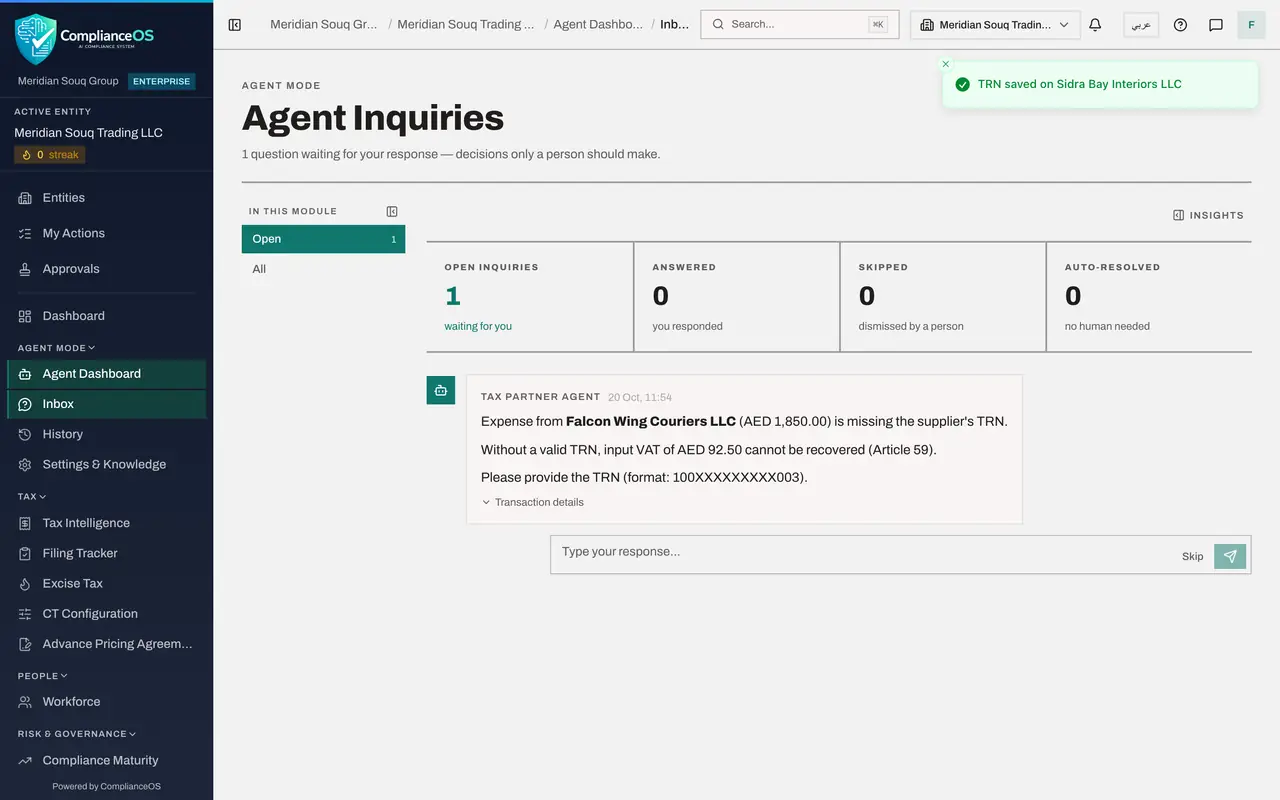
Select the send arrow at the right of the box. The app first checks that the answer is a valid UAE tax registration number, 15 digits. A message confirms TRN saved on Sidra Bay Interiors LLC: the number is now written on that supplier's transactions and on its record in the Vendor Directory. The question leaves the Open view. Had the number been mistyped, a message would say that it is not a valid TRN and that nothing was saved.
- Select Send
- 5
Skip the other question
The invoice from Falcon Wing Couriers is not to hand. Select Skip on that question. A message confirms Dismissed. Nothing in the records changes: the input VAT on that purchase still cannot be recovered until the number is on file.
- Select Skip
- 6
Select All
Go back to the top and select All. The view lists every question the agent has raised. The Falcon Wing Couriers question is marked Dismissed. Under the Sidra Bay Interiors question your answer is shown, the number you typed, marked You, with the line TRN saved on Sidra Bay Interiors LLC. Further down is the approval request of lesson 16 with your answer, Approve. Look at the tiles: Open reads zero, Answered reads two, your approval and your number, and Skipped, dismissed by a person, reads one. Auto-resolved stays at zero: nothing was settled without you.
- Select All
- 7
Ask the agent whether the answer was used
Choose Agent Dashboard in the left menu, go to the chat and type: Which suppliers are missing a tax registration number?
- Select Agent Dashboard
- Type Ask your agent anything:
Which suppliers are missing a tax registration number?
- 8
Send it and read the reply
Select the arrow. The agent now lists one supplier missing a tax registration number: Falcon Wing Couriers, the question you skipped. Sidra Bay Interiors is no longer listed, because the number you typed was saved on its transactions and its Vendor Directory record. The skipped question changed nothing, so Falcon Wing still needs its number. Checking the result of an answer, as you did here, is how you know it was used.
- Select Send (the arrow beside the box)
How to check it worked
Both questions have left the Open view, the All view shows your answer and the dismissed question, and the agent no longer lists Sidra Bay Interiors as missing a registration number: only Falcon Wing Couriers remains.
Common mistakes
- Typing a number you have not seen on the supplier's own tax invoice. The agent copies your answer to every transaction from that supplier.
- Skipping a question to make it go away. Skip dismisses it; the input VAT on that purchase still cannot be recovered until the number is on file.
- Assuming an answer was applied because the question left the Inbox. Read the message that confirms it, and check the result, as this lesson does.
Check your understanding
1. What does Skip do to an agent's question?
- A.Answers it with No
- B.Dismisses it without an answer; the underlying problem remains
- C.Deletes the transaction
- D.Sends it to a colleague
Show answer
Answer: B. Dismisses it without an answer; the underlying problem remains
Skip only removes the question from the Open view. Nothing in the records changes.
2. How do you confirm that an answer you gave the agent was used?
- A.The question disappears, so it was used
- B.Check the record, or ask the agent about it and compare with the record
- C.Wait a week
- D.It cannot be checked
Show answer
Answer: B. Check the record, or ask the agent about it and compare with the record
A question leaving the Inbox shows that you answered, not that the answer reached the records.