Lesson 20 of 33
Teach the agent a fact and manage what it remembers
What you will be able to do
This lesson is for the tax manager. The agent keeps a memory for each entity: facts about suppliers and preferences that it is given in the chat, and the feedback left with the thumbs. Memories it trusts are added to its instructions on every later message, so a wrong memory produces wrong work again and again. You will tell the agent a fact, find it under Agent Knowledge, search the list, and remove an entry.
Before you start
- You are signed in as the tax manager of Meridian Souq Trading LLC.
- In lesson 15 you marked a reply as helpful, so the agent's memory already holds one entry.
Steps
- 1
Tell the agent a fact
On the Agent Dashboard, go to the chat and type a fact about a supplier, in plain words: Remember that Falcon Wing Couriers LLC is a courier company in the UAE that supplies delivery services.
- Type Ask your agent anything:
Remember that Falcon Wing Couriers LLC is a courier company in the UAE…
- Type Ask your agent anything:
- 2
Send it and read the reply
Select the arrow. The reply starts with What was done: Remember fact, Done, with the key falcon wing couriers llc and the value courier company supplying delivery services. Then the agent confirms in its own words. As always, check the claim on the page that holds the result.
- Select Send (the arrow beside the box)
- 3
Open Settings and Knowledge
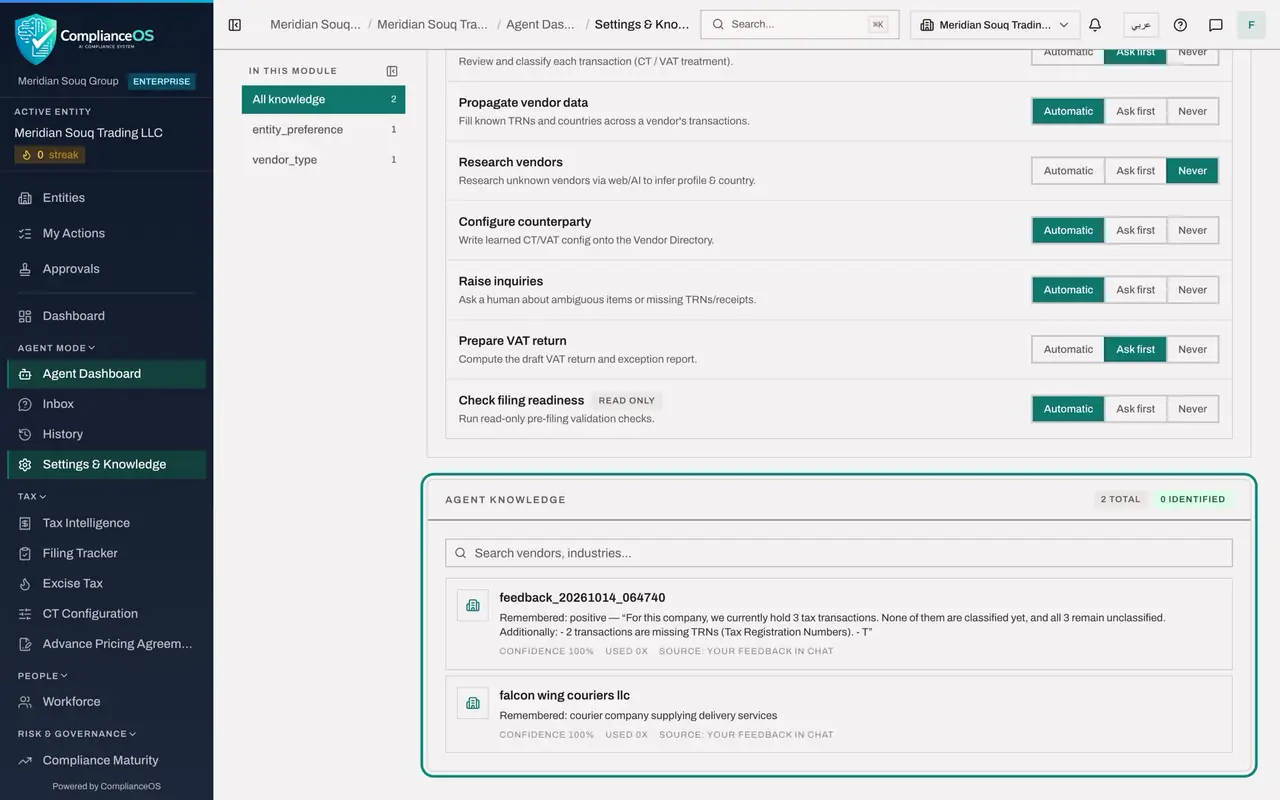
Choose Settings and Knowledge in the left menu and scroll to Agent Knowledge. It lists two entries. One is named feedback, followed by a date and a time: that is the thumb you gave in lesson 15, with the start of the reply you rated. The other is named falcon wing couriers llc, with what was remembered: courier company supplying delivery services. Each shows a confidence of 100 per cent, how many times it has been used, and its source: your feedback in chat.
- Select Settings & Knowledge
- 4
Search the memory
The list grows as the agent works. To find an entry, type part of its name in the search box. Type Falcon. Only matching entries stay in the list.
- Type Search vendors, industries...:
Falcon
- Type Search vendors, industries...:
- 5
Delete an entry
Clear the search box. Move the pointer over the entry whose name begins with feedback. A small bin appears at its right end. Select it. A window asks you to confirm: the agent will stop using this fact, and it cannot be restored.
- Select Delete (the bin on the entry)
- 6
Select Confirm
Select Confirm. The message Memory deleted appears and the entry leaves the list. The agent no longer uses it.
- Select Confirm
How to check it worked
Agent Knowledge lists the fact about Falcon Wing Couriers, the entry you deleted is gone after the message Memory deleted.
Common mistakes
- Telling the agent something you are not sure of. A stored fact is used for every later answer and classification. Tell it only what you would write in the file.
- Putting personal data or confidential terms into a fact. Keep to what the agent needs: what a supplier provides, and in which country.
- Deleting a memory to try it out. Once confirmed it cannot be restored. Read the entry before you select the bin.
Check your understanding
1. Why does a wrong memory matter more than a wrong answer?
- A.It does not
- B.A memory the agent trusts is added to its instructions on every later message, so the mistake repeats
- C.Memories are sent to the tax authority
- D.Memories cost more credits
Show answer
Answer: B. A memory the agent trusts is added to its instructions on every later message, so the mistake repeats
An answer is read once. A stored fact shapes every later answer and classification until someone removes it.
2. Where do you remove something the agent has learned?
- A.In the chat, by asking politely
- B.On Settings and Knowledge, under Agent Knowledge, with the bin on the entry
- C.In Tax Intelligence
- D.It cannot be removed
Show answer
Answer: B. On Settings and Knowledge, under Agent Knowledge, with the bin on the entry
Agent Knowledge lists each memory with its source and confidence, and each entry has its own delete button.