Lesson 8 of 33
Follow up, clear a conversation, and find it in the audit log
What you will be able to do
This lesson is for anyone who uses the Compliance Assistant, and for the people who review how it is used. You will ask a follow-up question that only makes sense inside the conversation, leave the page and come back, clear the conversation, and then open the Audit log to see that every question was recorded with the name of the person who asked it.
Before you start
- You are signed in as the compliance officer of Meridian Souq Trading LLC. This role can read the Audit log.
- The company holds the three tax transactions of lesson 1.
Steps
- 1
Ask a first question
On the AI Assistant page, type: Which of the tax transactions recorded for this company has the largest amount? Then select Send and wait. The answer names the sale of 84,000 dirhams to Mirdif Lantern Homeware, still unclassified for corporate tax, and cites one Sources passage on the corporate tax rate.
- Type Question box:
Which of the tax transactions recorded for this company has the larges… - Select Send
- Type Question box:
- 2
Ask a follow-up that depends on it
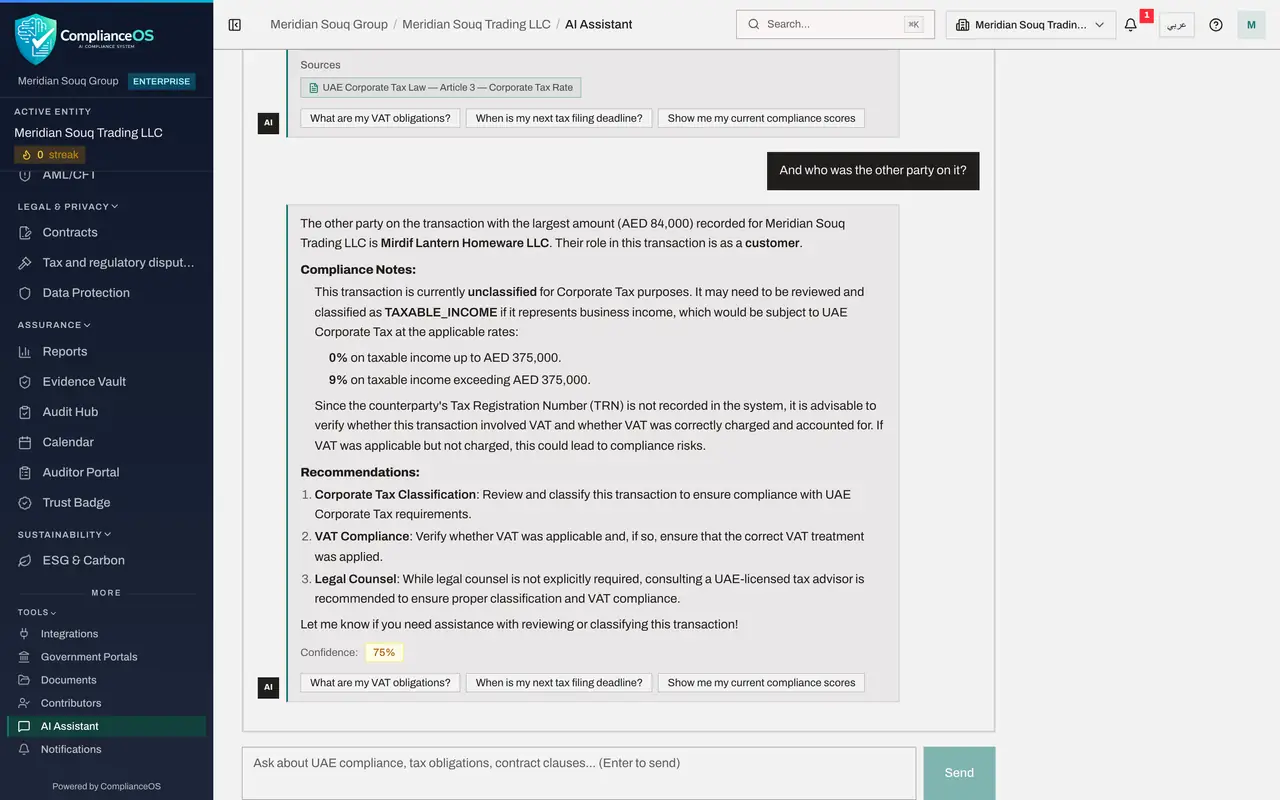
Now type a question that does not name the transaction: And who was the other party on it? Select Send. The assistant is given the earlier messages of this session, so it knows you mean the 84,000 dirham sale. It answers that the other party is Mirdif Lantern Homeware LLC, the customer, which is what Tax Intelligence showed in lessons 1 and 7. It adds notes of its own on the corporate tax rates and on checking the VAT treatment: commentary, to be weighed like any other.
- Type Question box:
And who was the other party on it? - Select Send
- Type Question box:
- 3
Read the session figures
On the right, under Context in use, Session reads Active and Messages counts four: your two questions and the two answers.
- 4
Leave the page and come back
Choose Dashboard in the left menu, then open AI Assistant again from More, Tools. The conversation is still there, with its Confidence figures and Sources, because the session is kept while this browser tab stays open.
- Select Dashboard
- Select Tools
- Select AI Assistant
- 5
Select Clear Session
Above the conversation, on the right, select Clear Session. A message confirms Session cleared and the page returns to Start a conversation. The assistant no longer has the earlier messages, and there is no list of past conversations to reopen. Clear the session when you move to an unrelated subject.
- Select Clear Session
- 6
Open the Audit log
Choose Audit log in the left menu. This page lists actions taken in your organisation, newest first, for roles that may read it. Your questions are at the top as Assistant: Message sent, with the entity and your name as the actor.
- Select Audit log
- 7
Filter to the assistant's entries
To see only the assistant's entries, open All Resource Types and choose Assistant conversation. The list narrows to the questions asked in this organisation, by everyone.
- Select Resource Type
- Choose Assistant conversation
- 8
Select Details on an entry
Select Details at the end of the newest row. The entry holds the Query, which is your exact question, the Confidence, the Session id, whether access was denied, the number of sources, and a Response summary with the start of the answer, here that the other party is Mirdif Lantern Homeware LLC. So the log records who asked what, and what they were told, even after the conversation has been cleared from the screen.
- Select Details
How to check it worked
After Clear Session the page shows Start a conversation again, and the Audit log still lists an entry Assistant: Message sent for each question you asked, with your name as the actor.
Common mistakes
- Thinking Clear Session erases the record. It empties the conversation on your screen. The audit entries for your questions stay.
- Looking for a list of past conversations. The assistant keeps the current conversation only. If an answer matters, copy it into the record it belongs to, with the check you made.
- Typing something into the assistant that should not be on record. Each question is written to the Audit log, which administrators, compliance officers and auditors can read.
Check your understanding
1. You select Clear Session. What happens to the audit entries for the questions you asked?
- A.They are deleted
- B.They stay in the Audit log
- C.They are hidden from administrators
- D.They are sent by email
Show answer
Answer: B. They stay in the Audit log
Clear Session empties the conversation shown to you. The Audit log is a separate, permanent record.
2. Why does the follow-up And who was the customer? work without naming the transaction?
- A.The assistant guesses
- B.Within one session the assistant is given the earlier questions and answers
- C.It reads your mind
- D.It does not work
Show answer
Answer: B. Within one session the assistant is given the earlier questions and answers
A session is one conversation. Earlier messages of the same session are passed along with each new question.