Lesson 14 of 33
Decide what the agent may do on its own
What you will be able to do
This lesson is for the tax manager, who is accountable for what the agent does to the tax records. Autonomy is the setting that decides, action by action, whether the agent acts on its own, asks a person first, or never does the action. A new agent is set to act on its own for everything. You will read the agent's settings and change three actions before the agent does any work.
Before you start
- You are signed in as the tax manager of Meridian Souq Trading LLC.
- The Tax Partner Agent is switched on and has not run yet.
Steps
- 1
Open Settings and Knowledge
In the left menu, under Agent Mode, choose Settings and Knowledge. The page is headed Agent Settings. Its first sentence is the principle: autonomy is set per agent and per action, and anything with a legal signature stays human, always.
- Select Settings & Knowledge
- 2
Read Configuration
Configuration has three settings. Active is the agent's main switch: when it is off, the agent does nothing. Monthly AI Budget is the number of AI credits the agent may use each month, with the amount used so far beneath it. Agent Persona is the standing instruction the agent works under. It comes filled in: a senior UAE tax consultant who is conservative, cites the law, and asks rather than guesses. Leave all three as they are. A later lesson shows who may change the budget.
- 3
Read the Autonomy list
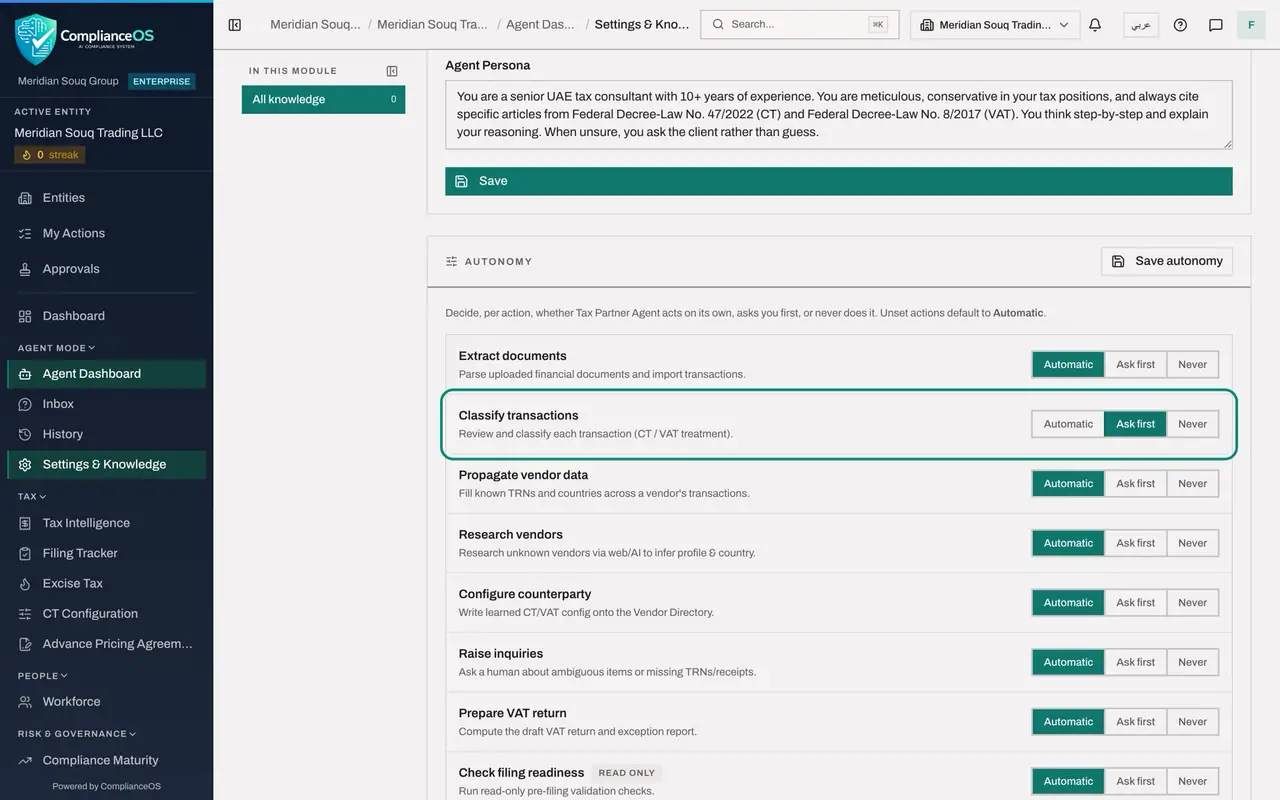
Scroll to Autonomy. Eight actions are listed, each with a short description and three choices. Automatic: the agent acts without asking. Ask first: the agent raises an inquiry and waits for a person. Never: the agent does not take this action. Every action starts on Automatic. Check filing readiness is marked Read-only, because it changes nothing.
- 4
Set Classify transactions to Ask first
Classifying decides the tax treatment of each transaction, so a person should agree before it happens. On the row Classify transactions, select Ask first.
- Select Ask first
- 5
Set Prepare VAT return to Ask first
On the row Prepare VAT return, select Ask first as well. The agent will then ask before it computes a draft return.
- Select Ask first
- 6
Set Research vendors to Never
Research vendors looks up unknown suppliers on the web. This company does not want supplier names sent to a web search, so on the row Research vendors select Never.
- Select Never
- 7
Select Save autonomy
Select Save autonomy at the top of the list. A message confirms Autonomy updated. The three choices now apply to every cycle the agent runs for this entity.
- Select Save autonomy
- 8
Look at Agent Knowledge
Below Autonomy is Agent Knowledge, the agent's memory: facts it has learned about your suppliers and your preferences. It reads No memories yet. A later lesson shows a memory being saved and how to remove one.
How to check it worked
A message confirms Autonomy updated. In the Autonomy list, Classify transactions and Prepare VAT return are set to Ask first, and Research vendors is set to Never.
Common mistakes
- Leaving everything on Automatic because it is the default. Automatic means the agent changes records without asking. Choose it deliberately, action by action.
- Changing a level and leaving the page. Nothing is saved until you select Save autonomy. The button is greyed out when there is nothing to save.
- Setting Raise inquiries to Never. The agent's questions are how it tells you about missing tax registration numbers and unclear items. Without them it stays silent.
Check your understanding
1. Classify transactions is set to Ask first. What does the agent do when a cycle reaches classification?
- A.It classifies and tells you afterwards
- B.It skips classification for ever
- C.It pauses that action and puts an approval request in the Inbox for a person to answer
- D.It sends an email to the tax authority
Show answer
Answer: C. It pauses that action and puts an approval request in the Inbox for a person to answer
Ask first means the agent raises an inquiry and waits. It acts only after a person approves.
2. Which level stops the agent from ever taking an action?
- A.Automatic
- B.Ask first
- C.Never
- D.Read-only
Show answer
Answer: C. Never
Never means the agent does not take the action at all, and records in its log that it skipped it.