Lesson 7 of 33
Check before you rely on it
What you will be able to do
This lesson is for everyone who uses the Compliance Assistant, and it is the most important one in the course. An answer from a language model can be right, partly right or wrong, and it reads the same in all three cases. You will check a figure against the screen that holds the record, check an answer about the Risk Register against the register, and learn which part of an answer a Sources line or a not-verified mark speaks to.
Before you start
- You are signed in as the compliance officer of Meridian Souq Trading LLC.
- The company holds the three tax transactions of lesson 1 and the risk of lesson 2.
Steps
- 1
Ask for totals
On the AI Assistant page, ask for figures you can check. Type: What is the total of our sales and the total of our purchases recorded for July to September 2026, before tax?
- Type Question box:
What is the total of our sales and the total of our purchases recorded…
- Type Question box:
- 2
Send it and note the figures
Select Send and wait. From lesson 1 you expect sales of 84,000 dirhams and purchases of 14,250 dirhams, which is 1,850 plus 12,400. The assistant gives exactly those totals for July to September 2026, and names the transactions behind each: the sale to Mirdif Lantern Homeware, and the fit-out by Sidra Bay Interiors and the courier services of Falcon Wing Couriers. Note the figures. They are still only a report until you check them.
- Select Send
- 3
Open Tax Intelligence
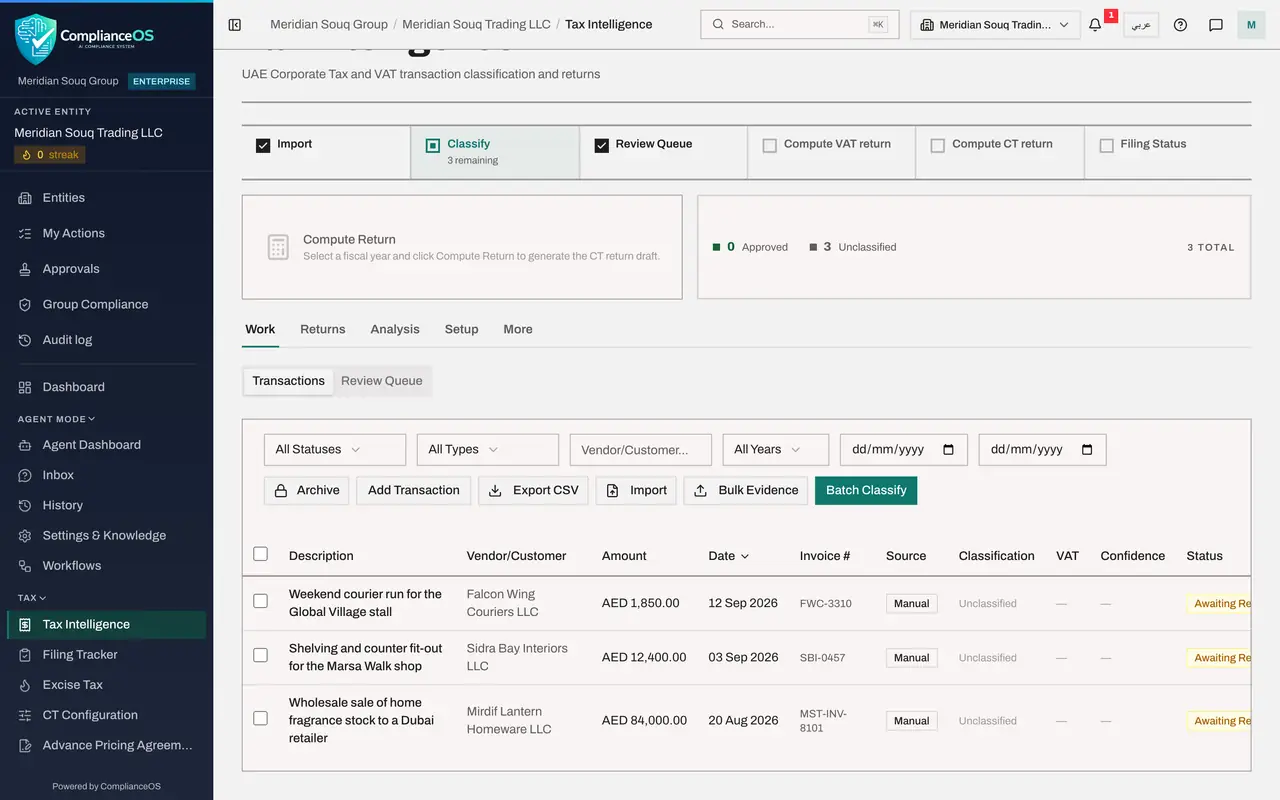
Now check the figures where the records are. Choose Tax Intelligence in the left menu. The Transactions list is the record. The assistant's answer is a summary of it.
- Select Tax Intelligence
- 4
Compare the rows with the answer
Read the Amount column. One sale of 84,000 dirhams, and two purchases of 1,850 and 12,400 dirhams, which add up to 14,250. The assistant's totals match the rows. Now you may use them, and if anyone asks, you can say where you checked them.
- 5
Open the Risk Register
Next, the Risk Register. Choose Risk Register in the left menu. It holds the one risk recorded in lesson 2, about supplier invoices without a tax registration number.
- Select Risk Register
- 6
Ask the assistant about the risks
Select the speech bubble at the top right. The window opens with your conversation. Look at the end of the totals answer first: there is no Sources line, and the answer says that no law applies because the figures come from the company's records. A Sources line, or a not-verified mark, speaks only to the law an answer cites. Figures are never proven by a source: they are checked against the records, as you just did. Then type: Which risks are recorded in our risk register?
- Select Open the AI assistant
- Type Question box:
Which risks are recorded in our risk register?
- 7
Send it and compare the answer with the page
Select Send, and read the answer against the page behind the window. It reports one risk, Supplier tax invoices arrive without a tax registration number, category Tax, entered by a person, likelihood 3 and impact 4, status Identified, owner Fatima Noor, and counts it as High. The row behind the window shows the same risk with the score 3 times 4, 12, and the High Risks tile reads 1. The answer matches the record.
- Select Send
- 8
Keep three checks in mind
Close the window. Before you rely on an answer, make three checks. A figure: compare it with the module's own screen. A rule: look up the article in the official text, whether or not Sources names it. A statement that something is missing or empty: open the module and look.
- Select Close assistant
How to check it worked
You have compared the assistant's totals with the three rows in Tax Intelligence and its answer about risks with the Risk Register, and both matched. You have also seen that an answer built from your own records carries no Sources line: the figures are checked against the records, not against the knowledge base.
Common mistakes
- Copying a figure from an answer into a return, a report or an email without opening the record. Open the module and read the figure there.
- Believing an answer that says there are no records. The assistant may not be able to see that module for you, or may be wrong. Open the module before you conclude that it is empty.
- Acting on an alarming remark, such as a warning about penalties, without checking what it is based on. Ask the assistant what the remark rests on, and check that.
Check your understanding
1. The assistant gives a total for your purchases. What do you do before using the figure?
- A.Use it, the assistant read the records
- B.Ask the same question again and take the average
- C.Open Tax Intelligence and compare the figure with the transactions listed there
- D.Check the Confidence figure only
Show answer
Answer: C. Open Tax Intelligence and compare the figure with the transactions listed there
The record is on the module's screen. A figure in an answer is checked against that screen before anyone relies on it.
2. An answer cites an article followed by not verified against the knowledge base. What do you do?
- A.Rely on it: the assistant named it
- B.Look the article up in the official text before relying on it, because it did not come from the product's knowledge base
- C.Ignore the whole answer
- D.Ask the same question until the mark disappears
Show answer
Answer: B. Look the article up in the official text before relying on it, because it did not come from the product's knowledge base
The mark tells you the reference comes from the model itself. A Sources chip shows only which knowledge-base passage was used. Either way, a rule is checked in the official text and a figure against the records.