Lesson 28 of 33
Review the AI draft and have a clause revised
What you will be able to do
This lesson is for legal counsel, the author of the draft. The agent has finished the draft of lesson 27. Before anyone is asked to approve it, the author reads it. You will open the draft, read the clauses and the agent's own checks, and tell the agent in plain words to change one clause. The agent rewrites that clause and keeps the result as a new version, so nothing is lost.
Before you start
- You are signed in as the legal counsel of Meridian Souq Trading LLC.
- Lesson 27 is done and the agent has finished: the draft is listed under Contract Drafts.
Steps
- 1
Find the draft under Contract Drafts
Choose Contracts in the left menu, select the Draft a Contract tab and scroll down to Contract Drafts. The draft is listed with its type, the two parties, the status Needs review, a risk score of 40, medium, version 1, and a tag Placeholders.
- Select Contracts
- Select Draft a Contract
- 2
Open the draft
Select Open at the end of the row. The AI Contract Draft Review window opens. Two banners come first. The red one says the draft has unresolved placeholders, the two parties' addresses in square brackets, and that it cannot be approved or finalised until none remains. The yellow one, Needs review, says the agent's own critique flagged issues to resolve. The tiles give the type, the jurisdiction, the governing law and the risk score.
- Select Open
- 3
Read the drafted clauses
Drafted Clauses lists the eight clauses in order, with the title, the wording and the law each cites. The first, Parties to the Agreement, holds the two placeholders. Read each clause as you would read a draft from a junior colleague, with the brief beside you.
- 4
Select Revise this clause
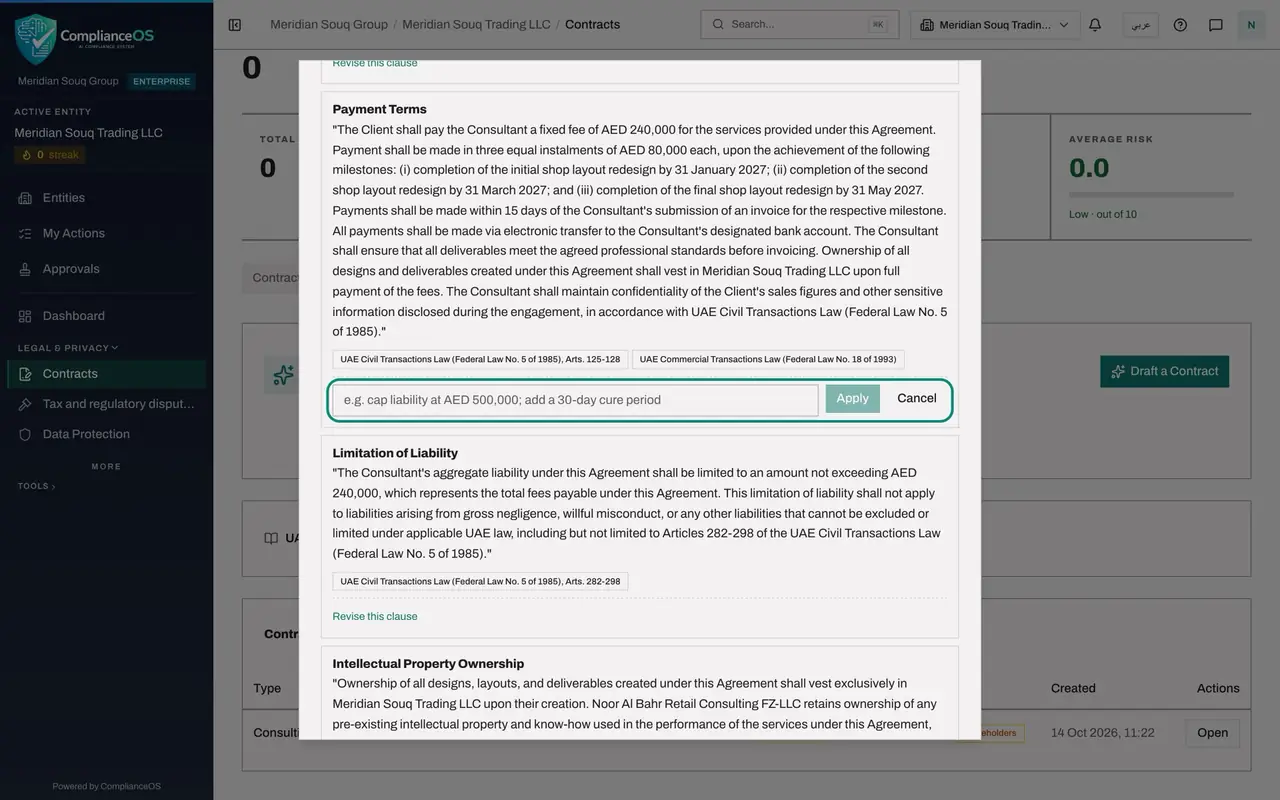
To change a clause, select Revise this clause under it. Here it is the clause about fees and payment. A box opens for your instruction, with Apply and Cancel beside it.
- Select Revise this clause
- 5
Tell the agent what to change
Type the change in plain words: Make each instalment payable within 30 days of the invoice. Then select Apply. The agent rewrites that clause only. In this example the payment clause then reads: payments shall be made within 30 days of the Consultant's submission of an invoice. It also gave each instalment a milestone date, 31 January, 31 March and 31 May 2027, which the brief did not specify; check that with the business.
- Type e.g. cap liability at AED 500,000; add a 30-day cure period:
Make each instalment payable within 30 days of the invoice. - Select Apply
- Type e.g. cap liability at AED 500,000; add a 30-day cure period:
- 6
Read the agent's own checks
Scroll down to Compliance Checks. These are tests the agent ran on its own draft. Most pass. Dispute resolution reads Fail: the contract does not say how disputes are settled, with a recommendation to add an arbitration clause. The checks help the reader. They are not an approval.
- 7
Close the window and look at the versions
Close the window, reload the page and select the Draft a Contract tab. The row now shows version 2, still Needs review and still tagged Placeholders, with a risk score of 45. Each revision makes a new version. The next lesson removes the placeholders.
- Select Draft a Contract
How to check it worked
Contract Drafts lists version 2 of the draft with the status Needs review, and its Payment Terms clause says payments are due within 30 days of the invoice.
Common mistakes
- Sending the draft for approval unread, because the agent's checks passed. The author is the first reader. The approver is the second.
- Rewriting the whole draft by instruction. Revise one clause at a time and read the result, so that you can see exactly what changed.
- Looking for an Approve button for yourself. The author of a draft cannot approve it. That is deliberate.
Check your understanding
1. You ask the agent to revise a clause. What happens to the earlier wording?
- A.It is lost
- B.It stays in the earlier version: the revised draft is saved as a new version
- C.It is emailed to the counterparty
- D.It is approved
Show answer
Answer: B. It stays in the earlier version: the revised draft is saved as a new version
Each revision creates a new version of the draft, so the history of what the agent wrote and what was changed is kept.
2. Can the author approve the draft after revising it?
- A.Yes
- B.No, approval must come from a different person
- C.Only after 24 hours
- D.Only for small contracts
Show answer
Answer: B. No, approval must come from a different person
The approver must be someone other than the author. The next lesson shows the approver's side.