Lesson 27 of 33
AI inside a module: have a contract drafted
What you will be able to do
This lesson is for legal counsel, and for anyone who wants to see how AI drafting is built into a module. Besides the assistant and the agent, several modules have their own AI buttons. Contracts has the clearest one: an agent writes a full draft from a short brief. The draft is only a draft. It cannot become a contract until a second person has approved it, which the next lesson shows. You will fill in the brief and start the drafting.
Before you start
- You are signed in as the legal counsel of Meridian Souq Trading LLC.
- Contracts holds no contracts and no drafts yet.
Steps
- 1
Open Contracts and the Draft a Contract tab
In the left menu, under Legal and Privacy, choose Contracts, then select the Draft a Contract tab. The panel Agentic Contract Drafting explains the process: an AI agent plans the clauses, writes each one with a reference to UAE law, and checks its own work. A person reviews and approves the result before it becomes a contract.
- Select Contracts
- Select Draft a Contract
- 2
Select Draft a Contract and choose the type
Select the Draft a Contract button on the panel. In the form, open Contract Type and choose Consulting. The type decides which standard clauses the agent starts from.
- Select Draft a Contract
- Select Contract Type
- Choose Consulting
- 3
Name the two parties
In Party A, type the full legal name of your own company. In Party B, type the full legal name of the other side. The counterparty here is invented for this course.
- Type Party A:
Meridian Souq Trading LLC - Type Party B:
Noor Al Bahr Retail Consulting FZ-LLC
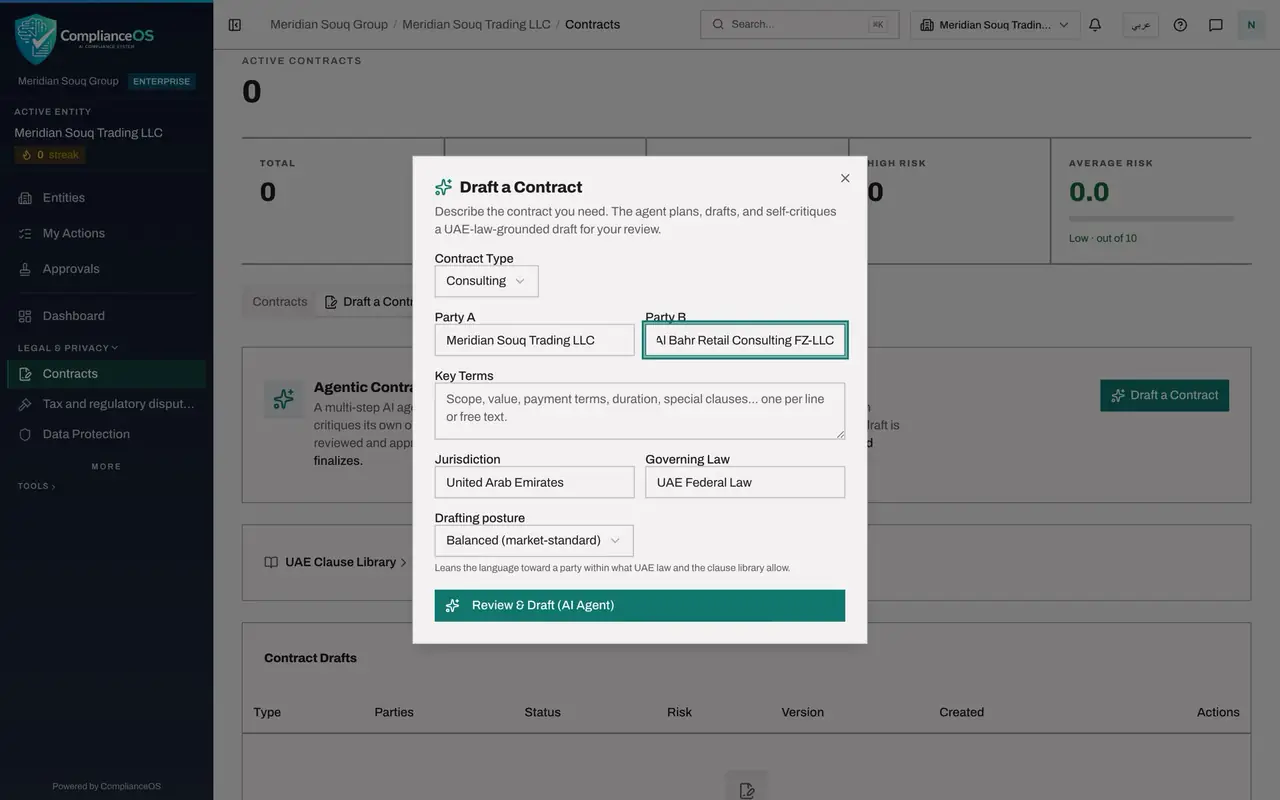
- Type Party A:
- 4
Describe the key terms
In Key Terms, say in your own words what the contract must cover: the scope, the fee and how it is paid, the dates, and any special conditions. This is the brief the agent writes from, so be as specific as you would be with a junior colleague.
- Type Key Terms:
Six-month engagement to redesign the layout of three Meridian Souq sho…
- Type Key Terms:
- 5
Select Review and Draft
Leave Jurisdiction, Governing Law and Drafting posture as they are, and select Review and Draft, AI Agent, at the foot of the form. The agent first reads your brief. If something important is missing, it lists questions with the assumptions it will make. Leave an answer empty to accept the assumption, and select Generate Draft with Answers.
- Select Review & Draft (AI Agent)
- 6
Leave the agent to work
The button now reads Drafting, this can take a while. Keep the form open. The agent plans the clauses, writes them, runs the compliance checks on its own draft and screens the counterparty against sanctions lists. After a few minutes the form closes and the draft opens for review.
How to check it worked
The button on the form reads Drafting, this can take a while, and a few minutes later the draft opens for review and is listed under Contract Drafts.
Common mistakes
- Leaving Key Terms empty. The agent then assumes the scope, the fee and the dates, and you will spend longer correcting the draft than you saved.
- Putting confidential figures or personal data into the brief that the contract does not need. Give the terms of the deal and nothing more.
- Treating the draft as ready because it reads well. It is written by a language model. The review and the approval by a second person are the control.
Check your understanding
1. What does the drafting agent need before it will start?
- A.Nothing
- B.The contract type and the full names of both parties
- C.A signed approval
- D.The counterparty's bank details
Show answer
Answer: B. The contract type and the full names of both parties
Contract Type, Party A and Party B are required. Key Terms is optional, but without it the agent has to assume the commercial terms.
2. When does an AI draft become a contract in the list?
- A.As soon as it is written
- B.After someone other than its author has approved it and it has been finalised
- C.After 24 hours
- D.Never
Show answer
Answer: B. After someone other than its author has approved it and it has been finalised
A draft needs the approval of a second person. Only an approved draft can be finalised into a contract.