Lesson 33 of 33
How this connects: the assistant, the agent and the records
What you will be able to do
This closing lesson is for everyone who took the course. It follows the records the course created through the product. You will ask the Compliance Assistant about three modules whose records were changed by other lessons: the contract that an AI drafted and a person approved, the transactions the agent classified, and the request the agent logged. Then you will open the notifications, My Actions and the Audit log, where that work lands and is recorded.
Before you start
- You are signed in as the compliance officer of Meridian Souq Trading LLC.
- All earlier lessons are done. The company holds three classified tax transactions, one risk, one deadline, one processing activity, one data subject request and one contract.
Steps
- 1
Ask the assistant about the contract
Open AI Assistant from the left menu, under More, Tools, and type: Which contracts do we hold, with their type and risk score?
- Select Tools
- Select AI Assistant
- Type Question box:
Which contracts do we hold, with their type and risk score?
- 2
Send it and read the answer
Select Send. The assistant reads Contracts and reports one contract: Consulting contract with Noor Al Bahr Retail Consulting, risk level Medium with a score of 40, status Complete, governing law UAE Federal Law. That is the draft an AI wrote in lesson 27 and a second person approved in lesson 29. It also reports no start or end date and a value of zero. Keep that in mind for the check on the Contracts page.
- Select Send
- 3
Ask about the classified transactions
Type: How are our tax transactions classified?
- Type Question box:
How are our tax transactions classified?
- Type Question box:
- 4
Send it and read the answer
Select Send. The assistant lists the three transactions with their categories: Taxable Income for the sale, Capital Asset for the shop fit-out and Operating Expense for the courier run, with no transaction left unclassified, and totals of 84,000 dirhams in sales and 14,250 in purchases. It also shows the tax registration number of Sidra Bay Interiors, the one you gave the agent in lesson 18. The classifications were made by the agent in lesson 16 and approved there by the tax manager. The assistant and the agent do not talk to each other; they read and write the same records.
- Select Send
- 5
Ask about the data subject request
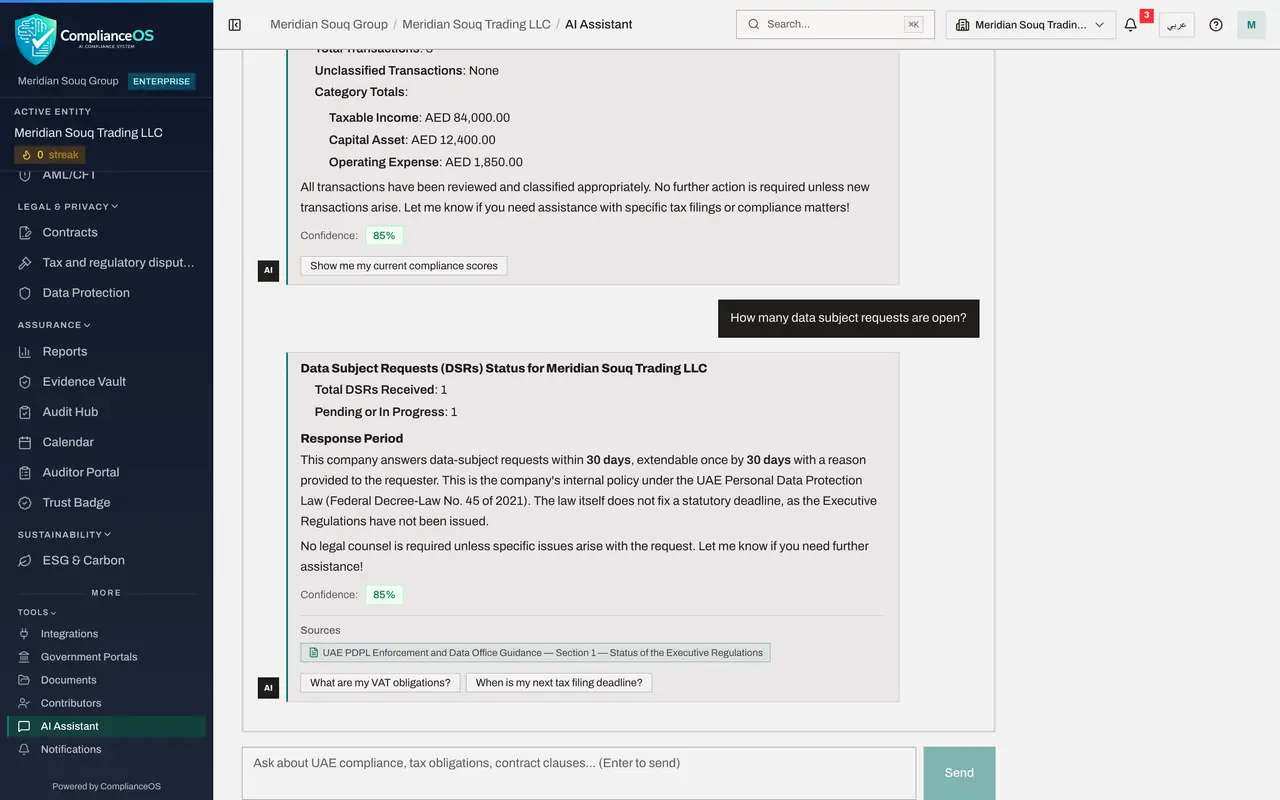
Type: How many data subject requests are open?
- Type Question box:
How many data subject requests are open?
- Type Question box:
- 6
Send it and read the answer
Select Send. The assistant reports one data subject request pending, the one the agent logged on your instruction in lesson 24. It states the response period the same way the agent did: 30 days by company policy, because the law itself sets no number of days yet, and it shows a Sources passage from the knowledge base on the status of the law's Executive Regulations.
- Select Send
- 7
Check the contract in Contracts
Now check on the module's own screen. Choose Contracts in the left menu. The list holds one contract, of the type Consulting, status Complete, risk score 40, as the assistant said. Its description says it was drafted in ComplianceOS, approved, and finalised from version 3. The Expiry column shows a dash: the fee and the dates are in the wording of the clauses, not yet in the contract's own fields, which is why the assistant reported no value and no dates.
- Select Contracts
- 8
Open the notifications
Select the bell at the top right. The newest notification is New VAT Compliance Requirement, the warning the workflow sent in lesson 26: check that supplier tax invoices show a valid tax registration number before recovering input VAT. Below it is New DSR: Access request received, with its due date, from the request the agent logged in lesson 24. Further down is a VAT Deregistration Advisory that Tax Intelligence raised by itself when the sales were entered in lesson 1. Work done by the agent and by workflows reaches people through the same notifications as any other record.
- Select 3 unread notifications
- 9
Open My Actions
Choose My Actions in the left menu. This page collects open work assigned to you across modules. The list is empty: the agent approval you met in lesson 16 was answered, and Completed in the last seven days counts one. Agent approval requests appear here while they wait for a person; the agent's other questions, such as the missing registration numbers, stay in the agent's Inbox.
- Select My Actions
- 10
Open the Audit log
Choose Audit log in the left menu. Read down the list. Your three questions are at the top as Assistant: Message sent, with your name. Below them are Risk insights: Generated, with System as the actor, from the workflow and the analysis. Then Contract draft: Finalised, Contract draft: Approved and Approval request: Approved with your name, and Contract draft: Clause revised with the name of legal counsel. Further down are Data subject request: Logged, with your name and the words via agent, and three entries Tax classification: Approved with the name of the tax manager. Who drafted, who changed and who approved are each on record.
- Select Audit log
- 11
Open the list of resource types
Open All Resource Types. The list names every kind of record that has an entry: Risk insight, Calendar deadline, Assistant conversation, Contract, Contract draft, Data subject request, Processing activity, Tax classification, Tax transaction and Transaction alert. Choose one to follow that kind of record. What the agent did step by step is in Agent History; a record it created appears here under its own type, with the person who asked and the words via agent.
- Select Resource Type
How to check it worked
The assistant's answers name the one contract, the three classified transactions and the one open request, the Contracts list shows the same contract, and the Audit log lists your questions and the approval and finalising of the contract draft.
Common mistakes
- Treating the assistant, the agent and the module buttons as one thing. The assistant reads. The agent and the workflows act within your permissions. The module buttons draft for a person to approve.
- Looking in one log only. Questions to the assistant and changes to records are in the Audit log. What the agent did, step by step, is in Agent History.
- Forgetting the rule of the course. Every answer, every reply and every summary is checked against the screen that holds the record.
Check your understanding
1. The agent classified the tax transactions in lesson 16. Why can the Compliance Assistant now report the classifications?
- A.The agent told the assistant
- B.Both read the same records: the agent changed them in Tax Intelligence, and the assistant reads Tax Intelligence when asked
- C.It guesses
- D.It cannot
Show answer
Answer: B. Both read the same records: the agent changed them in Tax Intelligence, and the assistant reads Tax Intelligence when asked
There is one set of records. Whatever changes them, a person, the agent or a workflow, the assistant reads the current state.
2. Where is each question put to the Compliance Assistant recorded?
- A.Nowhere
- B.In the Audit log, as Assistant: Message sent, with the person's name
- C.In My Actions
- D.In the Compliance Calendar
Show answer
Answer: B. In the Audit log, as Assistant: Message sent, with the person's name
Each question is an audit entry with the actor, the entity and the question itself.