Lesson 17 of 33
Run a full cycle and see what the agent asks
What you will be able to do
This lesson is for the tax manager. A full cycle is one complete round of the agent's work on this entity's tax records: it processes new documents, copies known supplier details across transactions, researches unknown suppliers, applies answers people have given, and raises questions about anything it needs a person for. You will start one, watch the steps appear, see which steps your autonomy settings skipped, and find the questions it raised.
Before you start
- You are signed in as the tax manager of Meridian Souq Trading LLC.
- Lesson 16 is done: the three transactions are classified and approved by you, and the two purchases still have no supplier tax registration number.
- Research vendors is set to Never, and Raise inquiries to Automatic.
Steps
- 1
Open the Agent Dashboard
Choose Agent Dashboard in the left menu. Run full cycle is at the top right, and again as the first action under Ask your agent to.
- 2
Select Run full cycle
Select Run full cycle. A panel opens under the three figures and reads Running daily cycle. The work is done in the background; the page reports each step as it is taken.
- Select Run full cycle
- 3
Watch the steps and wait for Done
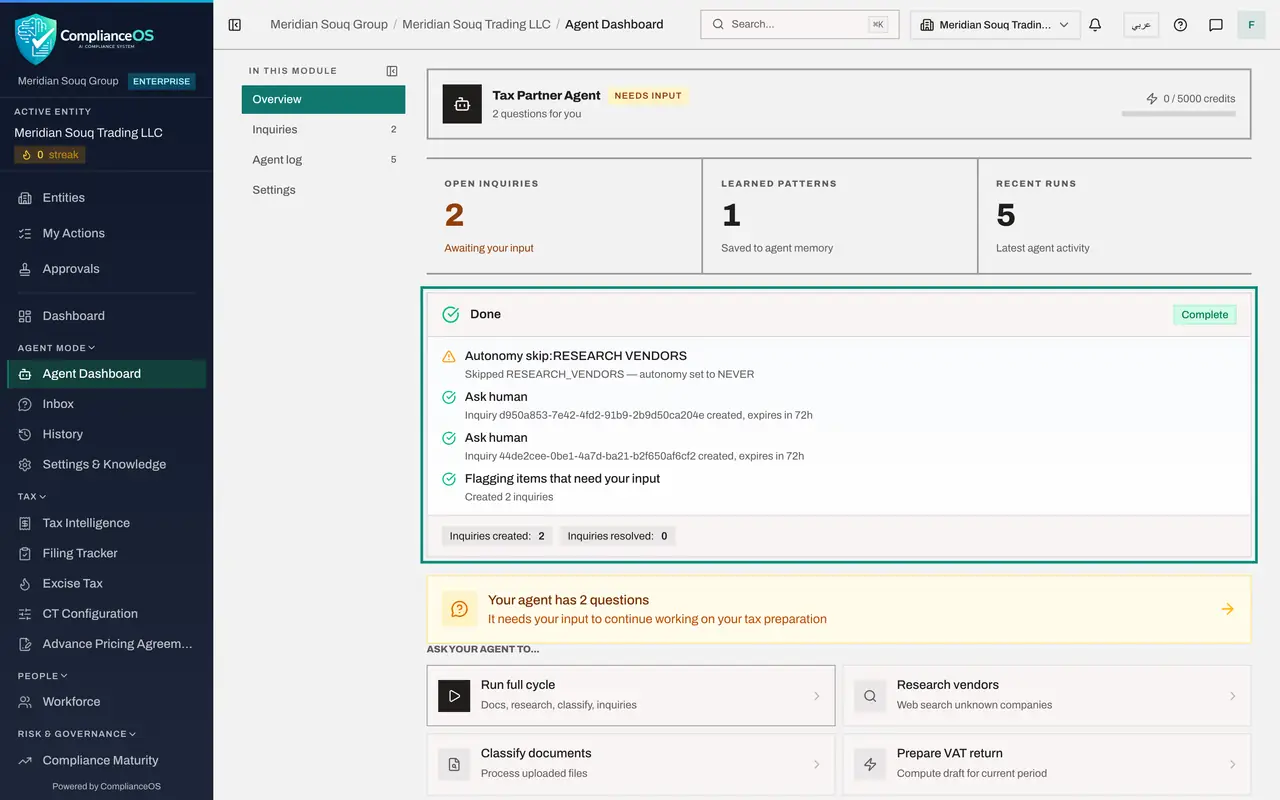
The cycle takes only seconds here, because the company is small. The panel ends with Done and Complete, and lists what happened. Autonomy skip, Research vendors: skipped because you set it to Never. Two steps named Ask human, each creating an inquiry. Flagging items that need your input: Created 2 inquiries. The chips at the bottom read Inquiries created 2 and Inquiries resolved 0.
- 4
Read the agent's state
Go back to the top. Open inquiries reads two, the line under the agent's name says 2 questions for you, and a yellow banner says Your agent has 2 questions. The state tag beside the name reads Needs input: the cycle has ended, and the agent is waiting for a person.
- 5
Open the Inbox
Choose Inbox in the left menu. The tiles at the top count the questions that are open, answered, skipped by a person and resolved without one. Two questions wait. One for each purchase: the expense from Falcon Wing Couriers, 1,850 dirhams, and the expense from Sidra Bay Interiors, 12,400 dirhams, are missing the supplier's tax registration number. Each card says how much input VAT cannot be recovered without it, 92.50 and 620 dirhams, which is 5 per cent of each amount, and asks for the number in the format shown. The next lesson answers one and skips the other.
- Select Inbox
How to check it worked
The cycle's panel ends with Done, the agent's state reads Needs input, and the Inbox lists the questions the cycle raised.
Common mistakes
- Leaving the page while the panel is still running and assuming the cycle failed. The work continues in the background. Open the Agent log to see the run.
- Running the cycle again because nothing seems to have changed. The agent is waiting for your answers. Open the Inbox.
- Reading Done as everything was done. Read the steps: some are skipped on purpose by your autonomy settings.
Check your understanding
1. Research vendors is set to Never. What does a full cycle do at that step?
- A.Researches anyway
- B.Skips it and records the skip
- C.Stops the whole cycle
- D.Asks for approval
Show answer
Answer: B. Skips it and records the skip
Never means the action is not taken. The cycle notes the skip and carries on.
2. The cycle ends and the state reads Needs input. What do you do?
- A.Run it again
- B.Open the Inbox and answer the agent's questions
- C.Switch the agent off
- D.Nothing
Show answer
Answer: B. Open the Inbox and answer the agent's questions
Needs input means the agent raised questions only a person can answer. They are in the Inbox.