Lesson 15 of 33
Ask the agent about your tax records
What you will be able to do
This lesson is for the tax manager. The chat on the Agent Dashboard is how you talk to the Tax Partner Agent. Unlike the Compliance Assistant, the agent is offered tools that match your own permissions on this entity: a person who may only view tax records gets an agent that can only look, and a person who may edit gets one that can also change. You will ask two questions that only read, mark a reply as helpful, and see that each exchange is counted as a run.
Before you start
- You are signed in as the tax manager of Meridian Souq Trading LLC.
- The agent is switched on, and its autonomy was set in lesson 14.
- Tax Intelligence holds the three unclassified transactions of lesson 1.
Steps
- 1
Go to Chat with your agent
On the Agent Dashboard, scroll to Chat with your agent. The agent's name is at the top of the box with the word Online. Your messages appear on the right and the agent's replies on the left.
- 2
Type a question that only reads
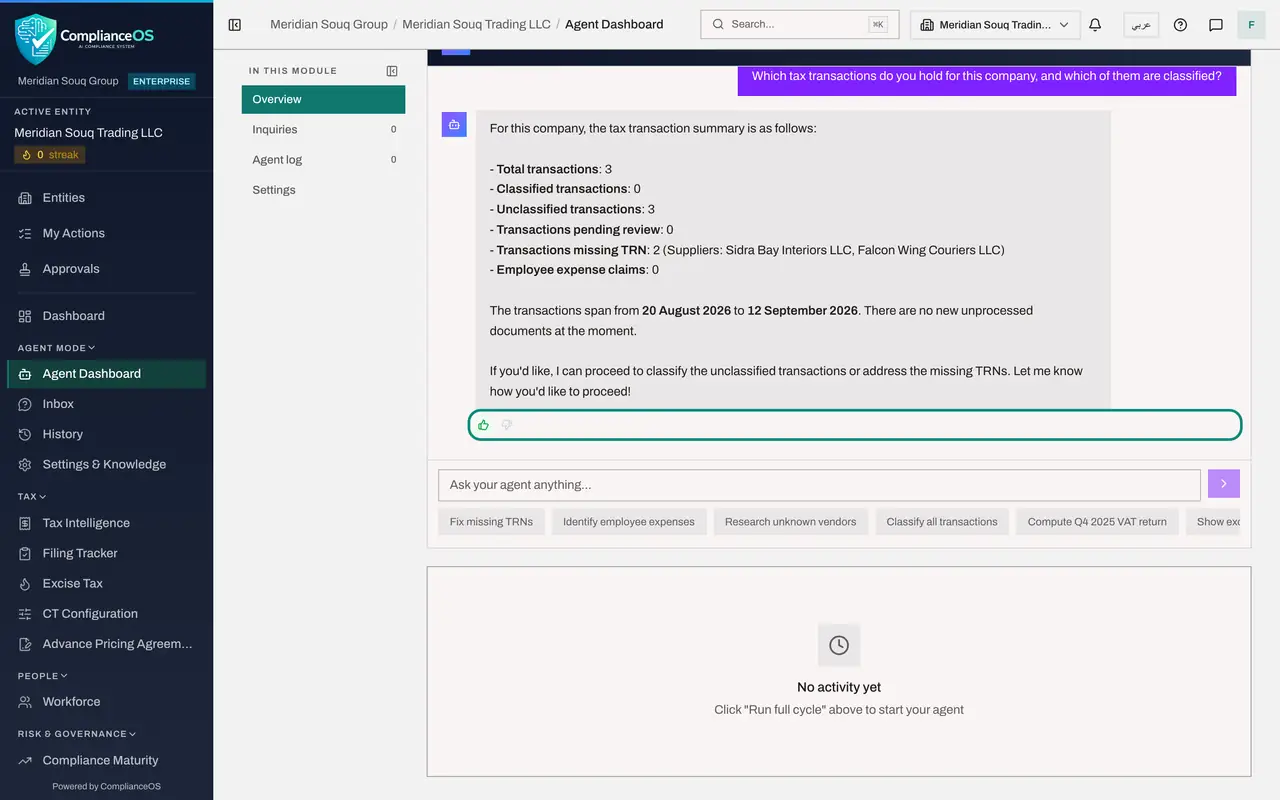
Select the box Ask your agent anything and type: Which tax transactions do you hold for this company, and which of them are classified?
- Type Ask your agent anything:
Which tax transactions do you hold for this company, and which of them…
- Type Ask your agent anything:
- 3
Send it and wait for the reply
Select the arrow beside the box, or press Enter. The word Online changes to Thinking while the agent works. It replies with a summary: three transactions in total, none classified, three unclassified, pending review zero, and two missing a tax registration number, or TRN, from the suppliers Sidra Bay Interiors and Falcon Wing Couriers. That matches Tax Intelligence: the two purchases have no supplier TRN. It then offers to classify them: an offer, not an action.
- Select Send (the arrow beside the box)
- 4
Mark the reply as helpful
Under each reply are two small thumbs: Helpful and Not helpful. Select Helpful. The thumb turns green. Your feedback is kept with the agent. It does not change any record.
- Select Helpful
- 5
Ask about the suppliers
Now type a second question: Which suppliers are missing a tax registration number?
- Type Ask your agent anything:
Which suppliers are missing a tax registration number?
- Type Ask your agent anything:
- 6
Send it and read the reply
Select the arrow. The agent lists two suppliers: Sidra Bay Interiors and Falcon Wing Couriers, the two purchases of lesson 1, and asks for their numbers if you have them. Mirdif Lantern Homeware is rightly left out: it is the customer of the sale, not a supplier. The reply agrees with the first one and with Tax Intelligence, which is how you know you can use it.
- Select Send (the arrow beside the box)
- 7
See the runs counted
Go back to the top of the page. Recent runs is no longer zero. Every exchange in the chat is recorded as a run of the agent, with the tools it used. The Agent log lesson opens these records.
How to check it worked
The chat holds your two questions with the agent's replies, the thumb under one reply is green, and Recent runs at the top of the page is above zero.
Common mistakes
- Selecting a suggestion under the box to see its wording. In the agent's chat a suggestion is sent at once, and some of them start work, such as Classify all transactions.
- Taking a list from the agent as the record. Check every name it gives against Tax Intelligence before you write to anyone: the agent summarises, and a summary can be wrong.
- Taking a reply as the record. The agent summarises what its tools return. Check figures in Tax Intelligence, exactly as you would for the Compliance Assistant.
Check your understanding
1. A colleague who may only view tax records chats with the agent. What can the agent do for them?
- A.Everything it can do for the tax manager
- B.Only look things up: the agent is offered just the tools that person's permissions allow
- C.Nothing at all
- D.File the return
Show answer
Answer: B. Only look things up: the agent is offered just the tools that person's permissions allow
Each tool is tied to the permission a person would need to do the same thing by hand, and is checked again when it runs.
2. What does the thumb under a reply do?
- A.It deletes the reply
- B.It records whether the reply was helpful, as feedback kept with the agent
- C.It approves a transaction
- D.It sends the reply by email
Show answer
Answer: B. It records whether the reply was helpful, as feedback kept with the agent
Helpful and Not helpful are feedback on the reply. They do not change any tax record.