Lesson 31 of 33
AI inside a module: risk insights and their reasoning
What you will be able to do
This lesson is for the compliance officer. Some modules have an AI summary of their own. In the Risk Register it is called AI Insights: on request, the product looks across the entity's modules and writes findings, each with its reasoning. You will run the analysis, read one insight with the facts it relies on, and see that an insight is advice: it does not add a risk to the register by itself.
Before you start
- You are signed in as the compliance officer of Meridian Souq Trading LLC.
- The Risk Register holds the one risk recorded in lesson 2, and lesson 26 has run a workflow that recorded an insight.
Steps
- 1
Open the Risk Register and select AI Insights
Choose Risk Register in the left menu. In the list on the left of the page, In this module, select AI Insights. Below the tiles the page offers a severity filter, Show Dismissed, and the button Run AI Analysis.
- Select Risk Register
- Select AI Insights
- 2
Find the insight the workflow recorded
Insights written earlier are listed here. In this company there is one card so far: Supplier Tax Invoice Validation for Input VAT Recovery, Medium, a Correlation Alert at 80 per cent confidence, for Tax. That is the insight the workflow of lesson 26 recorded. A workflow and this button write to the same list.
- 3
Select Run AI Analysis and wait
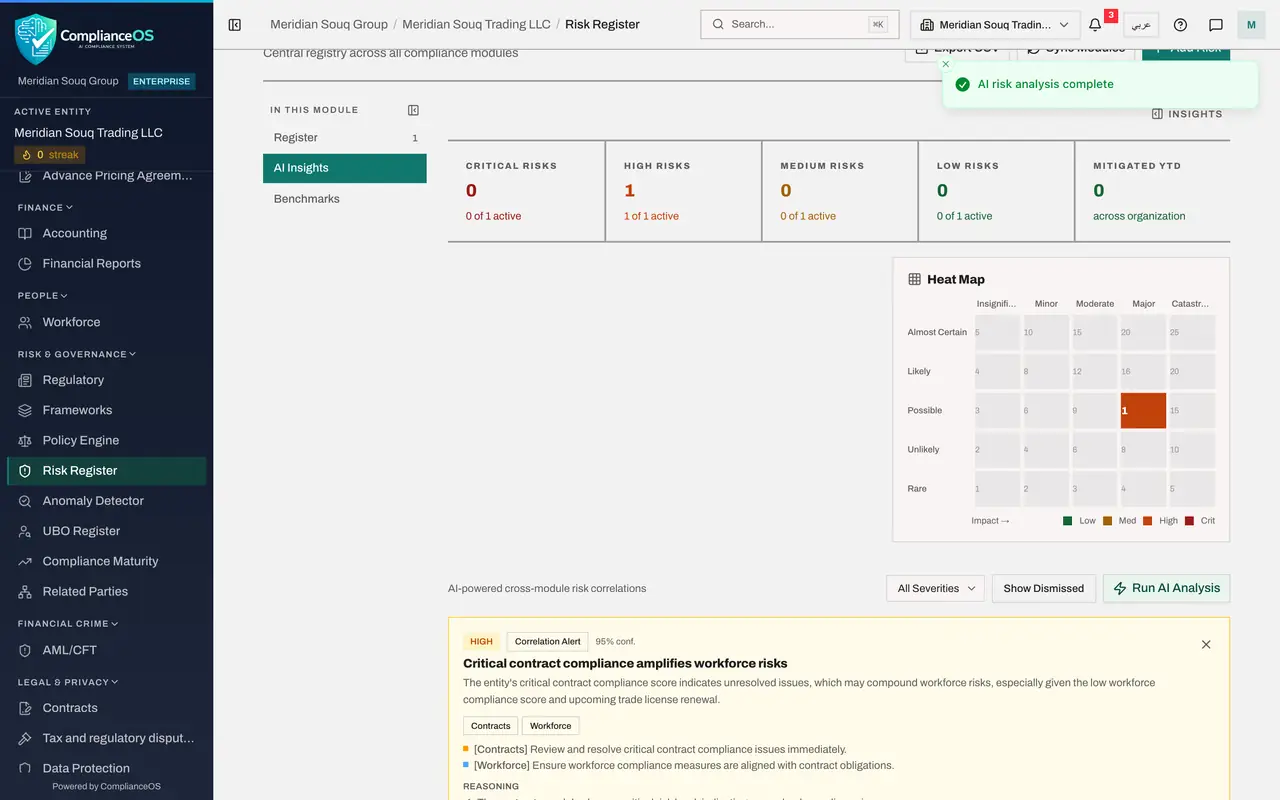
Select Run AI Analysis. The button reads Analyzing while the product looks at this entity's open items and scores across its modules. It can take up to two minutes. A message then confirms AI risk analysis complete.
- Select Run AI Analysis
- 4
Read an insight
Each card is one finding: its severity, the kind of finding, the AI's confidence, a title, a short explanation, the modules involved and a recommended action for each. The first new card is High, a Correlation Alert at 95 per cent confidence: Critical contract compliance amplifies workforce risks. It says the critical contract score may add to the low workforce score, with the trade licence renewal coming up. Two more new cards follow, on data protection and on AML, which means anti-money laundering.
- 5
Read the reasoning
Under Reasoning the card lists the steps of its argument: Contracts is at a critical risk level, Workforce is critical too, and the trade licence renewal may be affected. Treat each as a claim to check in its module. The scores are real: on the entity dashboard Contracts stands at 0 per cent and Workforce at 30 per cent. But Workforce holds a single employee and no payroll, and nothing in either module shows that the contract issues cause workforce problems: that link is the AI's own inference. The AML card rests on a fact you can check: the AML module holds one open alert, raised when the 84,000 dirham sale of lesson 1 passed a monitoring threshold. A confidence of 95 per cent does not make a finding true.
- 6
Go back to the Register view
In In this module, select Register. The register still holds one risk: the one you recorded in lesson 2. Neither the analysis nor the workflow added a risk here. An insight you agree with becomes a risk only when a person records it with Add Risk.
- Select Register1 (1)
How to check it worked
AI Insights lists at least one card with a severity, a confidence figure and a Reasoning section, and the Register view still holds exactly the risk you recorded yourself.
Common mistakes
- Reading an insight's title and skipping Reasoning. The reasoning lists the facts the AI relied on. Those facts are what you check in the module they come from.
- Assuming an insight is on the register. It is a suggestion. If you agree with it, record the risk yourself with Add Risk.
- Running the analysis repeatedly to get a better answer. Each run uses AI credits and may word the same finding differently. Run it when the records have changed.
Check your understanding
1. What makes an AI insight checkable?
- A.Its severity
- B.Its Reasoning, which lists the facts it relied on, so that you can look each one up in its module
- C.Its colour
- D.Nothing
Show answer
Answer: B. Its Reasoning, which lists the facts it relied on, so that you can look each one up in its module
A finding you cannot trace is an opinion. The reasoning names the facts, and the modules hold them.
2. An insight describes a real risk. How does it get onto the Risk Register?
- A.Automatically
- B.A person records it with Add Risk
- C.The agent adds it
- D.It cannot
Show answer
Answer: B. A person records it with Add Risk
Insights are advice shown on their own view. The register holds what a person has decided to record.