Lesson 30 of 33
A second person reads and approves the AI draft
What you will be able to do
This lesson is for the person who approves: here the compliance officer. The contract draft of lessons 27 to 28b was written by an AI agent at the request of legal counsel, who has reviewed it, had one clause revised and the placeholders filled in. It cannot become a contract on the author's word alone. You will find the request in your Approvals inbox, open the draft in Contracts, read it against the brief, approve it with a comment, and finalise it into a contract.
Before you start
- You are signed in as the compliance officer of Meridian Souq Trading LLC. This role may approve contract drafts written by someone else.
- Lessons 26 and 27 are done: the draft is listed under Contract Drafts, in the version its author reviewed.
Steps
- 1
Open Approvals
Choose Approvals in the left menu; its count reads one. The Approvals inbox lists the request: Approve or finalise a contract draft, Consulting draft version 3, submitted by your colleague, waiting on step 1, Approval, under the policy Strict maker and checker. Open record leads to the draft.
- Select Approvals1
- 2
Open Contracts and find the draft
The draft can also be reached from its module. Open the entity, choose Contracts in the left menu, and select the Draft a Contract tab. Under Contract Drafts, version 3, which your colleague revised in lessons 28 and 28b, reads Needs review. That is the version to read and decide on.
- Select Contracts
- Select Draft a Contract
- 3
Open the draft
Select Open at the end of the row. The AI Contract Draft Review window opens. In this example the banner reads Needs review: the agent's own critique flagged issues to resolve before the draft is finalised. The tiles give the type, the jurisdiction, the governing law and the risk score.
- Select Open
- 4
Read the clauses against the brief
Scroll to Drafted Clauses. Every clause has a title, its wording and the law it cites. You are the second pair of eyes, so check the facts of the brief: the two parties and their addresses, the fee of 240,000 dirhams in three instalments, and the dates, 1 December 2026 to 31 May 2027. In real work a draft with a wrong fact goes back to its author.
- 5
Select Approve draft
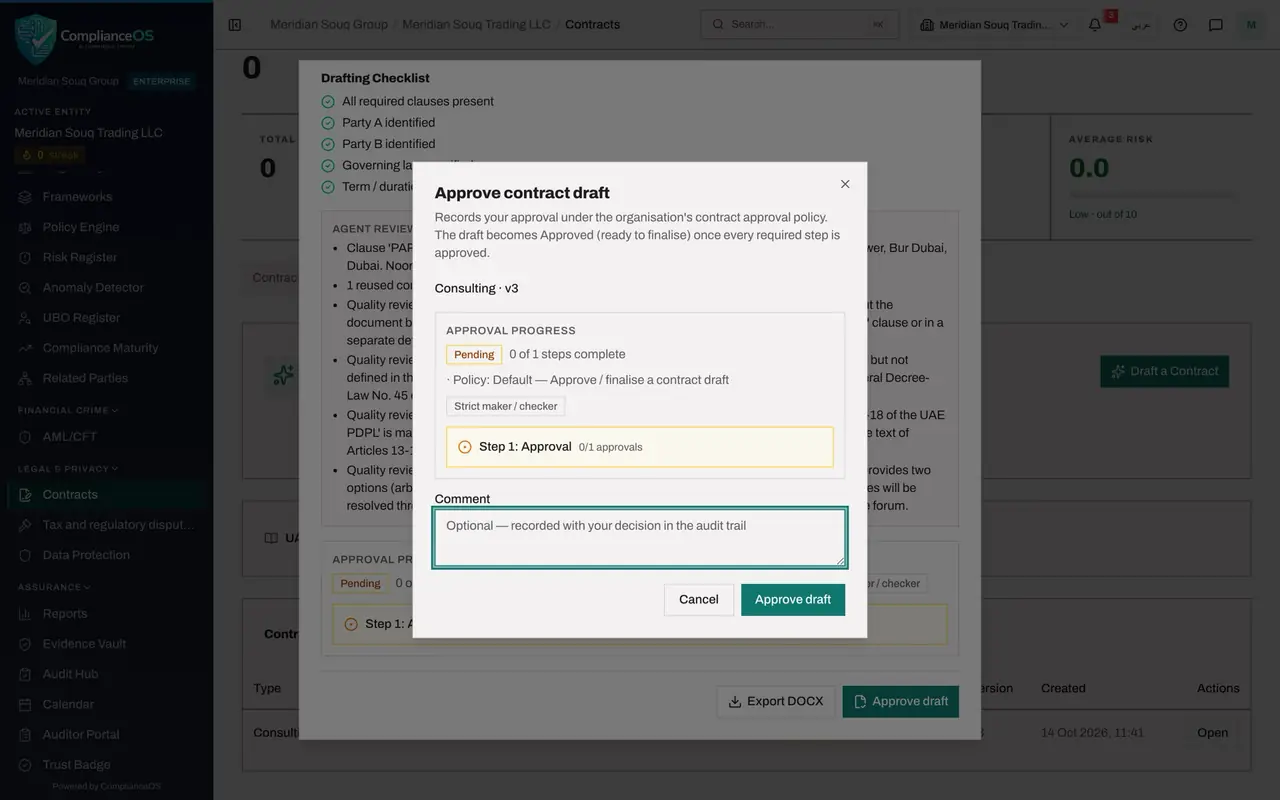
Scroll to the foot of the window. Approve draft is available to you because you did not write this draft. Select it. A small form headed Approve contract draft opens.
- Select Approve draft
- 6
Add a comment and approve
In Comment, say briefly what you checked. The comment is kept with your decision. Then select Approve draft.
- Type Comment:
Read all clauses. Parties, fee, instalments and dates match the brief.… - Select Approve draft
- Type Comment:
- 7
Check that the draft is approved
Close the window, reload the page and select the Draft a Contract tab again. Under Contract Drafts the status of the draft now reads Approved. Select Open on the row once more.
- Select Draft a Contract
- Select Open
- 8
Select Finalize into contract
At the foot of the window, Approve draft has been replaced by Finalize into contract. Select it. A line asks you to confirm: this creates a live contract from the approved draft.
- Select Finalize into contract
- 9
Select Confirm
Select Confirm. The contract is created, and under Contract Drafts the status of the draft changes to Finalized. Only now, after a person other than the author approved it, has the AI draft become a record.
- Select Confirm
- 10
Find the new contract in the list
Select the Contracts tab and scroll to the list. The new contract is there: Consulting contract with Noor Al Bahr Retail Consulting, type Consulting, status Complete, risk score 45. From here it is handled like any other contract, and it is a record the Compliance Assistant can find, as the closing lesson shows.
- Select Contracts
How to check it worked
Under Contract Drafts the draft reads Finalized, and the Contracts list holds a new Consulting contract with Noor Al Bahr Retail Consulting.
Common mistakes
- Approving because the agent's own checks passed. The agent checked its own work. You are the independent check: read the fee, the dates and the parties against the brief.
- Approving your own draft. The product does not allow it: the approver must be a different person from the author.
- Finalising before reading. Finalize into contract creates a live contract with obligations and an expiry date. It cannot be undone from this window.
Check your understanding
1. Who may approve an AI-written contract draft?
- A.The person who asked for it
- B.A person with the right to approve drafts who is not its author
- C.The agent
- D.Anyone
Show answer
Answer: B. A person with the right to approve drafts who is not its author
The approval must come from a second person. That is what makes it a check.
2. What should the approver compare the draft with?
- A.Nothing, the checks passed
- B.The brief and the business request: parties, fee, dates and special conditions
- C.Another AI draft
- D.The Compliance Calendar
Show answer
Answer: B. The brief and the business request: parties, fee, dates and special conditions
A draft can read well and still state the wrong fee or date. The approver checks the facts that matter against their source.