Lesson 6 of 33
Ask about your own company's records
What you will be able to do
This lesson is for anyone who uses the Compliance Assistant. The assistant can look in this company's records to answer a question. You will ask about the tax transactions, the deadlines and the data protection register that lessons 1 to 3 created, see what kind of answer each gives, and learn where the assistant stops: it reads and reports, and it changes nothing.
Before you start
- You are signed in as the compliance officer of Meridian Souq Trading LLC.
- Lessons 1 to 3 are done. The company holds three tax transactions, one risk, one deadline and one processing activity, and nothing else.
Steps
- 1
Ask for the tax transactions
On the AI Assistant page, type a question that names the records you mean. Here: List the tax transactions recorded for this company. Give only the date, the other party and the amount of each.
- Type Question box:
List the tax transactions recorded for this company. Give only the dat…
- Type Question box:
- 2
Send it and read the list
Select Send and wait. The assistant looks in Tax Intelligence and lists what it finds. You entered these three records yourself in lesson 1, so you can judge the answer: the sale of 84,000 dirhams to Mirdif Lantern Homeware, and the purchases of 1,850 dirhams from Falcon Wing Couriers and 12,400 dirhams from Sidra Bay Interiors.
- Select Send
- 3
Read what it adds to the list
Scroll through the rest of the answer. You asked for three things only, and the list keeps to them, marking Mirdif Lantern as the customer and the other two as suppliers. Below it, under Notes, the assistant adds a remark of its own: that the transactions are not yet classified for corporate tax, which is true, since lesson 1 left them unclassified. The list is made of facts you can check against Tax Intelligence. The notes are the assistant's commentary, to be weighed and checked before anyone acts on them.
- 4
Ask for the coming deadlines
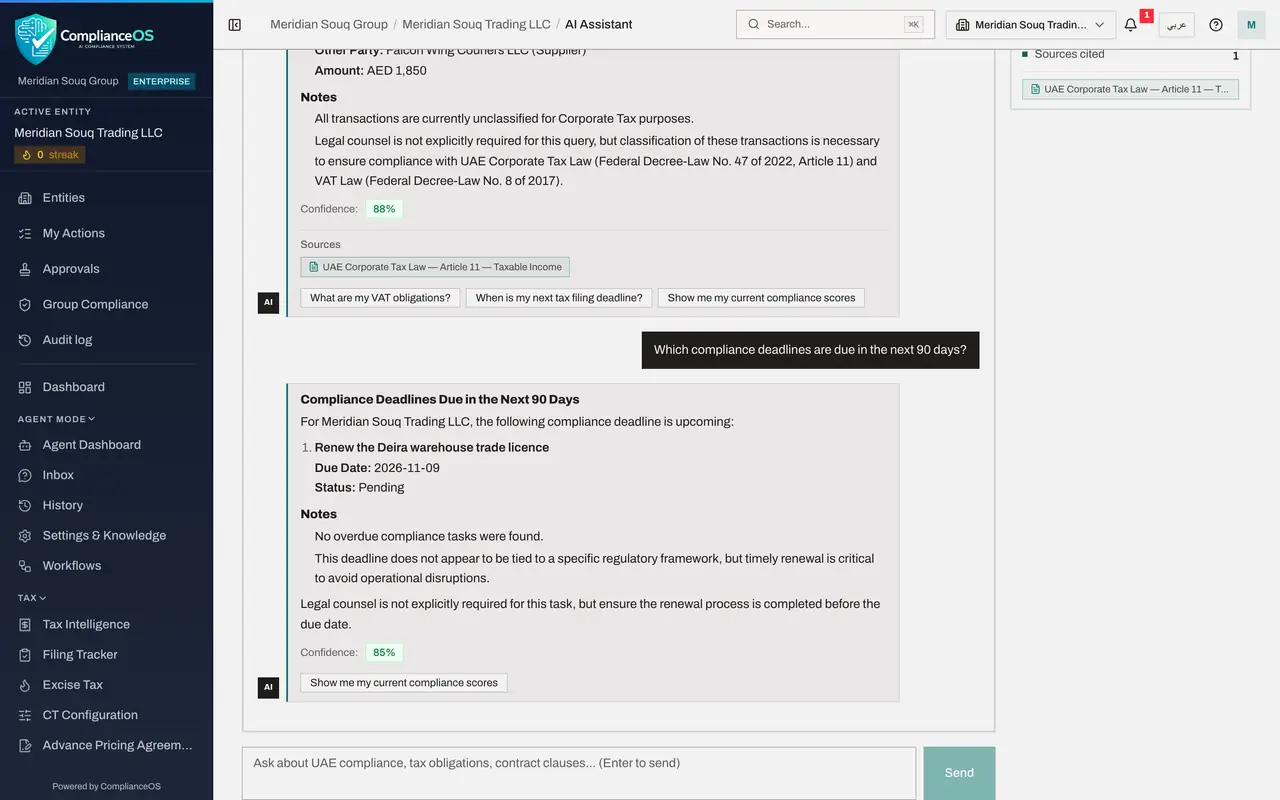
Now a different module. Type: Which compliance deadlines are due in the next 90 days?
- Type Question box:
Which compliance deadlines are due in the next 90 days?
- Type Question box:
- 5
Send it and read the deadline
Select Send. The assistant reads the Compliance Calendar and names the one deadline it holds: Renew the Deira warehouse trade licence, with its due date and the status Pending. That is the deadline added in lesson 2. It adds that no compliance task is overdue.
- Select Send
- 6
Ask about the data protection register
Type a question about a third module: How many processing activities are in our record of processing activities, and does any of them involve a transfer abroad?
- Type Question box:
How many processing activities are in our record of processing activit…
- Type Question box:
- 7
Send it and read the counts
Select Send. The assistant reports one processing activity and no transfer abroad, and names it: Online order delivery records, lawful basis Contract, status Active. That matches the entry added in lesson 3. It adds a note on the articles of the data protection law that would apply to a transfer abroad, with a Sources passage from the knowledge base. For everything else about the activity, open Data Protection.
- Select Send
- 8
Ask it to change something
Now ask for something the assistant cannot do. Type: Add a deadline on 30 November 2026 to renew the Marsa Walk shop tenancy contract.
- Type Question box:
Add a deadline on 30 November 2026 to renew the Marsa Walk shop tenanc…
- Type Question box:
- 9
Send it and read the reply
Select Send and read the reply. It begins: Nothing was changed. I can read this company's compliance data and explain it, but I cannot add, change or delete records. To do this yourself, open Compliance calendar. It then adds general background on tenancy renewal notices in Dubai, with a Sources passage. The Compliance Assistant reads records and answers questions. It never creates, changes or deletes anything, and it says so.
- Select Send
- 10
Check the Calendar
Do not take the reply's word for it. Choose Calendar in the left menu. Upcoming Deadlines still holds one entry, the trade licence renewal. Asking the assistant added nothing.
- Select Calendar
How to check it worked
The assistant has listed the three tax transactions with their amounts, named the trade licence renewal as the coming deadline, and reported one processing activity. Nothing in the company has been changed by asking.
Common mistakes
- Asking about records without saying which. Name the module and the period: the tax transactions for July to September, the deadlines in the next 90 days.
- Reading a summary as the full record. The assistant reports counts and main fields, such as the name, the lawful basis and the status of a processing activity. Open the module for the full detail.
- Asking the assistant to create, change or delete a record. The Compliance Assistant only reads. Work that changes records is done on the module's own screen, or by the agent in later lessons, after a person confirms.
Check your understanding
1. You ask the Compliance Assistant which deadlines are coming up. Where does the answer come from?
- A.From general knowledge of UAE deadlines only
- B.From this entity's Compliance Calendar, which the assistant reads when you ask
- C.From the other entity in the group
- D.From the internet
Show answer
Answer: B. From this entity's Compliance Calendar, which the assistant reads when you ask
For a question about your own position the assistant reads the records of the entity you are in. Here it found the one deadline added in lesson 2.
2. Can the Compliance Assistant add a deadline for you?
- A.Yes, if you ask politely
- B.Yes, after you confirm
- C.No, it reads and reports only
- D.Only for administrators
Show answer
Answer: C. No, it reads and reports only
The assistant answers questions. It does not create or change records.