Lesson 29 of 33
Replace the placeholders the agent left in the draft
What you will be able to do
This lesson is for legal counsel. The agent did not know the two companies' addresses, so it left them as placeholders in square brackets, and the product will not let anyone approve the draft until they are filled in. You will give the agent the addresses through the same Revise this clause box and check that the placeholder warning has gone.
Before you start
- You are signed in as the legal counsel of Meridian Souq Trading LLC.
- Lesson 28 is done: version 2 of the draft still holds two placeholders.
Steps
- 1
Open the draft
Choose Contracts, select the Draft a Contract tab, and select Open on the draft. The red banner lists the two placeholders: the address of Meridian Souq Trading LLC and the address of Noor Al Bahr Retail Consulting.
- Select Contracts
- Select Draft a Contract
- Select Open
- 2
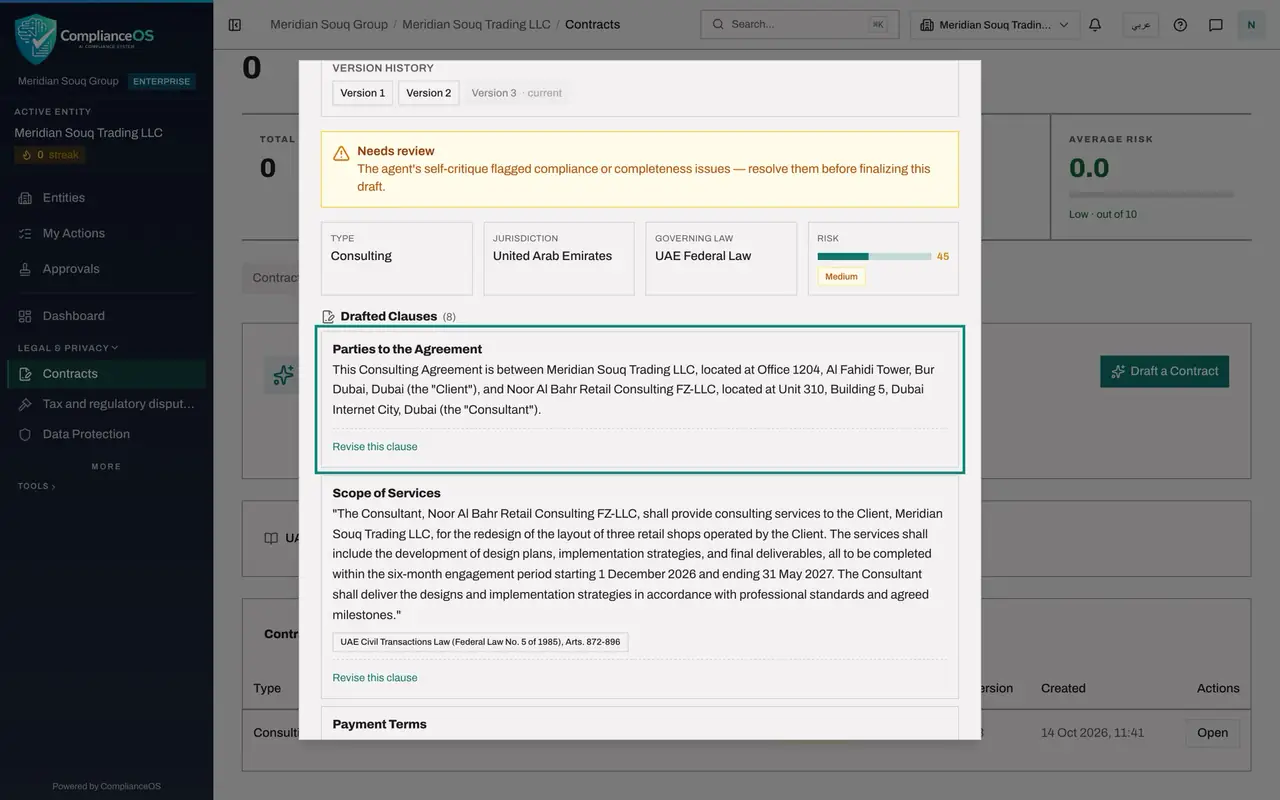
Select Revise this clause on Parties to the Agreement
Scroll to the first clause, Parties to the Agreement, which holds both placeholders, and select Revise this clause under it.
- Select Revise this clause
- 3
Give the agent the two addresses
Type the addresses in plain words, then select Apply. The addresses here are invented for training. The agent rewrites the clause with them; this takes up to a minute.
- Type e.g. cap liability at AED 500,000; add a 30-day cure period:
Meridian Souq Trading LLC is at Office 1204, Al Fahidi Tower, Bur Duba… - Select Apply
- Type e.g. cap liability at AED 500,000; add a 30-day cure period:
- 4
Check the banners
Scroll back to the top of the window. The heading now reads Version 3 of 3, with a Version history line listing versions 1, 2 and 3. The red placeholder banner is gone. The yellow Needs review banner stays: the agent's own critique, including the failed dispute resolution check, is for the approver to weigh.
- 5
Close the window and look at the row
Close the window, reload and select the Draft a Contract tab. The row shows version 3, Needs review, with no Placeholders tag. The draft can now be approved, by someone other than you.
- Select Draft a Contract
How to check it worked
The red banner about unresolved placeholders is gone from the newest version, and the Placeholders tag no longer shows on its row.
Common mistakes
- Approving around a placeholder by hand-editing the text elsewhere. Fill it in through the clause it belongs to, so that the change is versioned.
- Typing an address from memory. Use the registered address from each company's trade licence.
- Assuming the agent will find the address itself. It writes a placeholder whenever it lacks a fact; it does not look it up.
Check your understanding
1. Why can a draft with placeholders not be approved?
- A.It is too long
- B.Square-bracket placeholders mark facts the agent did not know; a contract with gaps must not be signed off
- C.The agent is still running
- D.It can be
Show answer
Answer: B. Square-bracket placeholders mark facts the agent did not know; a contract with gaps must not be signed off
The red banner says so: the draft cannot be approved or finalised until no placeholder remains.
2. Where do you fill in a placeholder?
- A.In the brief
- B.With Revise this clause on the clause that holds it
- C.In the Audit log
- D.By email to the agent
Show answer
Answer: B. With Revise this clause on the clause that holds it
The banner says to revise the clause it is in. The revision becomes a new version.