Lesson 1 of 31
Find your way around Vendor risk and the questionnaire library
What you will be able to do
This lesson is for the Data Protection Officer. You will open Vendor risk, learn what its four tabs and five counters are for, and look through the six ready-made questionnaires in the library so that you know which one to send to which kind of supplier.
Before you start
- You are signed in with the Data Protection Officer role for the entity.
- Nothing needs to exist yet: this lesson starts from an empty vendor risk register.
Steps
- 1
Open Data Protection
In the left menu, select Data Protection. The module opens with its own menu of sections on the left, under the heading In this module.
- Select Data Protection
- 2
Select Vendor risk
Select Vendor risk in the module menu, then select Hide on the Programme metrics card so that the section fits the screen. A vendor here means any supplier that handles personal data for you. The section has four tabs: Vendors, Findings, Questionnaires and Settings.
- Select Vendor risk
- Select Hide
- 3
Read the five counters
The counters summarise the register. Vendors is the total. High or critical counts the riskiest suppliers. Review overdue counts vendors whose next review date has passed. With vendor counts questionnaires that are still out. Open findings counts gaps that have not been closed.
- 4
Look at the empty register
The Vendors tab holds the vendor risk register. It is empty until you add your first vendor with the Add vendor button, which you will do in lesson three. The search box, the tier filter and the two switches narrow the list once it has rows.
- 5
Select the Findings tab
Select Findings. A finding is a gap you record while reviewing a vendor's answers, with the action needed to close it. This list collects the findings of every vendor in one place. It is empty for now.
- Select Findings
- 6
Select the Questionnaires tab
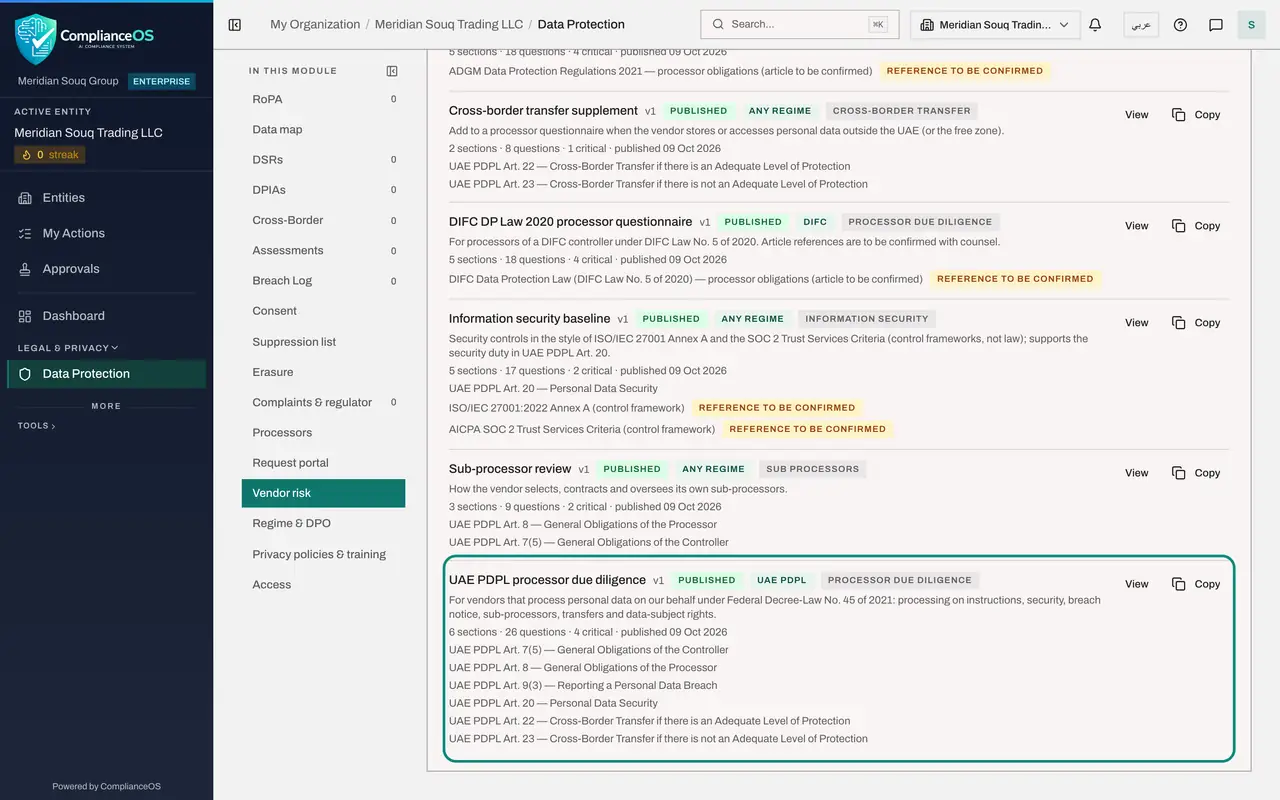
Select Questionnaires. Your questionnaires, at the top, holds the ones you write or adapt. The Library underneath holds six ready-made questionnaires. Each entry shows its version, its status, the law it serves, its type, and how many sections, questions and critical questions it has.
- Select Questionnaires
- 7
Find the questionnaire for UAE federal law
UAE PDPL processor due diligence is the main questionnaire for a supplier that processes personal data for you under the federal Personal Data Protection Law, or PDPL. It has twenty-six questions in six sections. The lines underneath list the articles of the law it refers to.
- 8
Note the two free zone questionnaires
DIFC DP Law 2020 processor questionnaire is for an entity regulated in the Dubai International Financial Centre. ADGM DPR 2021 processor questionnaire is for an entity in Abu Dhabi Global Market. The tag Reference to be confirmed means the article numbers should be checked with your legal counsel.
- 9
Note the information security baseline
Information security baseline asks seventeen questions about security controls, in the style of the ISO 27001 standard. Use it for a supplier whose main risk is technical, such as a hosting or software provider.
- 10
Note the two shorter questionnaires
Sub-processor review asks how the vendor chooses and oversees its own suppliers. Cross-border transfer supplement is added to a processor questionnaire when the vendor stores or reaches your data from outside the United Arab Emirates.
- 11
Open a questionnaire to read it
Select View beside UAE PDPL processor due diligence. The note at the top says that library questionnaires are read-only. The Details box shows the name and description in English and Arabic, the type and the regime, which is the law the questionnaire serves.
- Select View
- 12
See how a question is built
Scroll to Section 2, Processing on our instructions. Every question has an answer type, such as Yes or no, a Required tick, and a weight. The weight is how much the question counts towards the vendor's control score.
- 13
See what a critical control is
This question is ticked as a Critical control, with Tier at least High. If the vendor fails it or leaves it unanswered, the vendor's risk tier cannot be lower than High, however good the other answers are.
- 14
Go back to Vendor risk
Select Back to vendor risk at the top of the page. You return to the Vendors tab. In the next lesson you will copy a library questionnaire and adapt it.
- Select Back to vendor risk
How to check it worked
You can name the four tabs of Vendor risk, and you have opened the questionnaire called UAE PDPL processor due diligence and seen that library questionnaires are read-only.
Common mistakes
- Sending the DIFC or ADGM questionnaire to a supplier of a mainland company. Those two are for entities regulated in the Dubai International Financial Centre and in Abu Dhabi Global Market. For federal law use UAE PDPL processor due diligence.
- Treating the cross-border transfer supplement as a full assessment. It has only eight questions and is meant to be sent in addition to a processor questionnaire.
- Trying to edit a library questionnaire. Library questionnaires cannot be changed. Select Copy to make your own version, which is covered in the next lesson.
Check your understanding
1. Where do you find the ready-made due-diligence questionnaires?
- A.Under Settings
- B.Under Questionnaires, in the Library
- C.Under Findings
- D.In the vendor's profile
Show answer
Answer: B. Under Questionnaires, in the Library
The Questionnaires tab holds Your questionnaires at the top and the Library of six ready-made questionnaires underneath.
2. What does a critical control do?
- A.It makes the question optional
- B.It doubles the weight of the question
- C.If the vendor fails it or leaves it blank, the vendor's tier cannot go below the stated level
- D.It hides the question from the vendor
Show answer
Answer: C. If the vendor fails it or leaves it blank, the vendor's tier cannot go below the stated level
A failed or unanswered critical question keeps the vendor's tier at least as high as the level shown, whatever the score.