Lesson 3 of 31
Add a vendor to the risk register and read its profile
What you will be able to do
This lesson is for the Data Protection Officer. You will add a supplier that handles personal data for you to the vendor risk register, filling in every field of the form, and then open the vendor's profile to see how its inherent risk is worked out.
Before you start
- You are signed in with the Data Protection Officer role for the entity.
- You know who your contact at the vendor is and roughly how many people's data the vendor handles.
Steps
- 1
Select Add vendor
In Data Protection, select Vendor risk. On the Vendors tab, select Add vendor. The form called Add a vendor opens.
- Select Add vendor
- 2
Check whether the vendor is already in the directory
Open the Vendor box. It searches the vendor directory, which is shared with the Tax module so that a supplier's details are kept in one place. If the supplier is listed, choose it. If not, leave New vendor, not in the directory, selected.
- Select New vendor (not in the directory)
- Choose New vendor (not in the directory)
- 3
Enter the vendor's name and country
Type the vendor's legal name. In the country box, type the two-letter country code, here AE for the United Arab Emirates. A vendor outside the country adds to the cross-border risk.
- Type Vendor name:
SwiftParcel Delivery Services - Type Country (ISO code):
AE
- Type Vendor name:
- 4
Set the business criticality
Business criticality is how much the business depends on this vendor. Choose High for a supplier you could not easily replace. If you leave it as Not set, it is counted as medium.
- Select Not set
- Choose High
- 5
Set the data volume
Data volume is how many people's data the vendor handles. Choose the band that fits. This courier handles between one thousand and one hundred thousand customers, so choose Medium.
- Select Not set
- Choose Medium (1,000–100,000)
- 6
List the personal data the vendor handles
Under Additional data categories, list the kinds of personal data the vendor sees, separated by commas. The more categories, the higher the inherent risk.
- Type Additional data categories:
Customer name, Delivery address, Mobile number
- Type Additional data categories:
- 7
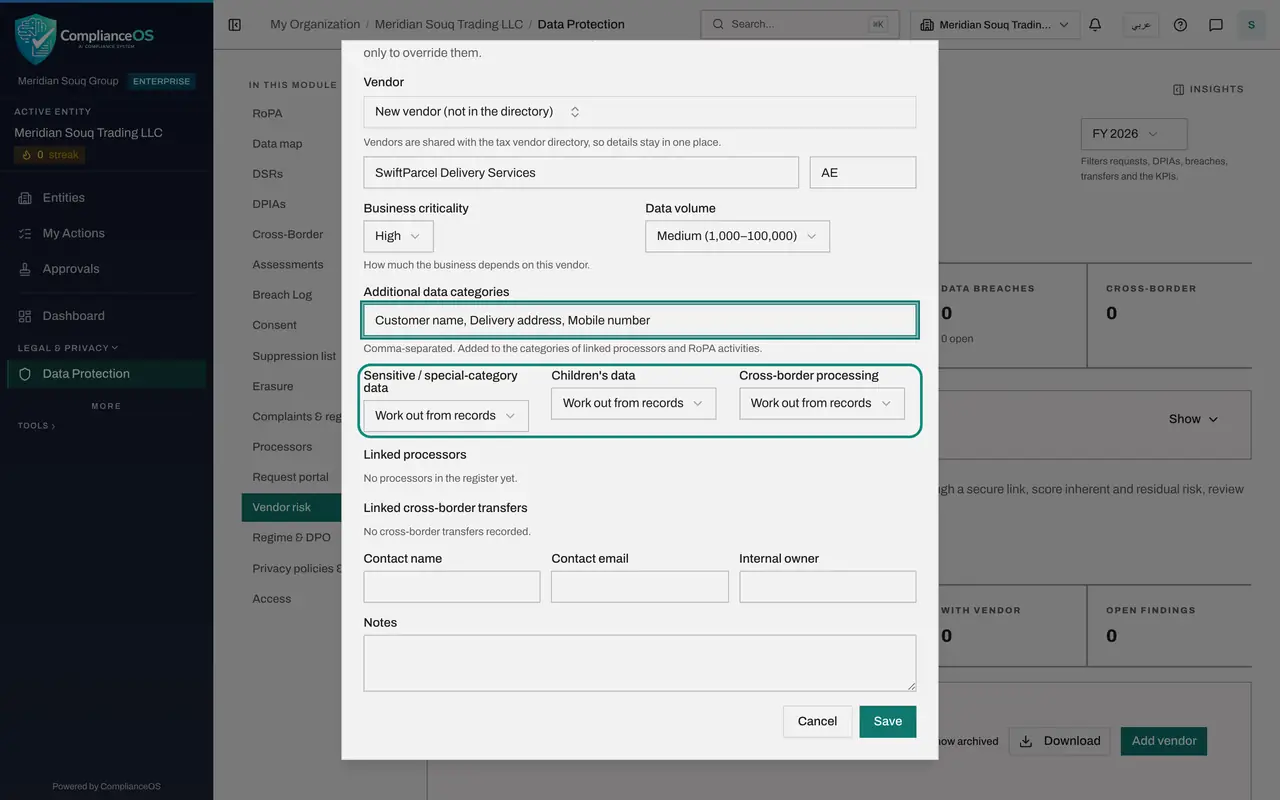
Leave the three override boxes on Work out from records
Sensitive or special-category data, Children's data and Cross-border processing each start on Work out from records. ComplianceOS then reads the answer from the processor and transfer records linked to this vendor. Choose Yes or No only to override those records.
- 8
Check the linked processors and transfers
Linked processors and Linked cross-border transfers list the records you already keep in the Processors and Cross-Border sections. Tick the ones that belong to this vendor. This company has none yet, so both lists are empty.
- 9
Add the vendor contact
Enter the name and e-mail address of the person at the vendor who will answer questionnaires. These are filled in for you each time you send one.
- Type Contact name:
Nadia Haddad - Type Contact email:
nadia.haddad@swiftparcel.example.com
- Type Contact name:
- 10
Add your internal owner and a note
Internal owner is the person in your own business who manages the relationship. Notes is free text for anything a colleague should know. Both are optional.
- Type Internal owner:
Head of Logistics - Type Notes:
Last-mile courier for online orders in Dubai and Sharjah.
- Type Internal owner:
- 11
Select Save
Select Save. The form closes and the vendor joins the register as Not rated and Never assessed. It has no tier until a questionnaire has been answered and approved. The Vendors counter now shows one more.
- Select Save
- 12
Open the vendor's profile
Select the vendor's name. The profile has three boxes at the top. Risk status shows the tier and the review dates. Vendor details shows the contact and owner. The third box shows the inherent risk score out of one hundred.
- 13
Read the inherent risk factors
Inherent risk is the risk a vendor carries before you look at its safeguards. Each row is one factor, with its value, where the value came from, and the points it adds. Here the points come from three data categories, a medium data volume and high business criticality.
- 14
See what else the profile holds
Further down are Assessment history, Findings, and the linked processors, transfers and processing activities. They are empty for a new vendor. At the top, Edit profile reopens the form, Send questionnaire starts an assessment, and Archive removes the vendor from the active register without deleting it.
How to check it worked
The vendor appears in the Vendor risk register with the risk tier Not rated and Never assessed under Latest assessment, the Vendors counter shows one more, and the vendor's profile shows an inherent risk score with the factors behind it.
Common mistakes
- Adding the same vendor twice under a slightly different name. Open the Vendor box and search first: vendors are shared with the tax vendor directory, so the supplier may already be there.
- Leaving Business criticality as Not set. It is then counted as medium, which can understate the risk of a supplier you depend on heavily.
- Setting Sensitive data, Children's data or Cross-border processing by hand when the vendor is already linked to processor and transfer records. Leave them on Work out from records unless you need to override what the records say.
Check your understanding
1. What does the risk tier show straight after you add a vendor?
- A.Low
- B.Not rated
- C.The inherent risk score
- D.High, until proven otherwise
Show answer
Answer: B. Not rated
A vendor has no tier until a questionnaire has been answered, reviewed and approved. Until then the register shows Not rated.
2. What is inherent risk?
- A.The risk left after the vendor's safeguards are counted
- B.The risk the vendor carries before you look at its safeguards
- C.The number of open findings
- D.The vendor's own estimate of its risk
Show answer
Answer: B. The risk the vendor carries before you look at its safeguards
Inherent risk comes from what the vendor handles and how much you depend on it. The vendor's answers then reduce it to the residual risk.