Lesson 7 of 31
What the vendor sees: changing an answer the reviewer challenged
What you will be able to do
This lesson shows the vendor's side again. After you return a questionnaire, the vendor's contact opens the same kind of secure link, finds your comment beside the question you challenged, changes the answer and submits again.
Before you start
- You have challenged an answer and returned the questionnaire to the vendor, as in lesson six.
- The vendor's contact has the link you copied when you returned it.
Steps
- 1
Open the link again
The vendor's contact opens the link. A box at the top says The reviewer asked for changes, with the note you wrote when you returned the questionnaire.
- 2
Enter your name and e-mail address
The contact enters their name and e-mail address again. Each person who works on the questionnaire is recorded against the answers they give.
- Type Your name:
Nadia Haddad - Type Your email (optional):
nadia.haddad@swiftparcel.example.com
- Type Your name:
- 3
Find the challenged question
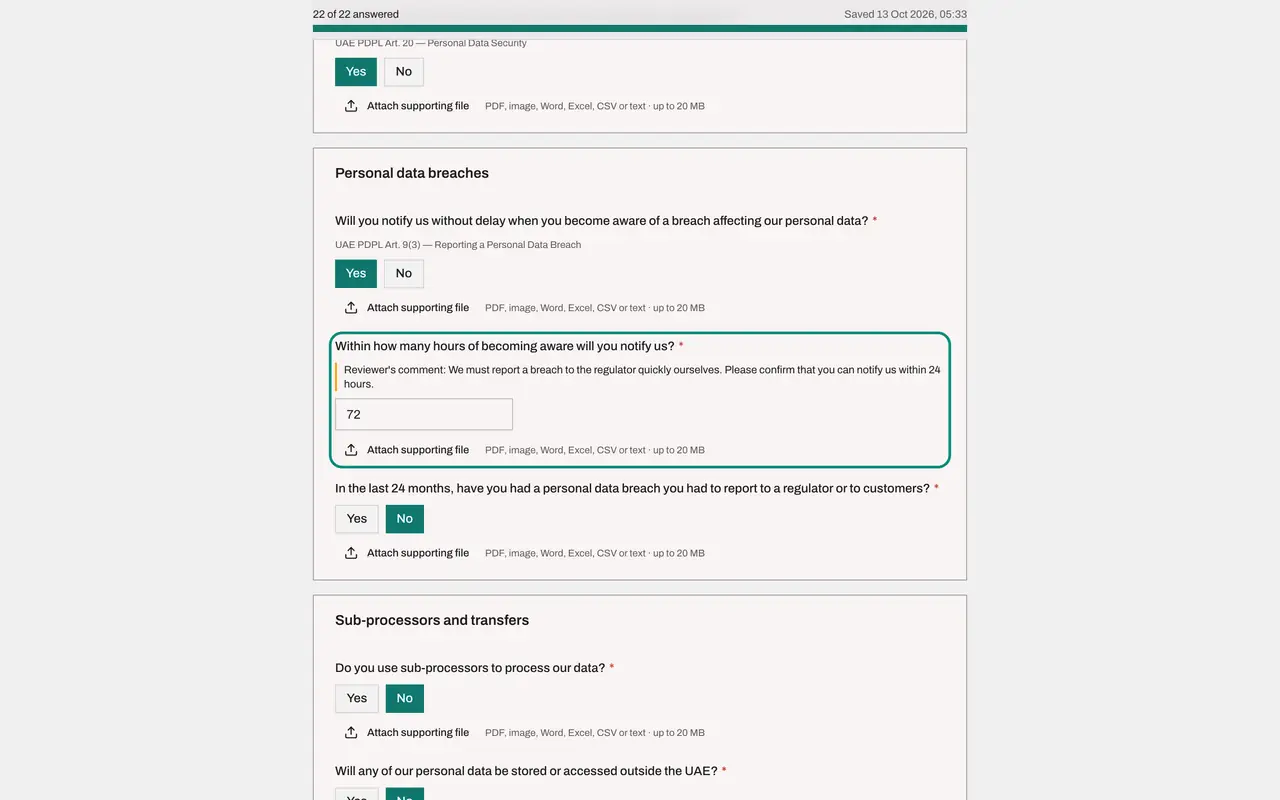
Scroll to the question you challenged. Your comment is shown under it, after the words Reviewer's comment.
- 4
Change the answer
The vendor replaces 72 with 24, the number of hours within which it will now tell you about a breach.
- Type Within how many hours of becoming aware will you notify us?*:
24
- Type Within how many hours of becoming aware will you notify us?*:
- 5
Tick the confirmation and select Submit answers
At the bottom, the vendor ticks the confirmation and selects Submit answers. The answers are locked again and the questionnaire comes back to you with the status To review.
- Select Submit answers
How to check it worked
The page again shows Thank you, your answers have been submitted, and the assessment in ComplianceOS is back to the status To review.
Common mistakes
- The vendor looking for an e-mail that was never sent. If you cleared the e-mail box when returning the questionnaire, you must pass the link on yourself.
- The vendor changing other answers by accident. Every answer can be edited again after a return, so ask the vendor to change only what your comment asks for.
Check your understanding
1. Where does the vendor see what you asked them to change?
- A.In a separate e-mail only
- B.In a box at the top of the page and beside the challenged question
- C.Nowhere: they must phone you
- D.In the vendor's ComplianceOS account
Show answer
Answer: B. In a box at the top of the page and beside the challenged question
The page opens with a box saying the reviewer asked for changes, and the challenged question shows the reviewer's comment.
2. What must the vendor do after changing the answer?
- A.Nothing, it saves automatically and is final
- B.Tick the confirmation and select Submit answers again
- C.Create an account
- D.Ask for a new questionnaire
Show answer
Answer: B. Tick the confirmation and select Submit answers again
Answers save automatically, but the questionnaire only comes back to you for review when the vendor submits it again.