Lesson 6 of 31
Review a vendor's answers, check the evidence and challenge a weak answer
What you will be able to do
This lesson is for the Data Protection Officer. You will open a questionnaire that a vendor has submitted, read how the risk score and tier were worked out, download the answers and the evidence, accept an answer, and send one weak answer back to the vendor with a comment.
Before you start
- The vendor has submitted the questionnaire, as in lesson five. Its row in the register shows To review.
- You are signed in with the Data Protection Officer role for the entity.
Steps
- 1
Find the vendor that has answered
In Data Protection, select Vendor risk. A vendor whose answers are waiting for you shows To review under Latest assessment. Select the vendor's name.
- 2
Open the submitted questionnaire
On the vendor's page, Assessment history shows the questionnaire as To review, with every question answered and a residual risk score. Select Review.
- Select Review
- 3
Read what to do next
The box at the top says Submitted: review each answer, raise findings, then ask for approval. Its buttons are Recalculate score, Raise finding, Return to vendor, Request approval and Cancel assessment.
- 4
Read the four score tiles
Inherent risk is the risk before safeguards, out of one hundred. Control score is how well the vendor's answers show that it protects the data. Residual risk is what is left, and it sets the tier: Low, Medium, High or Critical. The line underneath shows the calculation and the score at which each tier starts.
- 5
See where the marks were lost
Controls by section shows the marks earned in each section of the questionnaire. Here Security of processing and Personal data breaches are below one hundred percent, so those are the answers to read first. A section with no scored questions shows Not scored.
- 6
Download the answers
At the top right, select Download and choose CSV. You get a file with every question, answer and score, which you can keep with the vendor's contract. JSON gives the same content for another system.
- Select Download
- Select CSV (Excel, all rows)
- 7
Open the evidence the vendor attached
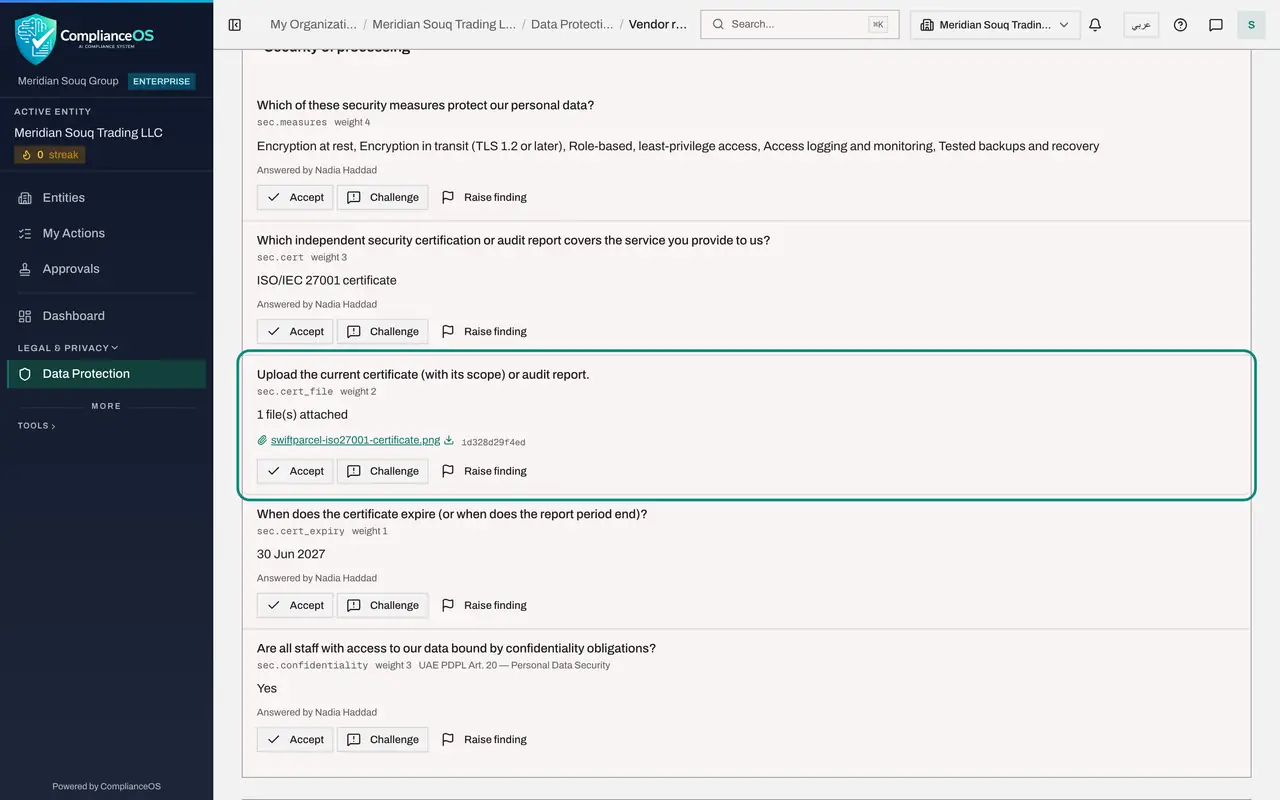
Scroll down to Answers. Each question shows the vendor's answer, who gave it and any file attached. Select the file name to download it. Check that the certificate is current and covers the service you use. The short code beside the name is a fingerprint of the file, which proves it has not changed.
- Select swiftparcel-iso27001-certificate.png
- 8
Accept an answer you are satisfied with
Select Accept on an answer you have checked. It is marked Accepted. Accepting is your own record of what you have reviewed, and it does not change the score.
- Select Accept
- 9
Select Challenge on a weak answer
The vendor says it would tell you about a breach within 72 hours. That leaves you no time to meet your own deadline with the regulator. Select Challenge on that answer.
- Select Challenge
- 10
Say what the vendor should change
Type what the vendor should change or explain. The vendor sees this comment beside the question when the questionnaire goes back. Then select Challenge.
- Type What should the vendor change or explain?:
We must report a breach to the regulator quickly ourselves. Please con… - Select Challenge
- Type What should the vendor change or explain?:
- 11
Select Return to vendor
Go back to the top. The button now reads Return to vendor, with the number one in brackets for the one challenged answer. Select it.
- Select Return to vendor (1)
- 12
Add a note and a new due date
Write a short note to the vendor and, if they need more time, a new due date. Clear Email the link to the contact if you will tell the vendor yourself, as here. Then select Return to vendor.
- Type Note to the vendor:
One answer needs your attention. Everything else is fine. - Type New due date (optional):
2026-11-10 - Select Email the link to the contact
- Select Return to vendor
- Type Note to the vendor:
- 13
Copy the link for the vendor
The questionnaire link works again until the vendor resubmits. Because no e-mail was sent, the link is shown for you to copy. Select Copy link, then Done.
- Select Copy link
- Select Done
- 14
Check the new status
The assessment now shows Returned to vendor and Link live, and the box at the top reads Returned to the vendor for changes. The next lesson shows what the vendor sees.
How to check it worked
The assessment shows the status Returned to vendor, the challenged answer carries the tag Challenged with your comment, and the With vendor counter in the register counts the vendor again.
Common mistakes
- Raising a finding for something the vendor could simply correct. Use Challenge when the answer itself should change, and a finding when a real gap must be tracked until it is fixed.
- Challenging without saying what you need. The vendor sees only your comment beside the question, so say exactly what to change or explain.
- Reading the tier without reading the calculation. A low score can still give a high tier when a critical control has failed, and the page says so under the score.
Check your understanding
1. How is the residual risk worked out?
- A.It is the vendor's own estimate
- B.Inherent risk, reduced according to the control score from the vendor's answers
- C.The number of open findings times ten
- D.The average of all vendors
Show answer
Answer: B. Inherent risk, reduced according to the control score from the vendor's answers
Residual risk is the inherent risk reduced by how well the answers show the data is protected. The line under the tiles shows the calculation.
2. When does the Return to vendor button become available?
- A.Always
- B.After at least one answer has been challenged
- C.Only after approval
- D.Only when the link has expired
Show answer
Answer: B. After at least one answer has been challenged
The button shows how many answers are challenged, in brackets. It stays unavailable while that number is zero.