Lesson 18 of 31
Draft a privacy policy from a starter template
What you will be able to do
This lesson is for the Data Protection Officer who writes policies. You will open Privacy policies and training, start a policy from a starter template, give it your own title, replace the placeholder for the data protection contact, adapt the English and Arabic text, set its owner and review cycle, see why you cannot record the legal review of your own draft, and submit it for approval.
Before you start
- You are signed in with the Data Protection Officer role for the entity.
- You know the day from which the policy should apply, and who will own it.
Steps
- 1
Open Privacy policies and training
In Data Protection, select Privacy policies and training at the bottom of the module menu. It has six sections: Overview, Policy library, Attestation campaigns, Training modules, Training campaigns and Public privacy notice.
- Select Privacy policies & training
- 2
Select Policy library
Select Policy library. This is where privacy policies, notices and procedures are written, approved and published. It is empty until you create your first policy.
- Select Policy library
- 3
Select New policy and choose a starting point
Select New policy. Open the Start from list. It offers a starter template for each kind of policy, and Blank policy at the end. Choose Acceptable use of personal data: the rules staff follow when they handle personal data.
- Select New policy
- Select Privacy notice
- Choose Acceptable use of personal data
- 4
Read what the template covers
The box describes the template, reminds you to have counsel review it before publishing, and lists the articles of the law it refers to. With Blank policy you would type a title and choose a type instead.
- 5
Select Create draft
Select Create draft. The policy opens as Draft, version 1.0, with the starter text in English and Arabic. An amber banner says Template, needs legal review. The banner is a reminder on this page only. It is not part of the policy text.
- Select Create draft
- 6
Give the policy your own title
Replace the English title with one that staff will recognise as your organisation's policy, and the Arabic title beside it.
- Type Title (English):
Meridian Souq acceptable use of personal data - Type Title (Arabic):
سياسة ميريديان سوق للاستخدام المقبول للبيانات الشخصية
- Type Title (English):
- 7
Set the effective date and the summary
Effective date is the day the policy starts to apply. What changed is a short note for the version history. The line under the draft's heading says this is a major change: people who acknowledged earlier versions would be asked again. For a later version you choose between major and minor.
- Type Effective date:
2026-10-27 - Type What changed:
First version, adapted from the starter template.
- Type Effective date:
- 8
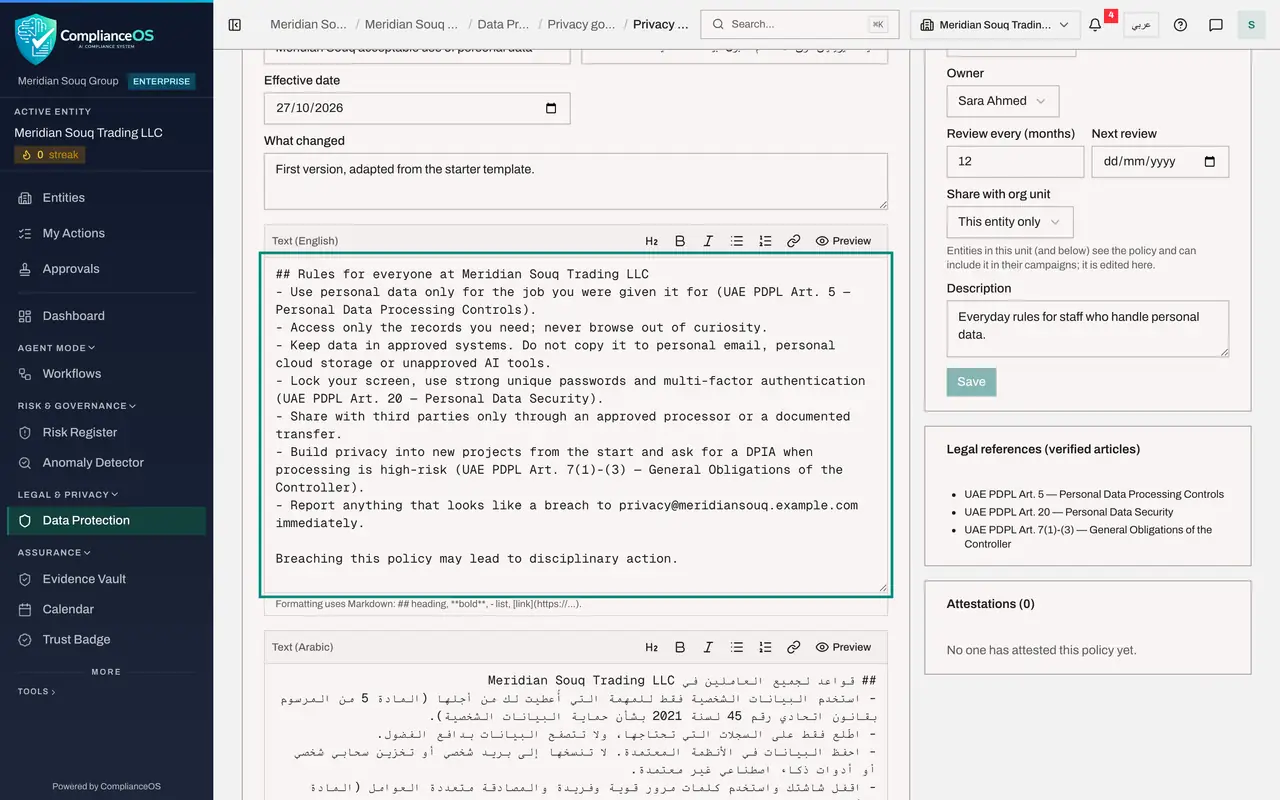
Replace the placeholder in the English text
Scroll through Text, English. The starter text names the data protection contact as [data protection contact], in square brackets, because no contact is set yet in the entity's data protection profile. Replace it with the Data Protection Officer's address. ComplianceOS will not let you submit, approve or publish a version that still contains a placeholder in square brackets, in English or in Arabic.
- Type Text (English):
## Rules for everyone at Meridian Souq Trading LLC - Use personal data…
- Type Text (English):
- 9
Adapt the English text
Edit the text under Text, English. The buttons above the box add a heading, bold or italic text, lists and a link. Here a contact section is added at the end.
- Type Text (English):
## Rules for everyone at Meridian Souq Trading LLC - Use personal data…
- Type Text (English):
- 10
Preview the text
Select Preview above the English text to see it as staff will. Headings and lists are laid out, and nothing about the template or the legal review appears in the text. Select Edit to go back to the box.
- Select Preview
- 11
Keep the Arabic text in step
Go back to Edit, then scroll to Text, Arabic. Replace [data protection contact] there too, and add the same contact section, so that staff who read the policy in Arabic see the same rules.
- Select Edit
- Type Text (Arabic):
## قواعد لجميع العاملين في Meridian Souq Trading LLC - استخدم البيانات…
- 12
Select Save draft
Go back to the top of the draft and select Save draft. Your changes are kept, and the page heading now shows your title.
- Select Save draft
- 13
Check the owner and the review cycle
On the right, Ownership and review holds the policy's type, its owner, how often it must be reviewed, the next review date, and whether it is shared with other entities in an org unit. You are the owner because you created the policy, and it is reviewed every 12 months. Rewrite the description and select Save in that box.
- Type Description:
Everyday rules for all staff who handle customer or employee data. - Select Save
- Type Description:
- 14
See why you cannot record the legal review
At the top right, Mark legal review done is greyed out for you. The amber note explains why: you drafted or edited this policy, so someone else must record its legal review: your legal counsel, whose role includes Record legal review, or a colleague with the right to approve policies.
- 15
Select Submit for approval and check the library
Select Submit for approval. The draft is locked while it waits, and a note says that whoever wrote or edited this version cannot approve it. Then select Back. The library lists the policy under your own title, tagged Draft, Awaiting approval and Needs legal review.
- Select Submit for approval
- Select Back
How to check it worked
The Policy library lists the policy under the title you gave it, with the tags Draft, Awaiting approval and Needs legal review.
Common mistakes
- Treating the starter text as legal advice. It is a starting point. A policy that began from a template cannot be published until someone other than its author records that legal counsel has reviewed it.
- Leaving a word in square brackets, such as [data protection contact], in the text. ComplianceOS refuses to submit, approve or publish a version that still contains one, in English or in Arabic.
- Changing only the English text. Staff who read the policy in Arabic must see the same rules, so keep the two texts in step.
- Forgetting Save draft before leaving the page. Submit for approval saves your changes for you, but simply going back does not.
Check your understanding
1. You wrote the draft. Why is Mark legal review done greyed out for you?
- A.The policy is already published
- B.Whoever drafted or edited the policy cannot record its legal review
- C.Only administrators can see legal reviews
- D.The button is for training campaigns
Show answer
Answer: B. Whoever drafted or edited the policy cannot record its legal review
The legal review must be recorded by someone else who has the right to approve policies, such as your legal counsel or the approver.
2. What does a Major change mean for a policy version?
- A.Nothing
- B.People who acknowledged earlier versions are asked to acknowledge the policy again
- C.The policy is retired
- D.It skips approval
Show answer
Answer: B. People who acknowledged earlier versions are asked to acknowledge the policy again
A major change asks everyone to attest again. A minor change leaves earlier acknowledgements valid.