Lesson 23 of 31
Build a training module with a lesson and a quiz
What you will be able to do
This lesson is for the Data Protection Officer. You will add the ready-made starter modules, then write your own short training module: a summary, the time it takes, the pass mark, the lesson text and two quiz questions. You will see that a module cannot be activated without a question, and then activate it.
Before you start
- You are signed in with the Data Protection Officer role for the entity.
- You have the lesson text ready, and two or three questions that test it.
Steps
- 1
Open Training modules
In Privacy policies and training, select Training modules. A module is a short lesson, in text or video, followed by a quiz. Passing the quiz issues a certificate. The list is empty to begin with.
- Select Training modules
- 2
Select Add starter modules
Select Add starter modules. Four ready-made modules are added as drafts: the basics of the Personal Data Protection Law, handling data subject requests, breach reporting and children's data. Each is tagged Starter, review, because its content should be checked before use.
- Select Add starter modules
- 3
Select New module and start blank
Select New module. The window offers the same starter templates, each with its length and number of questions, and a blank module. Choose Blank module to write your own, and type a title that says what staff will learn.
- Select New module
- Select Blank module (write your own lesson and quiz)
- Type Title (English):
Spotting and reporting a data breach
- 4
Select Create and look at Activate
Select Create. The module opens as a Draft with an empty lesson and no questions. Activate is greyed out, and the Quiz box says to add at least one question before activating.
- Select Create
- 5
Add a summary and the Arabic title
Under Title, Arabic, type the title that Arabic readers will see. Under Summary, English, write one line that learners read first.
- Type Title (Arabic):
اكتشاف اختراق البيانات والإبلاغ عنه - Type Summary (English):
How to recognise a personal data breach and who to tell.
- Type Title (Arabic):
- 6
Set the minutes, the pass mark and the refresher
Minutes is how long the module takes. Pass mark is the percentage of questions a learner must get right, here 100. Refresh, in months, sets how often the module must be taken again, here every 12 months. Video link is optional and takes a web address beginning with https.
- Type Minutes:
5 - Type Pass mark %:
100 - Type Refresh (months):
12
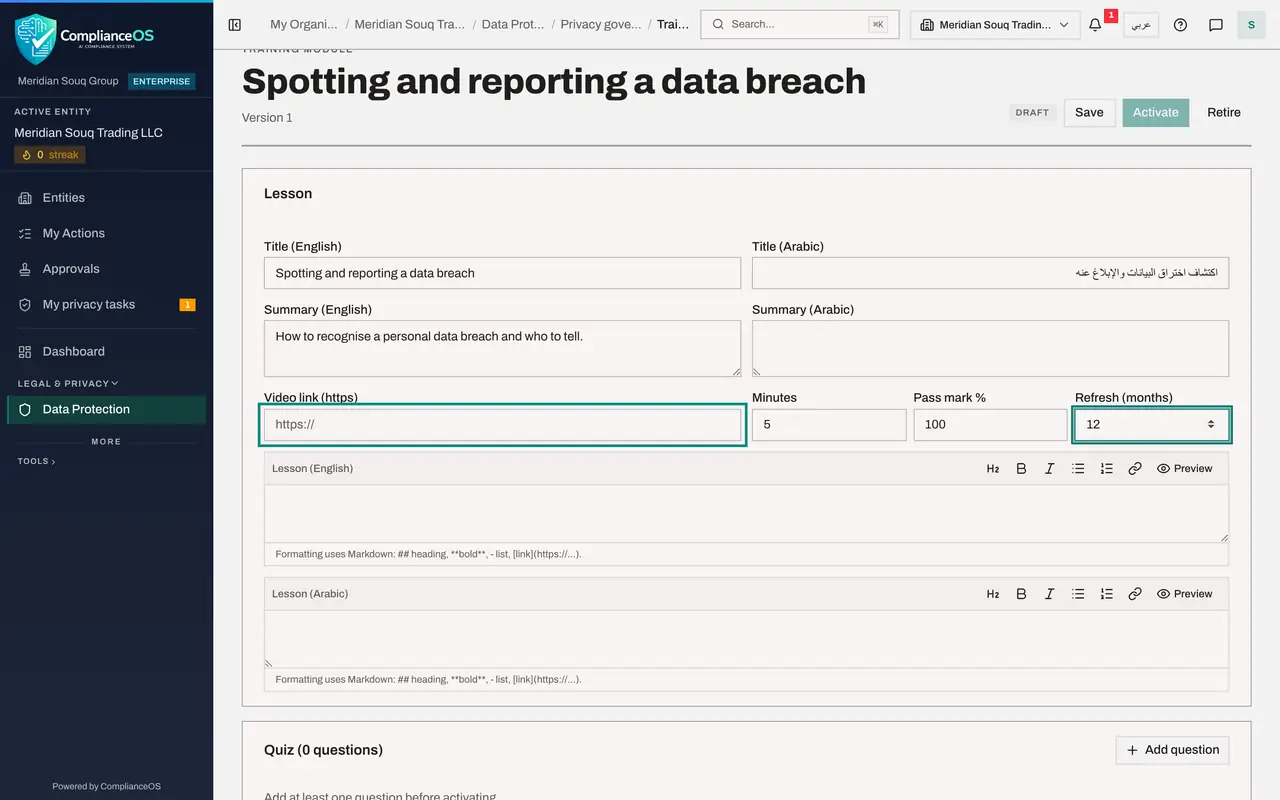
- Type Minutes:
- 7
Write the lesson
Type the lesson under Lesson, English. Keep it short and practical. Two number signs start a heading and a hyphen starts a list item. Preview shows the result. The Arabic box underneath holds the same lesson for staff who read Arabic.
- Type Lesson (English):
## What is a breach? A personal data breach is any loss, leak or wrong…
- Type Lesson (English):
- 8
Add the first quiz question
Select Add question. Type the question and each option in English and in Arabic, using Add option for a third choice. The first option starts ticked as the correct answer. Tick a different box if another option is right. The explanation is shown to the learner after a right answer.
- Select Add question
- Type Question (English):
A colleague emails a customer list to the wrong supplier. What do you… - Type Question (Arabic):
أرسل زميل قائمة العملاء بالبريد الإلكتروني إلى مورد خاطئ. ما أول ما تف… - Type Option (English):
Report it to the Data Protection Officer straight away - Type Option (Arabic):
أبلغ مسؤول حماية البيانات فورا - Type Option (English):
Wait to see whether the supplier notices - Type Option (Arabic):
انتظر لترى إن كان المورد سيلاحظ - Select Add option
- Type Option (English):
Ask the supplier to delete it and tell nobody - Type Option (Arabic):
اطلب من المورد حذفها ولا تخبر أحدا - Type Explanation (English, shown after a right answer):
Report at once: the time allowed for telling the regulator starts when…
- 9
Add a second question
Select Add question again and fill in the second question in the same way. If you tick more than one option as correct, the learner must choose exactly those. The bin at the top right of a question removes it.
- Select Add question
- Type Question (English):
Which of these is a personal data breach? - Type Question (Arabic):
أي مما يلي يعد اختراقا للبيانات الشخصية؟ - Type Option (English):
A lost delivery handheld holding customer addresses - Type Option (Arabic):
فقدان جهاز توصيل يحتوي على عناوين العملاء - Type Option (English):
A late delivery - Type Option (Arabic):
تأخر في التوصيل - Select Add option
- Type Option (English):
A price change on the website - Type Option (Arabic):
تغيير سعر على الموقع الإلكتروني - Type Explanation (English, shown after a right answer):
A lost device holding personal data is a breach, even if nobody is kno…
- 10
Select Save
Go back to the top and select Save. Activate becomes available only once the lesson and at least one question are saved.
- Select Save
- 11
Select Activate
Select Activate. The module becomes Active and can be assigned in a training campaign. Back to draft takes it out of use again, and Retire withdraws it for good. A note says that changing an active module's lesson or quiz starts a new version.
- Select Activate
- 12
Find the module in the list
Select Back. Your module is listed as Active, with its two questions, the pass mark and the refresher period. The four starter modules stay as drafts until you review and activate them.
- Select Back
How to check it worked
The module is listed under Training modules as Active, with two questions, a pass mark of 100 percent and a refresher every 12 months. The four starter modules are listed as Draft.
Common mistakes
- Forgetting to tick the correct option. Each question needs at least one option ticked as the correct answer, or learners cannot pass.
- Activating a starter module without reading it. Starter content is a draft and is tagged Starter, review. Have it checked before you activate it.
- Editing an active module to fix a small mistake without realising it starts a new version. People who already passed keep the version they took.
Check your understanding
1. Activate is greyed out on a new module. What is the most likely reason?
- A.You are not an administrator
- B.The module has no quiz question yet, or has unsaved changes
- C.No campaign exists
- D.The module has no video
Show answer
Answer: B. The module has no quiz question yet, or has unsaved changes
A module needs lesson text or a video link, at least one quiz question, and saved changes before it can be activated.
2. What does the pass mark mean?
- A.The number of attempts allowed
- B.The percentage of questions a learner must answer correctly
- C.The minutes allowed
- D.The number of questions shown
Show answer
Answer: B. The percentage of questions a learner must answer correctly
A pass mark of 100 percent means every question must be answered correctly. A learner who fails can review the lesson and try again.